Websites
App store builds with Expo, from the app builder
Building an app for the stores means turning the project into an Android file and an iPhone file signed for distribution, then submitting them from your own developer accounts. The builder runs the Expo builds for you; the store listings and the submission stay yours.
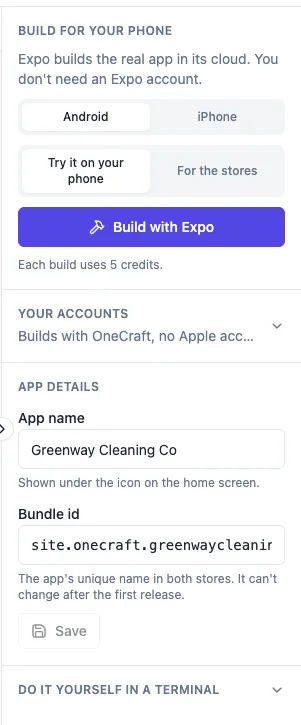
Builds from the phone panel
An app made in the builder is an Expo project. On a paid plan, the phone panel's Build with Expo starts an Android or iPhone build, either Try it on your phone or For the stores. Each build costs 5 credits, refunded if it never starts. Builds run on OneCraft's Expo organisation unless you connect your own Expo token.
Test installs
An Android test build shows a QR code and an install link, so staff and friends can install it straight away. An iPhone test build opens its Expo page for installing on registered devices. Each build row shows its status, Queued, Starting on Expo, Building with a timer, Ready or Failed with the first line of the error.
Signing
For Android, the first build makes an upload key for the app and keeps it sealed with your app, so every later build is signed the same way, which Google Play requires. For iPhone you add your Apple developer key, team ID, key ID and issuer ID once in the app's accounts; iPhone builds need them on either Expo account.
What you submit yourself
A store build gives you the file and the eas submit line to send it to the App Store or Google Play from your own developer account. OneCraft never submits for you, because Apple requires apps made with a builder to be submitted by the business itself. Apple charges 99 USD a year and Google Play 25 USD once.
Before you submit
Apple rejects apps that only repeat a website, so give the app something a bookmark cannot do, such as bookings, ordering or an account. A new personal Google Play account must test with at least 12 people for 14 days before going live. Built files are kept for 30 days; build again after that.
How it works, in three steps
Step 1
Make the app
Pick Mobile app in the generator, optionally based on one of your websites, and check it in the phone preview.
Step 2
Run a test build
On a paid plan, press Build with Expo, Try it on your phone, and install it from the QR code or Expo page.
Step 3
Build for the stores
Add your Apple key for iPhone, run a store build and submit it from your own developer accounts.
Limits worth knowing
- Expo builds need a paid plan, 5 credits each, refunded if a build never starts.
- iPhone builds need your Apple developer key; OneCraft never submits apps.
- Built files are kept for 30 days.
- Apple charges 99 USD a year and Google Play 25 USD once.
Questions people ask
Do I need a Mac to build for iPhone?
No. The iPhone build runs on Expo's servers from the builder, so you do not need Xcode or a Mac. You do need an Apple developer account and its API key, which you add once in the app's accounts. Submitting can also be done without a Mac through eas submit.
Do I need my own Expo account?
No. Builds run on OneCraft's Expo organisation by default. If you prefer the builds and the project under your own Expo account, connect your Expo token in the app's accounts, and later builds run there. Android signing stays the same either way.
What does a build cost?
Each Android or iPhone build costs 5 credits on a paid plan, charged when it starts and refunded if it never starts on Expo. The store fees are separate: Apple charges 99 USD a year for its developer program and Google Play 25 USD once.
Can staff try the app before it is in the stores?
Yes. An Android test build installs from a QR code or link on any Android phone that allows it. An iPhone test build installs from its Expo page on registered devices. Test builds are the usual way to show staff and friends before a store release.
Will OneCraft submit the app for me?
No. Apple's guideline 4.2.6 says apps made from a builder must be submitted by the business that owns them, from its own developer account. You submit the store build with eas submit or the store's own upload tools, and you own the listing.
Why might Apple reject my app?
The most common reason for builder apps is guideline 4.2, minimum functionality: an app that only repeats a website. Give the app real features such as bookings, ordering, accounts or offline use, provide a test account for reviewers, and write clear review notes.
Make your own website
The button opens the generator with this use case already described. Change the wording to match yours, generate, then edit anything you like.
Create a website with OneCraftRelated pages
Turn your website into a mobile app that reads the same database
To turn a website into a mobile app you either wrap the site in an app shell or build a real app that uses the same content and data. On OneCraft you choose Mobile app in the generator and base it on one of your websites: an agent writes an Expo app that takes the website's colours, fonts, content and database.
App that works offline, with cached lists and queued changes
An app that works offline keeps showing what it last loaded when the signal drops, and holds new changes until it can send them. For field staff, events and venues with poor reception, that is the difference between an app people use and one they give up on.
Staff roster app with shifts, swaps and timesheets
A staff roster app shows each person their shifts, lets them pick up open shifts, swap or ask for time off, and clock in and out. For the manager it replaces a spreadsheet and a group chat with one roster that refuses double shifts and adds up the hours for payroll.
More finished work of this kind is on the website examples hub.
Written and checked by the OneCraft team. Last checked .