Forms · Alternative
An Airtable forms alternative for designed public forms
An Airtable form is a door into a base: each submission becomes a record, ready for views, automations and interfaces. The trade is between a database and a designed form. If the process lives in Airtable, its forms are hard to replace; if the form faces the public and needs a look, a welcome screen, a PDF or a signature, a dedicated builder that posts into Airtable by webhook may serve better.
Updated , competitor details checked . Airtable is a trademark of Formagrid, Inc. OneCraft has no affiliation with Airtable and is not endorsed by it.
Indunil Asanka · Co-founder
3 min read · Published
The short verdict
Airtable forms win when the data's real home is an Airtable base with views, automations and interfaces that depend on each record. OneCraft wins on the public facing form itself: written from a description, themed, with welcome and thank-you screens, upload fields up to 100 MB a file, a response PDF and an optional signing step, sending data on by webhook.
| Feature | Airtable | OneCraft |
|---|---|---|
| Price | Free plan at no cost; Team $20 per user per month and Business $45 per user per month billed annually; Enterprise Scale custom checked 2026-10-21 | Free $0 with 100 credits; Starter $8, Pro $25, Pro+ $125 a month |
| Who is billed | Charged for users with edit permissions; no charge for read only collaborators, form submissions or share links checked 2026-10-21 | Plans meter AI credits, not users |
| Where data goes | Each submission is a record in the base the form is built on checked 2026-10-21 | A responses table, CSV export and a webhook keyed by label and by field id |
| Conditional fields | Conditional fields are available on all plan types; conditional groups only on Business and Enterprise Scale checked 2026-10-21 | Jump rules on conversational forms; no show or hide of fields |
| Branding | A cover image or a logo on a form requires a Team, Business or Enterprise Scale plan checked 2026-10-21 | 37 themes, 22 palettes, 10 welcome layouts and 4 thank-you layouts on every plan |
| Data validation | Data validation settings are only available on paid plans checked 2026-10-21 | Minimum and maximum length and value, file type and file count; no regex |
| Domain restriction | Restricting a form to one email domain is available on paid plans only checked 2026-10-21 | Domain restricted is one of 4 access types, alongside public, secret key and login required |
| Who can submit | People without an Airtable account can only submit standalone forms; interface forms need Editor access checked 2026-10-21 | Anyone with the link on a public form; login or a secret key when chosen |
| File uploads | Not itemised on the pages checked checked 2026-10-21 | 1 to 10 files per field, images and PDF, up to 100 MB each |
| PDF and signing | Not described on the pages checked checked 2026-10-21 | A response PDF, fillable PDF from Starter and an e-signing add-on |
Where Airtable is better
The form writes into a real database
Every submission lands as a record that views, linked records, automations and interfaces already use. OneCraft keeps responses in a table you can export or forward by webhook, but it is not a database you build a process on.
Automations on each new record
Because the response is an Airtable record, automations can assign it, notify a channel or update linked records the moment it arrives. On OneCraft that work starts only after the webhook has delivered the data somewhere else.
Submissions are free on paid plans
Airtable says it does not charge for form submissions or share links, only for editors. A busy public form costs nothing extra there, though OneCraft also prints no response cap.
Interface forms for internal teams
Interface Designer form layouts let staff create a parent record and related records in one place. OneCraft has nothing equivalent for structured internal data entry across linked tables.
Where OneCraft is different
A designed public face
Themes, background patterns, a welcome screen in 10 layouts and a thank-you screen in 4 are on every plan. Airtable puts a cover image and a logo behind its paid plans.
Two shapes of form
Classic forms with paginated or single column layouts, and conversational forms that ask one question at a time, come from the same builder. The respondent's experience can match the audience, not the database.
Paperwork after the record
A response can be printed through a PDF layout editor or sent for certified signing, which matters for vendor agreements, consent and registrations that need a signature on file.
A finished example
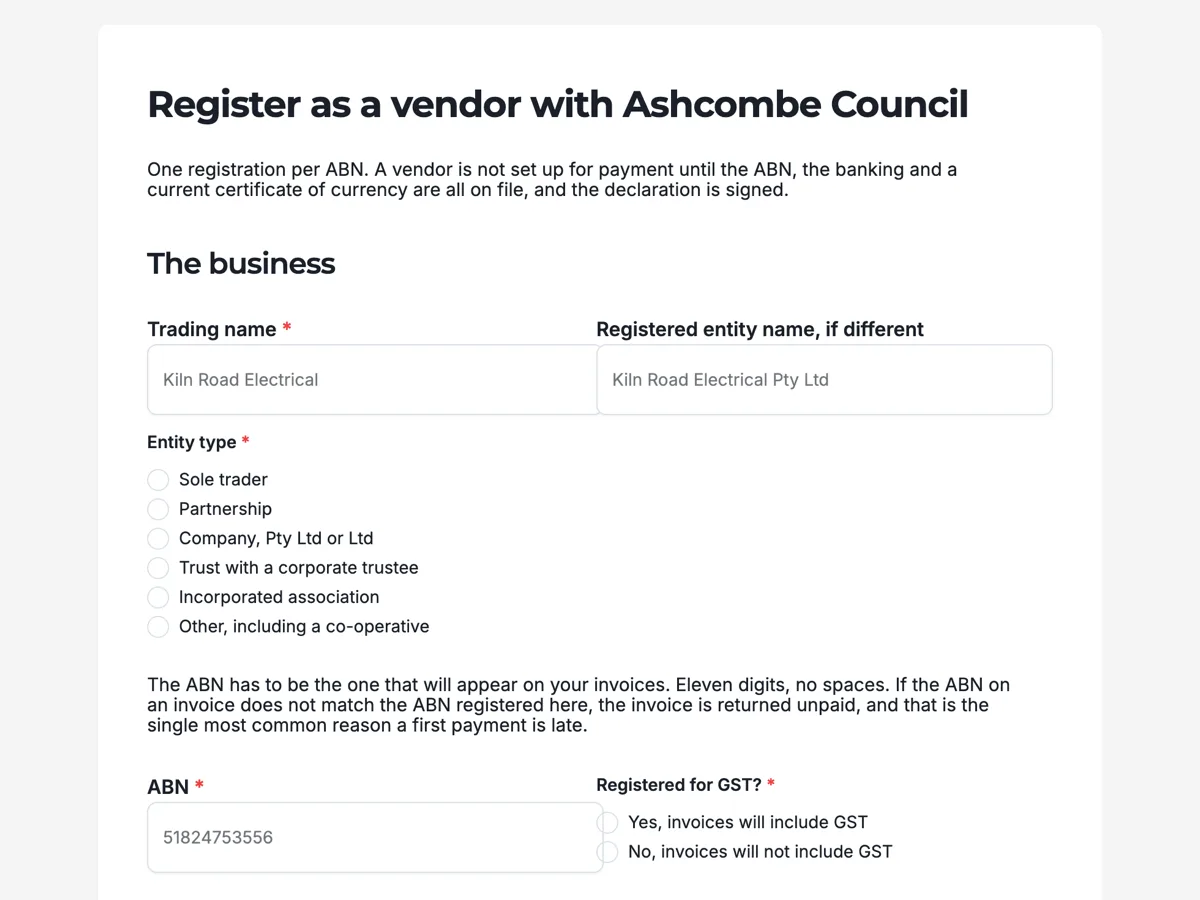 Vendor registration form with ABN, banking and insurance on itMade with OneCraft, exactly as the generator and editor left it. Open the page for the full breakdown.
Pricing in plain terms
Airtable's pricing page, checked 21 October 2026, says plans are charged per seat: the Free plan costs nothing, Team is $20 per user per month billed annually, Business is $45 per user per month billed annually, and Enterprise Scale is custom. It adds that read only collaborators, form submissions and share links are not charged on Team or Business. OneCraft prices AI generation at $0, $8, $25 and $125 a month for 100, 500, 1,500 and 7,500 credits, with no seats.
Sending responses into a base by webhook
If the base stays the system of record, a OneCraft form can feed it. The webhook posts each response once as JSON: an event name, a timestamp, the form's id, title and slug, and the response with data keyed by field label and raw data keyed by field id. Use the label keyed data for readable column mapping and the id keyed data when labels might change. Point the webhook at an automation service or a small endpoint that creates the Airtable record. There is no retry, so log what arrives.
What Airtable's help pages say about form plans
The Airtable help article on building and sharing forms, read on 21 October 2026, states that the form builder is on all plans but that cover images, logos, data validation and email domain restriction need a paid plan, and that conditional groups need Business or Enterprise Scale. It also notes that people without an Airtable account can only submit standalone forms.
How each column was sourced
Airtable facts come from its pricing page and its help article as read on 21 October 2026. OneCraft facts cite an internal ledger checked against the product's source code.
Who should stay with Airtable
Stay with Airtable forms if your process lives in an Airtable base: views, linked records, automations and interfaces that act on each submission. Moving the form out adds a webhook hop and a place for data to go missing, which only makes sense when the form's look, PDF or signature matters more.
Questions people ask
Can I send form responses to Airtable without Airtable forms?
Yes. A OneCraft webhook posts each response as JSON keyed by label and by field id, which an automation tool or your own endpoint can turn into an Airtable record. The webhook fires once without retry, so add logging or a queue if a missed record would matter.
Can Airtable forms be themed?
Airtable's help article says a cover image and a logo require a paid plan, and its forms follow Airtable's own layout. OneCraft forms take any of 37 themes, 22 colour palettes and a welcome screen layout on every plan, including the free one.
Is there a limit on uploads?
On OneCraft a file upload field accepts 1 to 10 files per field, images and PDF only, up to 100 MB each, and uploaded images are added as pages to the response PDF. The Airtable pages checked did not state form upload limits, so check its attachment limits per plan.
Do Airtable forms cost extra per submission?
No. Airtable's pricing page says Team and Business plans are not charged for form submissions or share links, only for users with edit permissions. OneCraft also prints no response cap and charges by AI credits. The cost that grows on Airtable is editors, so count who edits the base.
Can a respondent sign the form?
On OneCraft, yes: a signature field captures a drawn or typed signature, and the e-signing add-on can route the response to signers with a certificate of completion. The Airtable pages read for this comparison do not describe a signature field on forms.
Try the form side of OneCraft
The button opens the generator with a starting prompt already filled in. Change the wording to match your own work before you run it.
Create a form with OneCraftMore comparisons
- A Fillout alternative for AI forms, PDFs and signaturesA Fillout alternative that builds forms from a description or a PDF, exports fillable PDFs and sends responses for signature, with Fillout's free tier quoted.
- A Jotform alternative for forms, PDFs and signingOneCraft as a Jotform alternative: classic and conversational forms, fillable PDFs, e-signature and AI generation, with Jotform's breadth stated honestly.
- A Cognito Forms alternative for forms and PDFsA Cognito Forms alternative for AI written forms, response PDFs and certified signing, with the repeating sections, calculations and payments gap stated.
What the module actually does, feature by feature: the AI form builder page, and the forms maker page.
Step by step in the builder: Automate your form with add-ons, then Build your own form theme.
Written and checked by the OneCraft team. Last checked .