E-signatures · Alternative
A Jotform Sign alternative that signs the form response
A Jotform Sign alternative makes sense when the thing being signed is a form submission and the evidence behind it has to hold up. Jotform Sign pairs forms with a full signing product and a large template library; OneCraft turns each submitted response into its own envelope, with a hash chained audit log, a certificate of completion and a certified PDF.
Updated , competitor details checked . Jotform and Jotform Sign are trademarks of their owner. OneCraft is not affiliated with or endorsed by it, and every cell cites a public page or a named row in a fact ledger checked against source code.
Nuwan Madhusanka · Co-founder
4 min read · Published
The short verdict
Jotform Sign suits a team that wants forms, signing templates, approval flows, reminders, a mobile app and bulk send in one mature suite, and is happy to count signed documents per plan. OneCraft suits a form whose submission has to become a signed record with strong evidence: one envelope per response, a verifiable event chain, a certificate and a certified PDF, without a separate signing setup.
| Feature | Jotform Sign | OneCraft |
|---|---|---|
| Price and signing allowance | Starter free with 10 signed documents a month; Bronze $39 a month with 100, Silver $49 with 250, Gold $129 with 1,000, Enterprise unlimited checked 2026-09-29 | Free at $0 with 100 AI credits a month, then Starter $8, Pro $25 and Pro+ $125, per account; no signed document count is stated on any plan |
| Form response to envelope | Sign Automation on the Signature element generates a PDF copy of the submission with an audit trail after the form is submitted checked 2026-09-29 | One envelope per submitted response, one recipient per e-signature component, and a replayed message is a no-op because the response row records the envelope |
| Inline signature on the form | Form fillers review and sign their submission before completing the form, and submission editing is then disabled checked 2026-09-29 | An inline signature field, drawn or typed by the person filling the form and printed into the response PDF, separate from the certified e-signature |
| Who signs after submission | Signing order sends documents to multiple signers in a set order, and a signer can delegate to someone else checked 2026-09-29 | Each e-signature component names its signer from a fixed address, another field or at fill time, with a signing order, a copy on completion and an optional certificate |
| Certificate and audit | An audit trail sent along with the signed document, recording timestamps and signer details checked 2026-09-29 | 18 event types in a hash chained log verified on the envelope page, plus a three section certificate of completion as its own download |
| Verifying the signer | An access code that recipients enter before opening the document checked 2026-09-29 | Form envelopes are handed over with the email link as the check. Uploaded envelopes can add an access code or a 6 digit emailed code |
| Expiry and reminders | Automatic reminder emails, and a default one week expiration that can be changed or restored checked 2026-09-29 | Every envelope expires 30 days after creation with no setting to change it, and there are no automatic reminders |
| PDF design of the response | A PDF copy of the submission is generated automatically, with a chosen file name checked 2026-09-29 | A PDF layout editor shapes the response PDF; the fillable PDF export needs the Starter plan and up, and a blank template PDF is free |
| Signing templates | 1,000+ Jotform Sign templates across HR, healthcare, business, real estate and education checked 2026-09-29 | No signing templates. The form itself is the reusable part: every submission produces a fresh envelope from it |
| Workflow automation | Approval flow automation, bulk send, and signed documents uploaded to a cloud storage account checked 2026-09-29 | No approvals or bulk send. A webhook posts each submission once with no retry, and email alerts go to one address |
| Certified file | Encryption, digital certificates and cryptographic algorithms that record audit trails and prevent signature tampering checked 2026-09-29 | PAdES CMS certification at DocMDP P=1 with no quiet fallback: a failed certification marks the envelope failed. RFC 3161 timestamping is off |
| Signing on a phone | Jotform Sign Mobile, with in person signature collection in the mobile app checked 2026-09-29 | No app. Below 560 pixels the signer portal switches to a compact mode with typed fields in a panel above a read only document |
Where Jotform Sign is better
A signing product, not only a form step
Jotform Sign is a full signing tool beside its forms, with more than 1,000 signing templates, an inbox, delegation and a mobile app. Signing here starts from a PDF, a generated document or a form, with no template library, so a team signing many standard agreements outside forms has more to work with there.
Approval flows and bulk send
Jotform lists approval flow automation and bulk send for signing. There are no approvers and no bulk send here: every recipient is a signer, and each envelope is created one at a time or once per submission. A submission that must pass a manager before it counts has no equivalent.
Reminders and adjustable expiry
Jotform Sign sends automatic reminders and lets a sender change or restore an expiration. OneCraft envelopes always expire after 30 days with no reminder in between, so a signer who forgets simply lets the request lapse unless the sender resends it by hand.
Signer checks on form envelopes
An access code can be set on Jotform Sign documents. Envelopes created from a OneCraft form response are handed over with the email link as the only check, so the stronger access code and emailed code options apply only to envelopes prepared from an uploaded PDF.
Where OneCraft is different
One submission, one envelope
When a classic form with an e-signature component is submitted, the rendered response becomes an envelope with one recipient per component, their fields placed where the form printed them. The response records its envelope, so a retried message never sends the same response twice.
Two signatures that mean different things
The inline signature is drawn or typed by the person filling the form and printed into the response PDF. The e-signature is the certified step afterwards, with its own link, order and evidence. A form can carry both, for example the client inline and the practitioner by e-signature.
Evidence you can check yourself
Each audit event is sealed with a hash of the one before, and the envelope page reports whether the chain verifies. The certificate of completion lists the envelope, each signer's verification method, signing time, IP address and consent, and every event with a UTC timestamp.
The PDF version is designed, and the document can be generated
A PDF layout editor shapes how the form prints as a PDF, so a response reads like a finished form rather than a list of answers. When the thing to sign is an agreement rather than a form, the same account can generate it, and its signature blocks become envelope fields.
A finished example
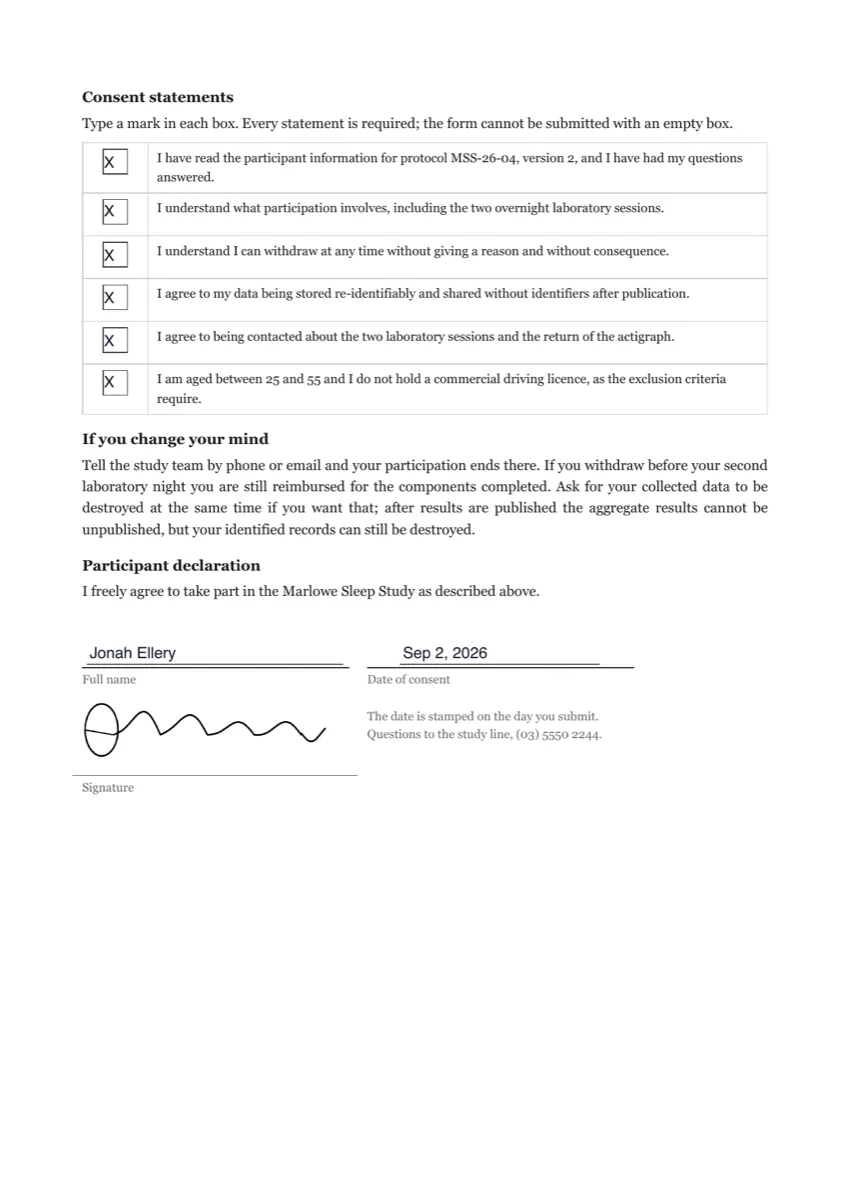 Consent form e-signatureMade with OneCraft, exactly as the generator and editor left it. Open the page for the full breakdown.
Pricing in plain terms
Jotform's pricing page, checked 29 September 2026, meters signing by signed documents a month: 10 on the free Starter plan, 100 on Bronze at $39 a month or $408 a year, 250 on Silver at $49 or $468 a year, 1,000 on Gold at $129 or $1,188 a year, and unlimited on Enterprise. The same plans cap active forms and monthly submissions. OneCraft lists Free at $0 with 100 credits a month, Starter at $8, Pro at $25 and Pro+ at $125, per account; its credits pay for AI generation, and no plan states an envelope count.
Inline signature or certified signature
The two are easy to confuse. An inline signature is a picture of a signature captured while the form is filled in, useful when the person submitting is the only party. A certified signature happens after submission, through a private link, and produces a PDF sealed so later edits are visible, with an audit log and a certificate behind it. On OneCraft the e-signature component, which exists on classic forms only, is the certified route; photo and signature fields do not work in conversational forms at all.
Moving across
Jotform forms and signing templates do not import. The practical route is to describe the form to the generator, or attach a PDF or photo of it on a paid plan, then add an e-signature component for each party who signs after submission and turn on the e-signing add-on. Each party's email can come from a fixed address, from another field such as the client's email, or be asked at fill time. Test the flow with a real submission before sharing the link.
What could not be checked
Jotform's product pages refused a plain scripted fetch with an unsupported browser notice, so the Jotform cells come from pages read through a full browser fetch on the date shown. The pages checked do not state what the audit trail records beyond timestamps and signer details, or the signing profile of the certificate. OneCraft cells each name a row in an internal ledger checked against the forms, listener and signing services' source code.
Who should stay with Jotform Sign
Stay with Jotform Sign if you rely on its signing templates, approval flows, reminders, bulk send or mobile app, or if you already run your forms in Jotform and the signed document allowance fits. Consider moving when the signature belongs to a form submission and a certified PDF with a checkable audit chain is what you need to keep.
Questions people ask
Can a form submission be signed by someone other than the person who filled it in?
Yes. Each e-signature component on a classic form is its own signer, and their email can be a fixed address, another field on the form, or asked while filling it in. After submission, those signers receive private links in the order set on each component, and the finished PDF is certified once the last one signs.
Does the e-signature field work in a conversational form?
No. The e-signature component is offered on classic forms only and falls through to a plain text box in a published conversational form. The inline signature pad and the photo field do render there, so a drawn signature can be collected one question at a time, but a certified signing envelope needs a classic form, which can still be paginated into steps.
What happens if the same submission is processed twice?
Nothing is sent twice. Once an envelope is created, its id is written to the response row, and a repeated message for that response is ignored. On the signing side, each stamp is recorded against the recipient too, so a replayed signing message does not stamp the PDF again. Every intermediate version of the file stays retrievable.
Is there a limit on signed documents per month?
No signed document or envelope count appears on any OneCraft plan; plans meter AI generation credits instead. The practical limits are per envelope: up to 25 recipients and 500 fields. Jotform counts signed documents per plan, from 10 a month on its free Starter plan to 1,000 on Gold, with Enterprise unlimited.
Can I send the response PDF somewhere automatically?
A webhook can post each submission as JSON once, with a ten second timeout and no retry, and an email alert can go to one address. The completed, certified PDF is emailed to every signer and the sender when the envelope completes. There is no cloud storage sync, which Jotform Sign lists for signed documents.
Who can see the certificate of completion?
The sender can download it from the envelope page at any time as its own PDF. If the append certificate option was on for the e-signature component, its pages are also added to the end of the signed PDF before certification, so every signer receives it inside the completion email attachment as well.
Try the signing flow side of OneCraft
The button opens the generator with a starting prompt already filled in. Change the wording to match your own work before you run it.
Send a document for signingMore comparisons
- A Jotform alternative for forms, PDFs and signingOneCraft as a Jotform alternative: classic and conversational forms, fillable PDFs, e-signature and AI generation, with Jotform's breadth stated honestly.
- Typeform vs Jotform, and where a third option fitsTypeform vs Jotform on price, logic, templates, payments and PDFs, with both sets of published figures dated, and where a third AI form builder fits in.
- A Signaturely alternative with a verified audit trailA Signaturely alternative compared row by row: pricing checked today, a hash chained audit trail, three signer checks, a lockout, and the templates it lacks.
What the module actually does, feature by feature: the E-signature software page, and the e-signatures maker page.
Step by step in the builder: Automate your form with add-ons, then Shape the PDF version of your form.
Written and checked by the OneCraft team. Last checked .