Forms · Compared
Jotform vs Google Forms, and when a third tool fits
The short answer on cost: Google Forms comes with Google Workspace and its product page states no form or response limit, while Jotform's free Starter plan stops at 5 forms and 100 submissions a month. The short answer on output: Jotform turns submissions into PDFs, takes payments and collects signatures, which Google Forms does not. A third tool fits between them for forms that need a PDF or a signing envelope but no payments.
Updated , competitor details checked . Jotform is a trademark of Jotform Inc. and Google Forms is a trademark of Google LLC. OneCraft is not affiliated with or endorsed by either.
Nuwan Madhusanka · Co-founder
3 min read · Published
The short verdict
Google Forms is the right answer for free, simple forms that end in a spreadsheet. Jotform is the right answer when a form must take payment, produce PDFs from 20,000 templates, collect signatures and route approvals, and the submission limits fit. The third column suits paperwork forms, intake, consent and applications, that need a designed PDF or a certified signature without payments.
| Feature | Jotform | Google Forms | OneCraft |
|---|---|---|---|
| Free plan | Starter at $0: 5 active forms, 100 monthly submissions, 10,000 monthly form views, 100 MB upload space, 10 signed documents a month checked 2026-10-21 | No form or response limit stated on the Forms product page checked 2026-10-21 | Free at $0 with 100 credits a month; no response cap printed |
| Paid plans | Bronze $39 a month or $408 a year, Silver $49 or $468, Gold $129 or $1,188 checked 2026-10-21 | Part of Google Workspace; Business Starter shown at A$9.90 per user a month on an annual commitment checked 2026-10-21 | Starter $8, Pro $25 and Pro+ $125 a month |
| Templates | 20,000+ premade form templates checked 2026-10-21 | Choose from pre-made survey and questionnaire templates checked 2026-10-21 | A generator that writes the form from a description |
| Payments | 40+ payment gateway integrations with recurring subscriptions checked 2026-10-21 | Not offered on the Forms product page checked 2026-10-21 | No payment component |
| PDF output | Convert submissions into PDF documents, single or multiple checked 2026-10-21 | Not offered on the Forms product page checked 2026-10-21 | Response PDF from a layout editor; fillable PDF export from Starter |
| Signatures | Electronic signature forms for contracts, agreements and waivers checked 2026-10-21 | No signature question among the question types checked 2026-10-21 | Inline signature plus an e-signing add-on with a certificate of completion |
| Conditional logic | Show or hide fields, send emails to certain users and show different thank-you messages checked 2026-10-21 | Send a responder to a certain section based on an answer checked 2026-10-21 | Jump rules on conversational forms only |
| Data destination | Integrations including Google Sheets, Excel and 200+ others checked 2026-10-21 | Export raw data into Google Sheets checked 2026-10-21 | CSV export and a webhook |
| File uploads | 100 MB upload space on Starter rising to 100 GB on Gold checked 2026-10-21 | File upload requires the responder to sign in to a Google Account checked 2026-10-21 | 1 to 10 files per field, images and PDF, up to 100 MB each |
| HIPAA | HIPAA compliance features on Gold and Enterprise checked 2026-10-21 | Not stated on the Forms product page checked 2026-10-21 | No compliance tier is claimed |
Where Jotform is better
Payments, PDFs and approvals in one account
Jotform takes payments through 40 plus gateways, converts submissions to PDFs, collects signatures and runs approval workflows, all in one product. Google Forms does none of these, and OneCraft does not take payments.
A template for almost anything
More than 20,000 form templates means most forms start half built. Google offers a handful of templates; OneCraft writes the form from a description instead of offering a gallery.
Where Google Forms is better
Free and limitless for everyday use
Google's Forms page states no form or response limit, and responses go straight to Sheets. Jotform's free plan stops at 5 forms and 100 submissions a month.
Collaboration in Workspace
Forms are shared with colleagues to collaborate and analyse results in one place, inside the Workspace a team already uses. Neither of the other columns ties into a whole office suite.
Where OneCraft is different
Paperwork without a template hunt
Describe the clinic intake or the consent and the generator writes it, or attach a photo of the paper form on a paid plan. Jotform's library is large, but you still search, pick and edit a template.
A certified signing record
The e-signing add-on sends a response to its signers and finishes with a PDF certified against later edits and a certificate of completion that lists each signer's verification method and IP address.
Price that does not climb with submissions
Jotform's plans are defined by submission and storage caps. OneCraft prices AI generation and prints no response cap, so a popular intake form does not force an upgrade.
A finished example
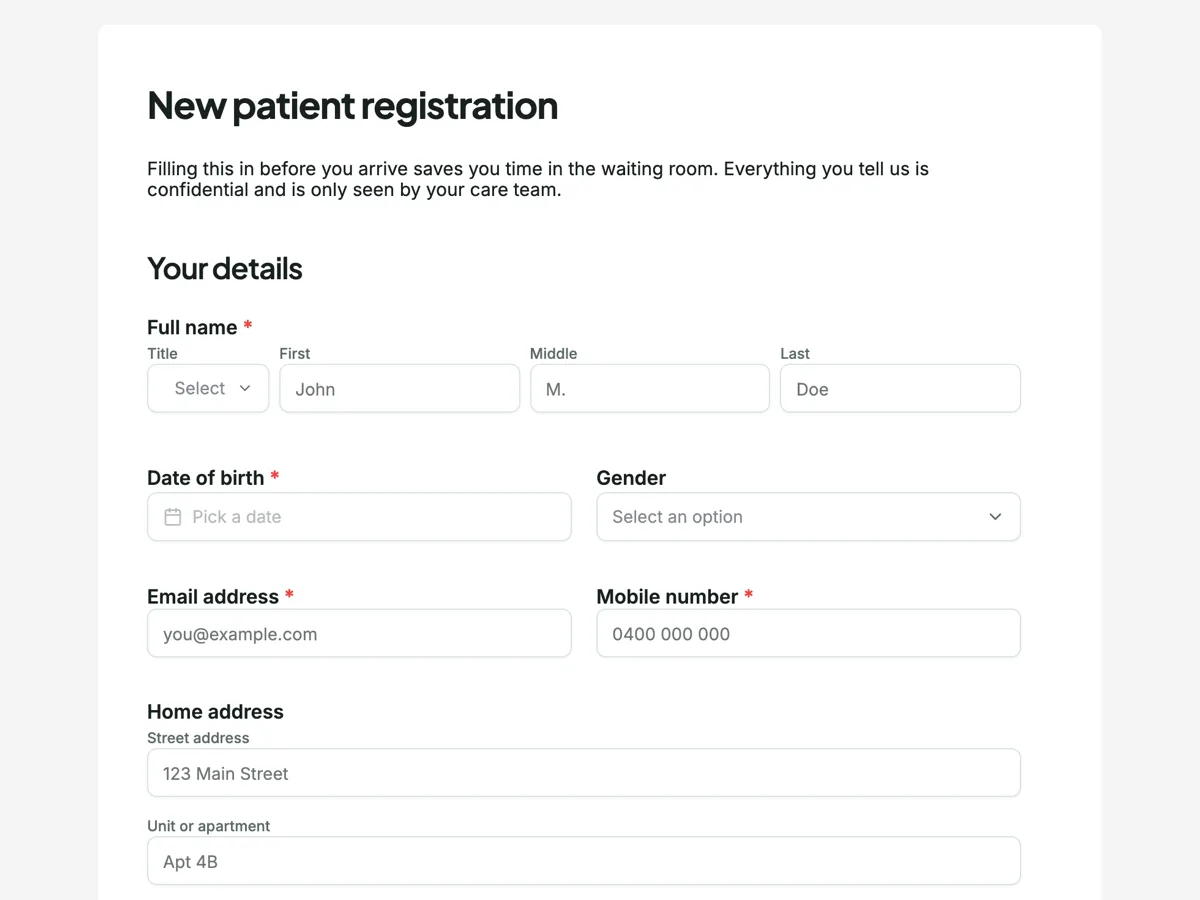 Patient intake formMade with OneCraft, exactly as the generator and editor left it. Open the page for the full breakdown.
Submission limits and PDF output side by side
Jotform's pricing, read on 21 October 2026, sets monthly limits by plan: Starter 100 submissions and 10 signed documents, Bronze 1,000 and 100, Silver 2,500 and 250, Gold 10,000 and 1,000, with form views from 10,000 to 10 million. Its features page says submissions convert into PDF documents. Google's Forms page states no submission limit and no PDF output; responses go to Sheets. OneCraft prints no response cap and renders every response as a PDF through its layout editor, with a fillable PDF export on Starter.
Prices read the same day
Jotform's Bronze is $39 a month or $408 a year, Silver $49 or $468 and Gold $129 or $1,188, with 50% off for nonprofits and education. Google sells Forms inside Workspace; its pricing page showed Business Starter at A$9.90 per user a month on an annual commitment to an Australian visitor. OneCraft lists $0, $8, $25 and $125 a month.
The deciding question
Ask what must happen after submit. A spreadsheet row: Google Forms. A payment, a PDF and an approval: Jotform. A printed or signed record from a form written for you: the third column.
Sources
Jotform facts come from its pricing and features pages, Google facts from the Forms product page, the Workspace pricing page and the Docs Editors Help article on question types, all read on 21 October 2026. OneCraft cells cite an internal ledger read from the product source.
Who should stay with Jotform or Google Forms
Stay with Google Forms if free, simple and spreadsheet bound describes your forms. Stay with Jotform if forms take payment, need approval workflows, HIPAA features or a ready template for every case. Choose the third column only when the main output is a designed PDF or a signed record and no payment is involved.
Questions people ask
Is Jotform better than Google Forms?
For payments, PDFs, signatures and approvals, yes. For free forms that feed a spreadsheet, Google Forms is simpler and has no submission cap on its product page. Jotform's free plan allows 5 forms and 100 submissions a month, so heavy free use favours Google.
Is Jotform free?
Jotform's Starter plan is free with 5 active forms, 100 monthly submissions, 100 MB of upload space and 10 signed documents a month, and forms carry Jotform branding. Paid plans start at Bronze, $39 a month or $408 a year.
Can Google Forms make a PDF of a response?
Google's Forms product page does not list PDF output; responses go to the Responses tab and Google Sheets. Jotform converts submissions into PDFs, and OneCraft renders each response as a PDF laid out in its own editor. Add-ons from the Workspace Marketplace can fill that gap for Google.
Can I collect a signature in Google Forms?
Not natively. Its help article lists no signature question type. Jotform offers electronic signature forms, and OneCraft offers a signature field plus an add-on that sends a response for certified signing. Some people ask respondents to type their name as a substitute, which records intent but no drawn signature, so check what your process requires before relying on it.
Which suits a physiotherapy intake form?
Any of the three can collect the details. Jotform fits if the clinic needs HIPAA features or payments, OneCraft if it wants the form generated and a signed consent PDF, and Google Forms if the clinic only needs answers in a spreadsheet.
Try the form side of OneCraft
The button opens the generator with a starting prompt already filled in. Change the wording to match your own work before you run it.
Create a form with OneCraftMore comparisons
- A Jotform alternative for forms, PDFs and signingOneCraft as a Jotform alternative: classic and conversational forms, fillable PDFs, e-signature and AI generation, with Jotform's breadth stated honestly.
- A Google Forms alternative: what you gain, what you give upOneCraft as a Google Forms alternative: themes, welcome screens, fillable PDFs, e-signature and AI generation, against the Sheets link you give up.
- Google Forms vs Microsoft Forms, with a third columnGoogle Forms vs Microsoft Forms compared on cost, quizzes, spreadsheet sync, design, logic, file upload and AI, with OneCraft as a third column.
What the module actually does, feature by feature: the AI form builder page, and the forms maker page.
Step by step in the builder: Shape the PDF version of your form, then Convert a paper form to a web form.
Written and checked by the OneCraft team. Last checked .