Forms · Alternative
A Paperform alternative with AI forms and e-signing
Paperform reads like a document you fill in, takes money at the end of it, books appointments and does sums along the way. The product compared here writes the form for you instead, then exports it as a fillable PDF or sends the answered version out for signature, and it takes no payments, books nothing and calculates nothing.
Updated , competitor details checked . Paperform is a trademark of its owner. OneCraft has no affiliation with Paperform and no endorsement from it.
Nuwan Madhusanka · Co-founder
3 min read · Published · Updated
The short verdict
Paperform earns its price when the form is also the checkout, the booking sheet and the calculator, and it is the stronger product for anything commercial. OneCraft is the better fit when the hard part is writing the form at all, and when the finished answers need to leave as a fillable PDF or a signed and certified one.
| Feature | Paperform | OneCraft |
|---|---|---|
| Free plan | $0 with 30 submissions a month, one user and unlimited forms checked 2026-09-20 | $0 with 100 AI credits a month, roughly four generated projects, and no submission ceiling printed on the pricing page |
| Paid tiers | Essentials $24 a month or $288 a year with 1,200 submissions a year and one user; Pro $49 or $588 with 12,000 a year and three users; Business $99 or $1,188 with 120,000 a year and five users, extra users $9 each up to 25 checked 2026-09-20 | Starter $8, Pro $25 and Pro+ $125 a month, buying 500, 1,500 and 7,500 AI credits; attachments on the generator need one of those paid plans |
| Taking money | Take payments. Automate workflows. Payments are listed on every plan including the free one checked 2026-09-20 | No payment field and no gateway. A form cannot charge anyone |
| Calculations | Make magic with calculations, listed from the Essentials plan upward checked 2026-09-20 | Nothing is computed. A number field collects a number, and totals have to be worked out after export |
| Appointments | Stay on schedule without the back-and-forth emails, with bookings synced to Google Calendar checked 2026-09-20 | No scheduling. A date field and a time field record a preference, with a date format string and a 12 or 24 hour clock |
| Question logic | Use question logic for tailored experiences checked 2026-09-20 | Jump rules on conversational forms only: an answer can skip ahead or end the form. A classic form shows every question to everyone |
| One question at a time | Not offered as a separate form type on the features page checked 2026-09-20 | Conversational is a first class form type with a 25 component toolkit and 25 themes of its own, including recorded audio and video answers |
| Opening and closing screens | Curate your unique look and feel by customizing colors, fonts, layouts and themes checked 2026-09-20 | 10 welcome screen layouts and 4 thank-you layouts, with a confetti toggle, a button link and an optional timed redirect |
| Writing the form | Choose from hundreds of free, pre-built templates to inspire your work checked 2026-09-20 | A generator prompt of up to 10,000 characters builds the fields, sections and theme; language is free typed with 32 suggestions |
| Fillable PDF | Not published as a form output on the features page checked 2026-09-20 | A fillable PDF export from the Starter plan up, laid out in a dedicated PDF editor; the blank template PDF has no plan gate |
| Signing | Document signing is referred to Papersign, a separate product rather than a form add-on checked 2026-09-20 | An e-signature component on the form, plus an add-on that sends the submitted response out as a signing envelope with a certificate of completion |
| Connecting other tools | 2000+ integrations, listed on every plan including the free one checked 2026-09-20 | One webhook per submission, posted once with a ten second timeout and no retry, plus an email alert to a single address |
Where Paperform is better
The form can be the checkout
Payments appear on every Paperform tier, the free one included. A pottery studio can sell a workshop seat at the bottom of the registration form and be done. Here the same studio collects the booking and then has to invoice separately, because no OneCraft form has ever charged anyone anything.
Sums happen while somebody types
Calculations are part of Paperform from the Essentials plan up, so quantity times price, hours times rate and scored questionnaires all work inside the form. OneCraft records numbers and leaves the arithmetic to whoever opens the export. For order forms and quotes that is a real functional gap rather than a stylistic one.
Bookings sync to a calendar
Paperform's scheduling feature takes availability, offers times and syncs the result to Google Calendar. OneCraft has a date field and a time field, which collect a stated preference and nothing more. Nobody's calendar is consulted and no slot is held, so double bookings are entirely possible.
Questions that adapt to answers
Paperform's question logic tailors what appears next. OneCraft has only jump rules on conversational forms, so a classic form asks every question of every respondent and no field appears or hides on an answer, which suits an intake sheet and frustrates anything that branches by role, eligibility or product. It is the most common reason a Paperform user should not move.
Two thousand integrations against two add-ons
Paperform advertises over two thousand integrations on every plan. The OneCraft equivalent is a webhook and an email alert, so anything that has to land in a spreadsheet, a CRM or a project tracker needs code in the middle that somebody has to keep running.
Where OneCraft is different
Describing beats assembling
The generator takes up to 10,000 characters of plain description, in a freely typed language with 32 suggestions offered, and returns a form with its fields, sections, welcome screen and theme already set. Building by hand is still possible, but it is the repair path rather than the normal one.
One question at a time is its own product
Conversational forms are not a display option applied to a classic form. They carry their own 25 component toolkit, their own 25 themes, and components no classic form has, including recorded audio and video answers and a profile screen that gathers name, email, phone and address together.
The answers can leave as paper
A form has a PDF life as well as a web one. The blank template PDF downloads with no plan gate for anyone who still needs a printed sheet, a fillable PDF export opens on the Starter plan, and each filled response renders through a layout editor where the fields are arranged deliberately rather than dumped in order.
Signing is built in, not a sibling product
Paperform points signing at Papersign. Here the e-signature component lives in the classic toolkit, and switching on the add-on turns each submitted response into an envelope with identity checks, an 18 event hash chained trail and a PAdES certified PDF at the end.
A finished example
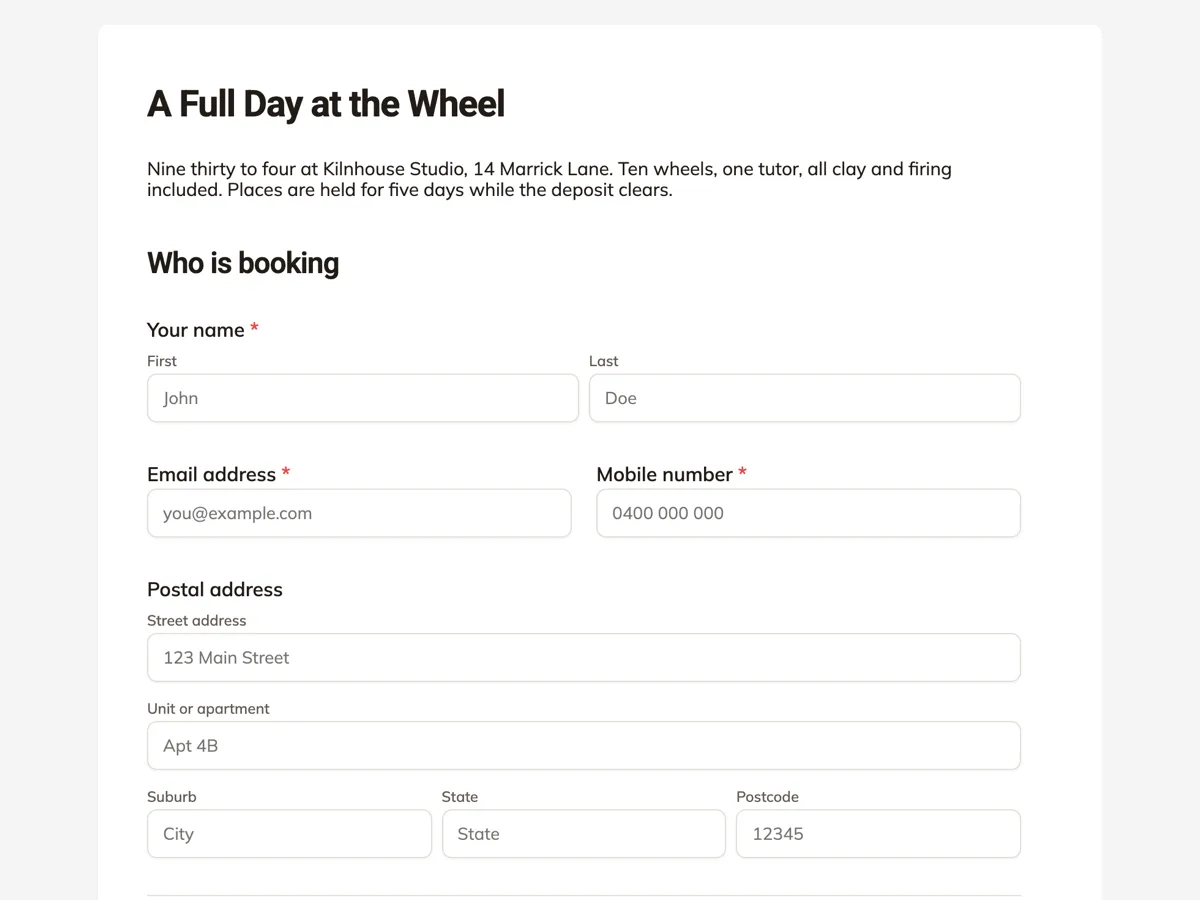 Workshop registration formMade with OneCraft, exactly as the generator and editor left it. Open the page for the full breakdown.
Reading the two price lists side by side
Paperform's pricing page on 20 September 2026 lists a free tier with 30 submissions a month, Essentials at $24 monthly or $288 for the year with 1,200 submissions a year, Pro at $49 or $588 with 12,000, and Business at $99 or $1,188 with 120,000 submissions and five users, extra seats at $9 each to a maximum of 25. Prices are stated in US dollars before sales tax. OneCraft lists $0, $8, $25 and $125 a month and counts AI credits instead: 150, 500, 1,500 and 7,500 a month, described on the page as about 4, 15, 45 and 225 AI projects. A busy form on Paperform is billed by how many people answer it. A busy account here is billed by how often something is generated.
What a move across looks like
Nothing imports directly, and the parts that make a Paperform form valuable are usually the parts that cannot travel. Payments, calculations and bookings have no destination. A form that is really a questionnaire moves cleanly: export it to PDF, attach that file to the generator on a paid plan, and check the rebuilt fields for required flags and option lists. Submissions already collected stay in Paperform, so download them before closing the account. Anything with a price in it should be treated as a rebuild in a different tool, not a migration.
Where the claims came from
Paperform does not print a per feature breakdown for signing on its features page, and the signing link goes to Papersign, a separate product with its own site, so this page quotes only what appears on paperform.co and does not compare the two signing products. The features page also does not state a fillable PDF output, so that cell reads as not published rather than as an absence. Integration and template counts are Paperform's own claims, quoted as written on the day above.
The other column, and how it was verified
Every OneCraft cell names a row in an internal ledger built by reading the product's source: 41 component types, 37 themes split 12 classic and 25 conversational, 10 welcome layouts and 4 thank-you layouts, a prompt ceiling of 10,000 characters, five attachments of 10 MB on a paid plan, a webhook with a ten second timeout and no retry. The gaps are recorded the same way, which is why the table states flatly that there are no payments, no calculations, no scheduling, and logic limited to jump rules on conversational forms.
Who should stay with Paperform
Stay with Paperform if the form takes payment, does arithmetic, or books a time in somebody's calendar, and stay if branching questions are what keeps it short. Those three capabilities are absent here, and no amount of AI drafting compensates for a form that cannot charge or calculate.
Questions people ask
Can a registration form collect the fee as well as the booking?
Not in OneCraft. There is no payment component and no gateway integration, so the fee has to be invoiced or collected elsewhere. Paperform lists payments on every plan, including its free tier, which makes it the sounder choice for any form where money changes hands at the end.
Is there anything like Paperform's calculations?
No. Numbers are collected and validated with minimum and maximum values, but nothing is multiplied, summed or scored while the form is being filled. A quantity times price line, a quote total or a scored questionnaire all have to be worked out after the responses are exported to CSV.
What does the conversational form type give that Paperform does not?
One question at a time as a genuine form type, with 25 components and 25 themes of its own, including recorded audio and video answers and a combined profile screen. Photo and inline signature fields render there too; only the e-signature component, which starts a certified signing envelope, stays on classic forms.
Can respondents book a time slot?
They can state a preferred date and time on a form, but nothing is reserved and no calendar is checked. Paperform's scheduling syncs with Google Calendar and prevents clashes. If the whole point of the form is filling a timetable, that difference is the decision, not the price.
How does the signing add-on differ from an inline signature?
An inline signature is drawn or typed by the person filling the form and printed into the response PDF. The add-on goes further: each submitted response becomes a signing envelope with its own recipient, verification, a hash chained event trail and a PAdES certified PDF, with a certificate of completion generated alongside it.
How many people can work on a form?
The published pricing page meters AI credits rather than seats, so it does not put a number on collaborators the way Paperform does with one, one, three and five users per tier plus $9 extra seats. Treat the OneCraft account as a shared login rather than a product with roles and permissions.
Try the form side of OneCraft
The button opens the generator with a starting prompt already filled in. Change the wording to match your own work before you run it.
Create a form with OneCraftMore comparisons
- A Typeform alternative, compared honestlyOneCraft as a Typeform alternative for conversational forms: what matches, what does not, where Typeform stays ahead, and both public pricing pages quoted.
- A Fillout alternative for AI forms, PDFs and signaturesA Fillout alternative that builds forms from a description or a PDF, exports fillable PDFs and sends responses for signature, with Fillout's free tier quoted.
- A Cognito Forms alternative for forms and PDFsA Cognito Forms alternative for AI written forms, response PDFs and certified signing, with the repeating sections, calculations and payments gap stated.
What the module actually does, feature by feature: the AI form builder page, and the forms maker page.
Step by step in the builder: Classic and conversational forms compared, then Design your welcome and thank-you screens.
Written and checked by the OneCraft team. Last checked .