Forms · Alternative
A SurveyMonkey alternative for surveys and feedback
SurveyMonkey sells the research apparatus around a survey: expert written questions, industry benchmarks, advanced logic and analysis that goes beyond counting. This page compares that with a general form builder used for feedback work, where the questions are generated from a brief, a Likert grid is a matrix component and analysis means a responses table and a CSV file.
Updated , competitor details checked . SurveyMonkey and NPS are trademarks of their respective owners. OneCraft is not affiliated with SurveyMonkey and is not endorsed by it.
Nuwan Madhusanka · Co-founder
3 min read · Published · Updated
The short verdict
SurveyMonkey is the right tool when the survey is research: benchmarked questions, randomisation, significance testing and analysis a stakeholder will trust. OneCraft is the pragmatic option when the survey is a feedback form that also has to look like the rest of a small business, and when the same account is making its documents, flyers and slides.
| Feature | SurveyMonkey | OneCraft |
|---|---|---|
| Free plan | Basic is free with unlimited surveys and 10 questions per survey checked 2026-09-20 | Free at $0 with 100 AI credits a month, no question limit and no response limit printed on the pricing page |
| Individual plans | Advantage Annual at A$32 a month, billed A$384 a year, with unlimited questions and 15,000 responses a year; Premier Annual at A$119 a month, billed A$1,428, with 40,000 responses a year, plus A$0.15 per additional response checked 2026-09-20 | Starter $8, Pro $25 and Pro+ $125 a month for 500, 1,500 and 7,500 AI credits; nothing is charged per response |
| Team plans | Team Advantage at A$23 per user a month billed annually with a three user minimum and 50,000 responses a year; Team Premier at A$75 per user a month with 100,000 responses a year; Enterprise quoted on request with a five user minimum checked 2026-09-20 | No per user pricing is published, and no roles or permissions are described. Access to a survey is controlled by one of four types: public, secret key, login required or domain restricted |
| Question kinds | Named types include multiple choice, rating scale, Likert scale, matrix, dropdown, open ended, ranking, image choice, click map, file upload and slider, with NPS given as a zero to ten example checked 2026-09-20 | 41 component types in total. A Likert grid is the matrix component with rows and columns, a rating scale is a radio field with the scale as its options, and a zero to ten recommendation question is a radio field with eleven options |
| Survey logic | Research-grade features such as advanced logic and randomization, with block randomization listed on the Premier tiers checked 2026-09-20 | Jump rules on conversational forms only, and no randomisation. Questions always appear in the same order |
| Benchmarks | Responses to unaltered expert-certified questions from the Question Bank are anonymised and aggregated into benchmarks, available for selected questions in English only checked 2026-09-20 | No question bank and no benchmark data of any kind |
| Analysis | Sentiment analysis, industry benchmarks and other analysis tools, with statistical significance and multi-survey analysis listed on team plans checked 2026-09-20 | A responses table and a CSV export with one column per field. A matrix answer is written as statement and answer pairs in that single column, and choice fields export their labels |
| Writing the survey | Write a short prompt and let AI instantly build a survey for you checked 2026-09-20 | A prompt of up to 10,000 characters, in a freely typed language with 32 suggestions, producing the questions, sections, welcome screen and theme in one generation |
| One question at a time | Not offered as a survey type on the pages checked checked 2026-09-20 | A conversational form type with 25 components and 25 themes of its own, including spoken and recorded video answers |
| Payments | Payment acceptance is listed among the Team Advantage features checked 2026-09-20 | A survey cannot take payment. There is no payment component and no gateway |
| Look of the survey | Premium themes and shared brand assets are listed on the Team Advantage plan, with white label branding on Team Premier checked 2026-09-20 | 37 themes, 22 colour palettes, 24 background patterns and 23 font pairs, plus 10 welcome layouts and 4 thank-you layouts |
| Results as a document | Not published as a response level PDF on the pages checked checked 2026-09-20 | Each response can be exported as a PDF laid out in a dedicated editor, and a blank template PDF downloads with no plan gate, with a fillable PDF export from Starter |
Where SurveyMonkey is better
Questions that have been tested on other people
The Question Bank and expert certified templates exist so a survey does not have to be written from instinct, and the benchmark programme turns unaltered versions of those questions into comparisons against other organisations. Nothing here offers either. A generated survey is written for the brief it was given and has no external reference point.
Analysis beyond counting
Sentiment analysis, statistical significance, crosstabs and multi survey comparison are part of what a SurveyMonkey subscription buys. The equivalent here is a responses table and a CSV file, so any significance testing happens in a spreadsheet or a statistics package that somebody else has to drive.
Logic and randomisation
Advanced logic routes respondents past questions that do not apply, and randomisation reduces order effects, both of which matter when the results are meant to be defensible. Randomisation does not exist here and logic stops at jump rules on conversational forms, so a survey has to be short enough that everyone can reasonably answer every question.
Response volume is the product
Team plans quote 50,000 and 100,000 responses a year and a per response price beyond that, which tells you the platform is built for volume fieldwork. A feedback form built here has no response ceiling printed, but it also has none of the panel, distribution or weighting machinery that large samples need.
Where OneCraft is different
The survey is generated with its look already set
One brief of up to 10,000 characters produces the questions, the sections, the welcome screen and a theme chosen from 37, in whatever language was asked for. What comes back is a publishable form rather than a question list waiting for design work.
Feedback can be spoken instead of typed
The conversational form type carries a recording component for audio or video answers, defaulting to a two minute limit with a visible timer. For open ended feedback from customers or staff, a spoken answer often says more than a text box, and it is not an option SurveyMonkey offers in the same place.
A response is also a document
Each submitted response can be rendered as a PDF laid out on a twenty pixel grid in a dedicated editor, which suits feedback that has to be filed, countersigned or attached to a record. A blank template PDF downloads without a plan gate for collecting the same survey on paper, and a fillable PDF export opens on the Starter plan.
The survey shares an account with everything else
The same login writes the report that presents the results, the slides that summarise them and the flyer that advertises the next round. SurveyMonkey is a deeper research tool and a narrower one, and the comparison is really between depth in one discipline and breadth across five.
A finished example
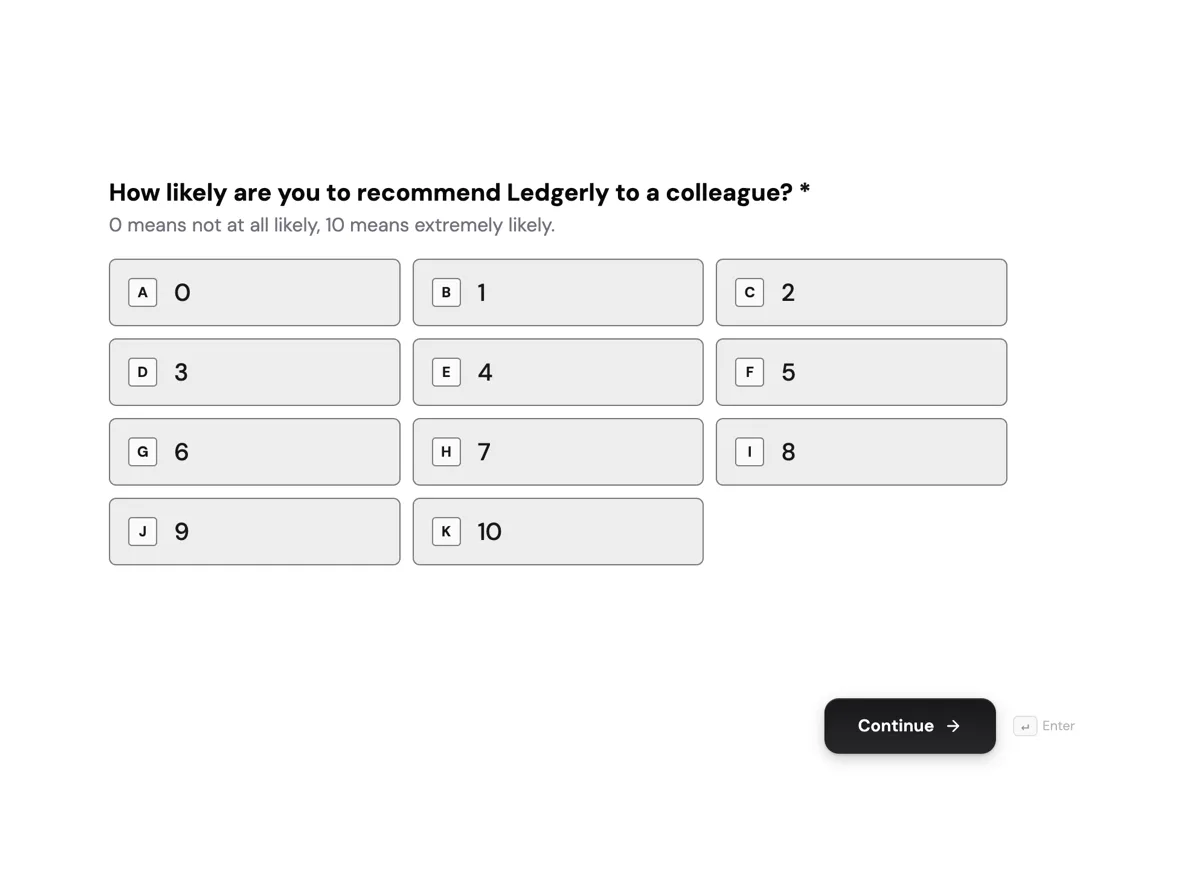 NPS survey with the score explainedMade with OneCraft, exactly as the generator and editor left it. Open the page for the full breakdown.
Two ways of charging for a survey
SurveyMonkey's individual pricing, read on 20 September 2026 and shown in Australian dollars, lists Basic free with ten questions per survey, Advantage Annual at A$32 a month billed A$384 yearly with 15,000 responses a year, and Premier Annual at A$119 a month billed A$1,428 with 40,000 responses. Extra responses cost A$0.15 each. Team plans start at A$23 per user a month billed annually with a three user minimum. OneCraft lists $0, $8, $25 and $125 a month in US dollars and counts AI credits, from 150 to 7,500, with no response charge at all. A single large study is cheaper to run where responses are unmetered; a research programme that needs seats, panels and benchmarks is not really priced here at all.
Building the same questionnaire in a general form builder
Most survey question shapes have a direct equivalent. A Likert grid is the matrix component, which takes rows and columns and can be set to one answer per row or several. A rating scale is a radio field whose options are the scale points, laid out in one, two or three columns. A zero to ten recommendation question is a radio field with eleven options. Ranking, click maps and sliders have no equivalent and should be redesigned as choice questions or dropped. Open ended feedback can be a long text field, or on a conversational form a recorded audio or video answer.
Reading the results
Responses arrive in a table and export as CSV with one column for each field. Composite answers are joined rather than split: a matrix exports as statement and answer pairs separated by pipes in its single column, an address joins its parts with commas, and choice fields export the option labels rather than stored values. Dates use the format set on the field, and the export pages through every response rather than only the visible page. Anyone expecting crosstabs or significance testing inside the product should plan on a spreadsheet step, or stay with SurveyMonkey.
What was verified, and where
SurveyMonkey figures come from its pricing pages and its tour and benchmarks pages on the date above, and prices are reproduced in the currency the pages displayed. The question types page names its types without printing a total, so no count appears for that column. Every OneCraft figure traces to an internal ledger taken from the product source, including the 41 component types, the matrix behaviour, the 25 component conversational toolkit, the two minute default on recordings and the exact shape of the CSV export.
Who should stay with SurveyMonkey
Stay with SurveyMonkey if the results have to stand up to scrutiny, if benchmarks or significance testing are part of the deliverable, if logic and randomisation shape the questionnaire, or if tens of thousands of responses arrive each year. None of that apparatus exists here.
Questions people ask
Can a Likert scale grid be built without a dedicated question type?
Yes. The matrix component takes rows of statements and columns of response options and can be set to one answer per row or several. That covers agreement scales, frequency scales and satisfaction grids. What it cannot do is randomise the row order, so question order effects have to be accepted or designed around.
How is a zero to ten recommendation question handled?
As a radio field with eleven options, laid out in one, two or three columns. The scores export as labels in a single CSV column, so calculating the promoter and detractor split happens in a spreadsheet. There is no built in scoring, segmentation or trend chart for it inside the product.
Is there a question bank or benchmark data?
No. There is no library of expert written questions and no benchmark comparison against other organisations. SurveyMonkey builds benchmarks from unaltered Question Bank questions, in English only and for selected questions. If a result has to be positioned against an industry norm, that is a reason to stay there.
Can respondents be skipped past questions that do not apply?
Yes, in a conversational form. Its Logic tab sets rules that jump a respondent ahead or end the survey when an answer matches. A classic form has no logic, and neither kind randomises question order. SurveyMonkey lists advanced logic and randomisation on its paid tiers and is the better fit for a complex branching instrument.
Can feedback be recorded as audio or video?
Yes, on a conversational form. The recording component takes audio or video, defaults to a two minute limit and shows a timer, and the CSV export marks the answer as a recording rather than transcribing it. Classic forms do not offer it. Photo and signature fields also work in a conversational form; only the e-signature component is classic only.
What happens to results when a plan is downgraded?
Plans here meter AI generation credits rather than responses, so collection does not stop when credits run out. Exports are described as limited on the free tier. SurveyMonkey meters responses per year and charges A$0.15 for each one over the limit, which is the figure to model before a big send.
Try the form side of OneCraft
The button opens the generator with a starting prompt already filled in. Change the wording to match your own work before you run it.
Create a form with OneCraftMore comparisons
- A Typeform alternative, compared honestlyOneCraft as a Typeform alternative for conversational forms: what matches, what does not, where Typeform stays ahead, and both public pricing pages quoted.
- A Google Forms alternative: what you gain, what you give upOneCraft as a Google Forms alternative: themes, welcome screens, fillable PDFs, e-signature and AI generation, against the Sheets link you give up.
- A Microsoft Forms alternative outside Microsoft 365A Microsoft Forms alternative for people without a 365 subscription: AI written forms, 37 themes, conversational mode, fillable PDFs and certified signing.
What the module actually does, feature by feature: the AI form builder page, and the forms maker page.
Step by step in the builder: View, export and manage your responses, then Paginate a classic form into steps.
Written and checked by the OneCraft team. Last checked .