Classic form
Catering order form with per head packages and dietary counts
A catering order is a headcount, a time and an address, and every other detail exists to protect one of those three. This form takes the order the way a kitchen reads it, packages by the head, dietary needs as numbers rather than sentences, and a delivery window the driver can meet.
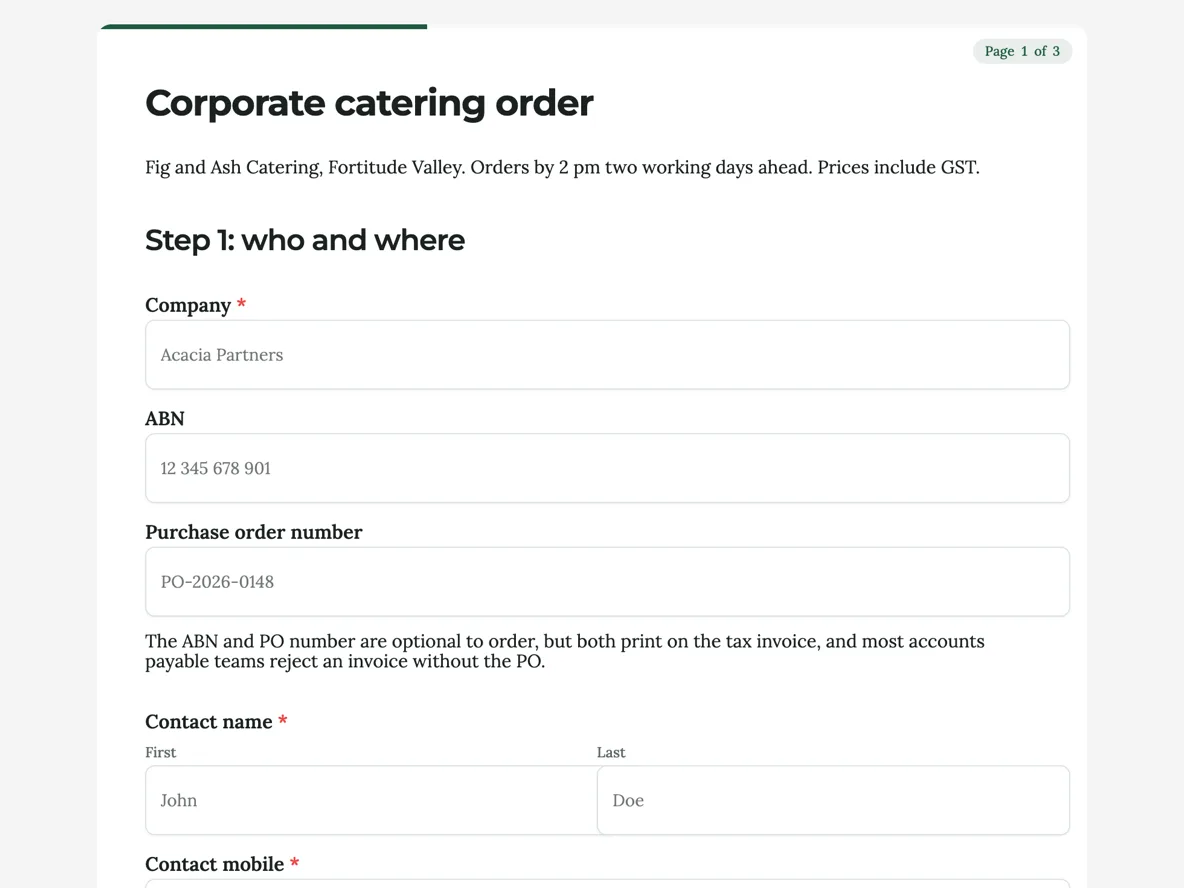
The form itself
A static copy of the finished form, exactly as it renders. Nothing here can be filled in or submitted, so read it as a reference and build your own from the button above.
Every field, and what it collects
The complete field list, in the order respondents meet it.
- CompanyShort textRequired
- ABNShort text
- Purchase order numberShort text
- Contact nameNameRequired
- Contact mobileShort textRequired
- Contact emailShort textRequired
- Delivery addressAddressRequired
- DateDateRequired
- Serve timeTimeRequired
- PackageSingle choiceRequired
- Options: Working lunch, $24.50 per head · Sandwich and salad, $19.00 per head · Grazing table, $32.00 per head · Breakfast, $16.50 per head · Morning tea, $9.50 per head
- HeadcountNumberRequired
- Dietary needs, by countTable
- Columns: Need · Number of people
- Add drinksMultiple choice
- Options: Juice, $4 per head · Sparkling water, $3 per head · Coffee urn, $45 flat
- Delivery windowSingle choiceRequired
- Options: 30 minutes before serve time · 60 minutes before serve time · Set up on site (adds $60)
- Site accessLong text
- Collection of plattersSingle choiceRequired
- Options: Same day after 3 pm · Next working day · Disposable platters (adds $2 per head)
- I accept the order terms: changes free until 2 pm the working day before, cancellation inside that time is charged in fullMultiple choiceRequired
- Options: I accept
Step 1: who and where
Step 2: what and how many
Step 3: delivery
What a catering order form has to get right
The kitchen multiplies one package price by one headcount, the driver commits to one window at one address, and the invoice has to survive accounts payable. This form is organised around exactly those three readers. The buyer’s office supplies the company, ABN and PO number in step one; the person running the meeting answers step two; facilities or reception answers step three. Pagination is not decoration here, the three steps map to the three people who usually share the filling in, and each can stop at the edge of what they know.
How to adapt this form
A set menu caterer swaps the package radio for a dropdown of named menus and keeps the per head pricing in the labels. Per item ordering, platters and quantities rather than packages, replaces the package question with a bigger table listing item and quantity columns, at the cost of the customer doing more arithmetic. A school canteen version drops the ABN and PO fields, adds a class or room field, and shortens the dietary table to the needs the canteen actually caters. In every case, keep prices GST inclusive in the labels, because a surprise on the invoice undoes the whole form.
What makes this form work
Dietary needs arrive as a count table
Five fixed rows with a Need and a Number of people column mean vegan 3, gluten free 2 reaches the kitchen as numbers that can be plated and checked off. The paragraph above the table names the five rows, so every order uses the same vocabulary the kitchen does.
Every price is inside the label that sells it
Five packages and three drink add ons carry their GST inclusive prices in the option text, from $9.50 morning tea to the $45 coffee urn. The customer sees $24.50 before the invoice does, and the set up on site option even discloses its $60 in the delivery step.
The delivery window is a choice of three, not a wish
Thirty minutes before serve, sixty before, or a set up on site, those are the windows a driver on a Brisbane morning can actually commit to. A free text time field would collect 8.55am sharp please; a radio collects something the run sheet can honour.
Questions people ask
Should a catering order form show prices?
Yes, GST inclusive, inside the option labels where the choice is made. The working lunch reads $24.50 per head at the moment of selection, the intro says prices include GST, and the tax invoice that follows matches what the customer already saw. The invoice is generated from the order, never the other way around.
How do you take dietary requirements without a free text mess?
As counts. The five row table records vegetarian, vegan, gluten free, halal and nut allergy as numbers of people, which is the format a kitchen plates from. One long text field for anything unusual would sit next to it comfortably; what never works is a paragraph mixing three needs and no numbers.
What happens when the headcount changes?
The thank-you screen states the cutoff, 2 pm the working day before, and the customer emails the change. The caterer notes the change against the order and reissues the invoice. Catering headcounts always move; the form’s job is to fix the deadline, not to pretend the number is final.
Does the form calculate the total?
No. Table cells and number fields hold what is typed in them; nothing multiplies the package price by the headcount. The confirmation email carries the total on the tax invoice, which the Australian rules require to show the GST anyway, so the arithmetic happens where the paperwork already lives.
Why paginate a form this size?
Seventeen fields and three paragraphs in one column is a wall; three steps of seven, six and four fields is a sequence. The steps also split cleanly across the buyer’s office, since the person who knows the PO number is rarely the one who knows about the loading dock. In the classic paginated mode each step renders as its own page with next and back.
Is the ABN required to order?
No, and the paragraph under it says why it is asked at all: it prints on the tax invoice for the buyer’s own records, and many finance teams want it there. The order goes through without it; the invoice just carries one less line.
How does the order reach the kitchen?
An email alert with every answer lands as the order arrives, and the response PDF prints the dietary table as a proper table. The kitchen reads package, headcount and the five dietary counts from one sheet, which is the entire point of collecting them as structured fields.
Build your own in about a minute
The button below opens the generator with this use case already described. Change the wording to match your own, generate, then edit anything you like.
Make one like thisOther form examples
Wholesale account application form for a new stockist
A small maker approving a stockist is deciding where its product will physically sit, and no amount of paperwork answers that. This fourteen field application asks for the ABN and the order size, then asks for two or three photographs of the shop that will carry the range.
Veggie box order form with swaps and gate instructions
A veggie box order form has to set the box size, how often it comes and the few vegetables a household will never eat, then get the driver through the gate to a shady spot. This one prices three box sizes, allows up to two swaps with the rule written out, and makes the gate instructions a required question.
Site inspection booking form for an electrician's quote
A site inspection booking form has to get a tradesperson to the right address, through the right door, with the right parts, at a time someone can let them in. This one asks the job type, access, a time window and parking, takes photos of the switchboard and the work area, and asks about pets before the gate opens.
Want the steps in the builder? Read Paginate a classic form into steps, then Automate your form with add-ons. For everything this generator can do, see the form maker.
Written and checked by the OneCraft team. Last checked .