Conversational form
Customer support form for an online store
A customer support form that sorts by problem answers many orders without a reply, because a customer whose parcel is not late yet is told so on the spot. This conversational version for a homewares store asks for photos only when something arrived damaged, and never asks a product question for an order number.
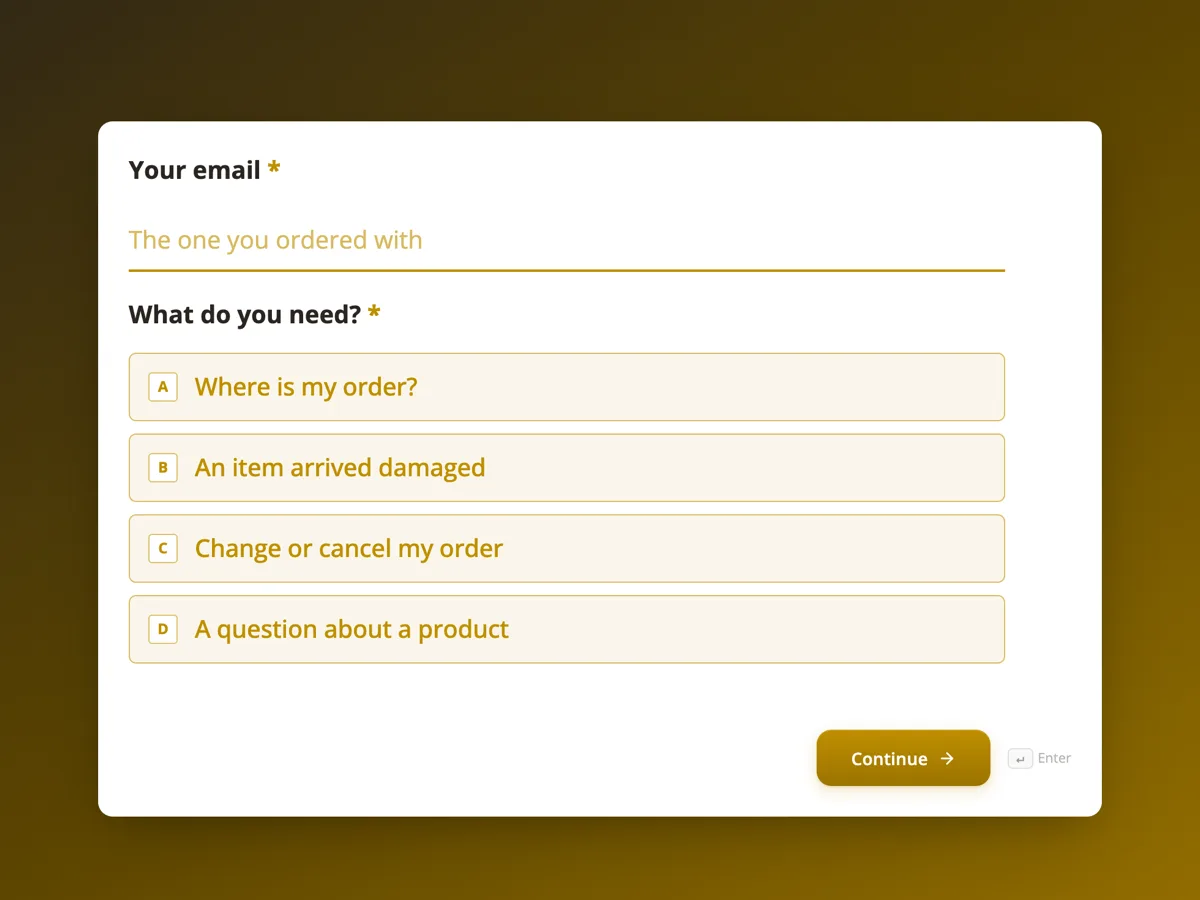
The form itself
The first screen of the form. A conversational form shows one question per screen, so the remaining screens are listed in the field table below. Nothing here can be filled in or submitted, so read it as a reference and build your own from the button above.
Every field, and what it collects
The complete field list, in the order respondents meet it.
- Your emailEmailRequired
- What do you need?Single choiceRequired
- Options: Where is my order? · An item arrived damaged · Change or cancel my order · A question about a product
- Order numberShort text
- Has it been more than 5 business days since it was dispatched?Single choice
- Options: Not yet, it has been under 5 business days · Yes, it is late
- Up to 3 photos of the damage and the boxFile upload
- Do you still have the packaging?Single choice
- Options: Yes · No
- What would you like to change?Long text
- What would you like to know?Long text
- Your first nameShort text
- Anything else?Long text
What each field on this form collects
Screen 1 takes the email and one of four needs. Screen 2 takes the order number and whether five business days have passed since dispatch. Screen 3 is a stop screen with no question. Screen 4 takes up to three photos and screen 5 asks whether the packaging was kept. Screen 6 asks what to change and screen 7 what the customer would like to know. Screens 8 and 9 take a first name and anything else.
The rules, as the Logic tab shows them
On screen 1: if What do you need is Where is my order?, go to screen 2; if it is An item arrived damaged, go to screen 4; if it is Change or cancel my order, go to screen 6; if it is A question about a product, go to screen 7. On screen 2: if Has it been more than 5 business days is Not yet, go to screen 3; otherwise go to screen 8. Screen 3 is set to End and submit. Screens 5 and 6 go to screen 8. Screen 7 needs no setting, because screen 8 comes next in order anyway.
The tracking stop screen
Where is my order is the most common message an online store gets, and many arrive before the parcel is even late. The stop screen tells the customer the normal delivery time and where the tracking link is, and still submits, so customer care can see how many people asked. A customer whose order really is late goes on to screen 8 and gets a reply. Consumer rights to receive what was paid for, set out by agencies such as GOV.UK and Consumer Affairs Victoria, are not affected by any of this; the form only sorts the messages.
How to adapt this form
A store that ships overseas changes the five day threshold to a figure per region and adds a country question with a rule for each. A furniture retailer adds a delivery booking path. A store with a returns form adds a fifth need, I want to return something, that jumps straight to a screen linking to it and ends.
What makes this form work
Not yet late gets an answer
An order under five business days since dispatch jumps to a screen that explains the timeline and points to the tracking email. The customer gets an answer immediately, and the inbox gets one less message.
Photos only for damage
Only the damaged item path asks for photos, then whether the box was kept. Every other customer skips both screens.
Four needs, four short paths
Each need jumps to its own screen and then joins the shared ending. No customer sees more than five screens.
Questions people ask
What should a customer support form ask?
Who the customer is, what they need, and then only the details that need requires: an order number for tracking, photos for damage, the change for a change request. A branching form keeps each path short, which gets more complete messages than a long form with every field.
How fast should an online store reply to customers?
Many stores aim for one business day, and faster for orders that are late or damaged. Say your response time on the thank you screen so customers do not send a second message. This form promises one business day, Monday to Friday.
Should damaged item claims need photos?
Photos help the store resolve the claim quickly and claim from the courier, so asking is reasonable. Consumer law does not let a store refuse a valid claim just because there is no photo, so the field is optional and customer care can follow up.
Does the tracking stop screen hide late orders?
No. Only customers who say it has been under five business days reach it, and it tells them to come back if it does not arrive. Their message is still submitted, so customer care can see the volume and follow up if delivery times slip.
Can the form be put on the store's help page?
Yes. A published form can be linked or embedded in a website. Customers fill it in on the page, and every message lands in the responses table, with an optional email alert to the customer care inbox so nothing waits until someone checks.
Why is the email the only required field?
Every path needs a way to reply, so the email on screen 1 is required along with the need. Later questions sit on screens that some paths skip, and the server checks required questions on every screen, so they are optional.
Build your own in about a minute
The button below opens the generator with this use case already described. Change the wording to match your own, generate, then edit anything you like.
Make one like thisOther form examples
Product return form with separate faulty and change of mind paths
A product return form must treat a faulty item as a consumer guarantee claim, not as a change of mind, because the Australian Consumer Law gives faults remedies that a store's returns policy cannot take away. This conversational version for an outdoor gear store sends each reason down its own path, and only applies the 30 day window to change of mind.
Product recommendation quiz built from jump rules
A product recommendation quiz works when each answer narrows the shelf, and four questions are enough to point most people at one product. This coffee roaster quiz uses three jump rules, with no scoring, to land every path on one of four blend screens.
Support ticket form that branches by area and severity
A support ticket form should ask a billing question and a bug for different things, and treat an outage differently from a question. This conversational version for an invoicing app routes feature requests to the roadmap, asks for a phone number when nobody can work, and only asks for steps to reproduce when something is broken.
Want the steps in the builder? Read Build a conversational support form, then Set the reply times on the thank you screen. For everything this generator can do, see the form maker.
Written and checked by the OneCraft team. Last checked .