Conversational form
Support ticket form that branches by area and severity
A support ticket form should ask a billing question and a bug for different things, and treat an outage differently from a question. This conversational version for an invoicing app routes feature requests to the roadmap, asks for a phone number when nobody can work, and only asks for steps to reproduce when something is broken.
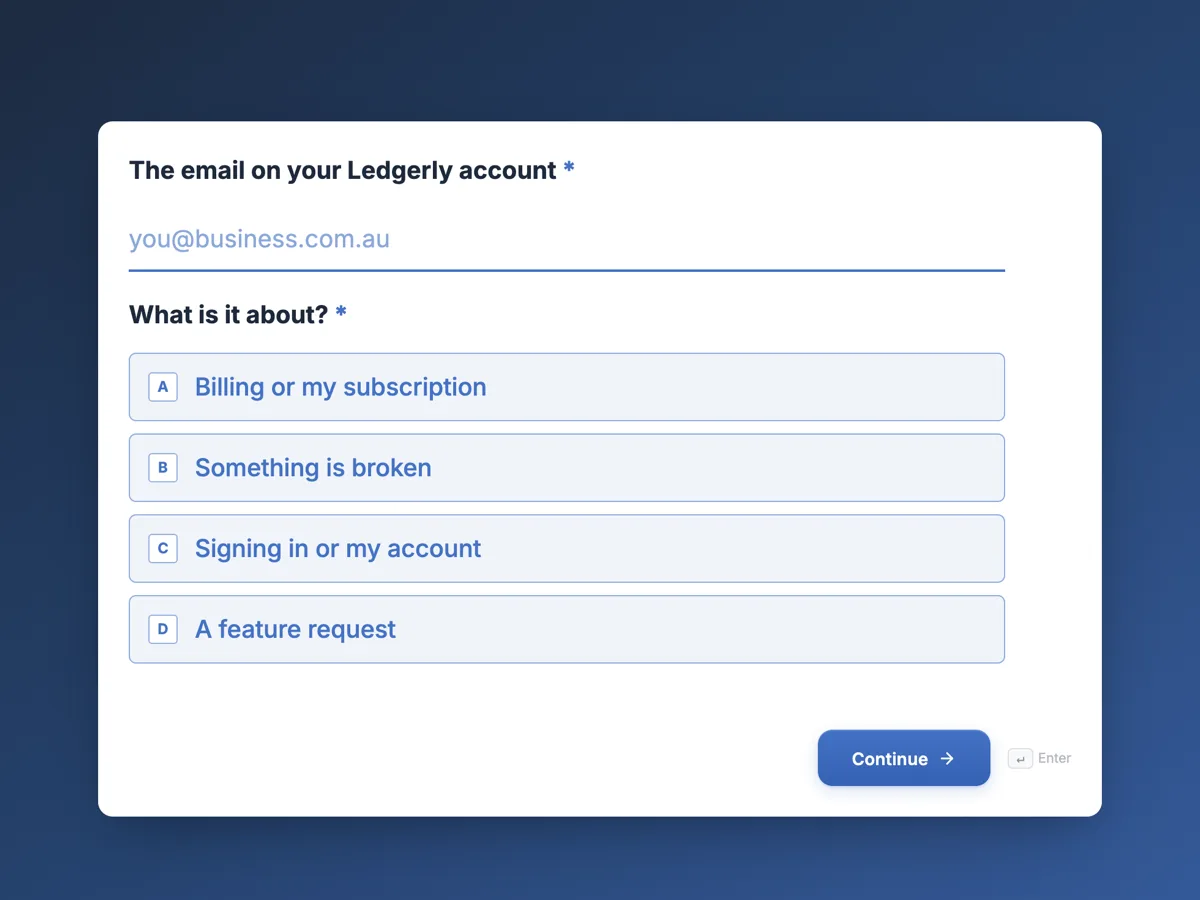
The form itself
The first screen of the form. A conversational form shows one question per screen, so the remaining screens are listed in the field table below. Nothing here can be filled in or submitted, so read it as a reference and build your own from the button above.
Every field, and what it collects
The complete field list, in the order respondents meet it.
- The email on your Ledgerly accountEmailRequired
- What is it about?Single choiceRequired
- Options: Billing or my subscription · Something is broken · Signing in or my account · A feature request
- How much is it affecting you?Single choice
- Options: Nobody in my business can work · One feature is broken, I can work around it · It is a question
- Account ID, from Settings, then BusinessShort text
- A phone number support can call in the next hourPhone
- Which invoice or charge is it about?Short text
- What did you do, what did you expect, and what happened?Long text
- Which browser or app?Dropdown
- Options: Chrome · Safari · Edge · Firefox · iPhone app · Android app
- A screenshot or screen recording frame, optionalFile upload
- Anything else support should know?Long text
What each field on this form collects
Screen 1 takes the account email and what the ticket is about, from billing to a feature request. Screen 2 asks the severity in plain words. Screen 3 is the roadmap screen with no question. Screen 4 takes the account ID and a phone number for urgent tickets. Screen 5 asks which invoice or charge a billing ticket concerns. Screens 6 to 8 ask the steps to reproduce, the browser or app and a screenshot, and screen 9 leaves room for anything else.
The rules, as the Logic tab shows them
On screen 1: if What is it about is A feature request, then go to screen 3. On screen 2: if How much is it affecting you is Nobody in my business can work, then go to screen 4; if What is it about is Billing or my subscription, then go to screen 5; otherwise go to screen 6. Screen 3 is set to End and submit, screen 4 to go to screen 6, and screen 5 to go to screen 9, so a billing ticket never sees the browser question. The severity rule comes before the billing rule, so an outage on the billing page still reaches the urgent screen.
Severity in the customer's words
Customers do not know what P1 means, and if asked whether something is urgent, everyone says yes. Asking how much it is affecting them, with three plain answers, gets a more honest picture. Nobody in my business can work is unmistakable and gets a phone call within the hour. Help desk tools such as Zendesk and Jira Service Management let teams define their own ticket fields and request types, and the answers here map neatly onto priority fields when tickets are passed on.
How to adapt this form
A software company with enterprise clients adds the contract tier on screen 1 and a rule sending those tickets to a dedicated screen. A mobile game studio swaps billing for in app purchases and asks for the device model. A team without a public roadmap changes screen 3 to thank the customer and promise a reply instead.
What makes this form work
Feature requests leave early
A request for a new feature jumps from screen 1 to the roadmap screen and ends. Support queues fill with bugs and billing, and ideas go where the product team reads them.
Outages get a phone number
Nobody in my business can work jumps to a screen asking for the account ID and a number to call within the hour. The urgent path collects exactly what an urgent reply needs.
Billing skips the bug questions
Screen 5 goes straight to screen 9. Someone asking about a charge is never asked which browser they use or to reproduce steps.
Questions people ask
What makes a good support ticket?
A clear summary of the problem, who is affected and how badly, the steps that cause it, what was expected and what happened, the browser or device and a screenshot. A branching form asks for these only when they apply, so customers write good tickets without being told how.
How is ticket severity decided?
By the effect on the customer's work, not by how upset they are. Plain answers such as nobody can work, one feature is broken, or a question map onto internal priorities. Support can still adjust the priority after reading the ticket, since customers sometimes misjudge it.
Can a customer attach a screen recording?
A file upload field accepts only images and PDFs, so this form asks for screenshots or a frame from a recording. For a full video, ask customers to share a link in the last screen. Screenshots of an error message usually tell support what they need.
Why is only the first screen required?
Because feature requests end at screen 3 and never see screen 2. The server checks every required question on submit, even on screens a jump skipped, so a required severity question would block feature requests. Keeping later questions optional lets every path submit.
Can tickets go straight into a help desk tool?
The webhook add-on posts each submission once as JSON, with answers keyed by field label, so a small integration can create the ticket. It has no retry, so keep the responses table as the full record in case the help desk is down.
Does the customer get a ticket number?
The form does not send emails to the customer. The help desk tool or the support team replies from the email given on screen 1, usually with a ticket number. The thank you screen sets expectations for response times by severity.
Build your own in about a minute
The button below opens the generator with this use case already described. Change the wording to match your own, generate, then edit anything you like.
Make one like thisOther form examples
Customer inquiry form routed by need
A customer inquiry form that routes by need puts a quote in front of sales and a spare part in front of service on the first day, instead of waiting in a general inbox. This conversational version for a pump manufacturer asks each type of inquiry only the questions its team needs.
Help desk request form that routes by problem
A help desk request form that asks the right follow up for each problem saves the first reply, because the technician starts with the detail they would otherwise have to ask for. This conversational version also stops anyone whose work has stopped completely and tells them to phone, while still logging the outage.
RMA form for industrial parts with every serial
An RMA form is where a return becomes a traceable record, so every serial number goes in before anything ships. This conversational version for an industrial electronics maker branches on the reason: excess stock sees the restocking fee and can cancel, and only failures in service are asked how long the units ran.
Want the steps in the builder? Read Create a branching conversational form, then Send tickets to your help desk tool. For everything this generator can do, see the form maker.
Written and checked by the OneCraft team. Last checked .