Conversational form
Help desk request form that routes by problem
A help desk request form that asks the right follow up for each problem saves the first reply, because the technician starts with the detail they would otherwise have to ask for. This conversational version also stops anyone whose work has stopped completely and tells them to phone, while still logging the outage.
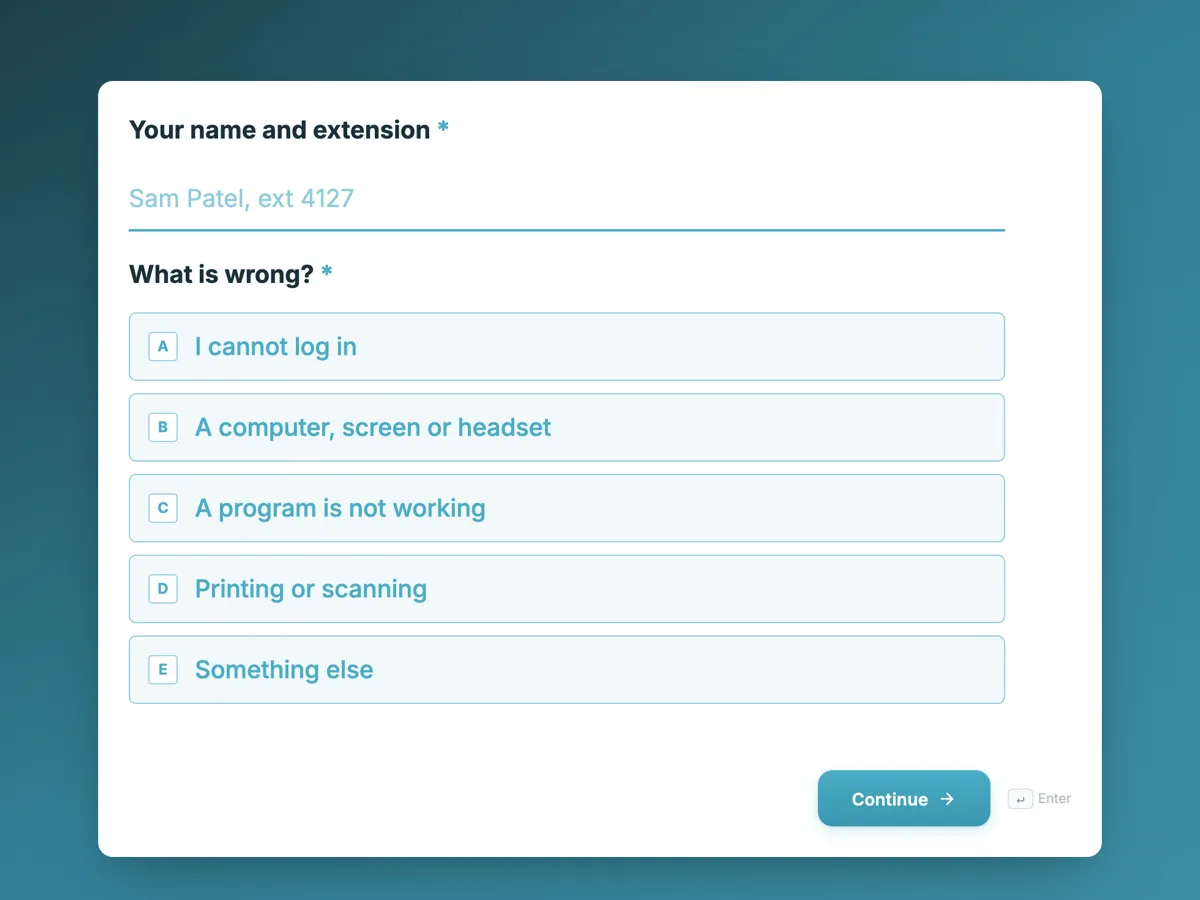
The form itself
The first screen of the form. A conversational form shows one question per screen, so the remaining screens are listed in the field table below. Nothing here can be filled in or submitted, so read it as a reference and build your own from the button above.
Every field, and what it collects
The complete field list, in the order respondents meet it.
- Your name and extensionShort textRequired
- What is wrong?Single choiceRequired
- Options: I cannot log in · A computer, screen or headset · A program is not working · Printing or scanning · Something else
- Has this stopped your work completely?Single choiceRequired
- Answer yes only if you cannot do any client work at all right now.
- Options: Yes, I cannot work at all · No, I can work around it for now
- Which sign in is failing?Single choice
- Never type your password into this form.
- Options: Windows sign in · Email · Practice management software · The authenticator app on my phone
- Which device?Dropdown
- Options: Laptop · Desktop · Monitor · Headset · Docking station · Phone handset
- Which program, and what does the error say?Short text
- Which printer?Single choice
- Options: Level 2 copier · Level 3 copier · Reception printer · Home printer
- Tell us what happenedLong text
- Asset tag on the device, if there is oneShort text
- A screenshot of the error, optionalFile upload
What each field on this form collects
Screen 1 asks for the person's name and extension and what is wrong, from five choices. Screen 2 asks whether work has stopped completely. Screen 3 is a stop screen with no question, telling the person to call. Screens 4 to 7 each hold one follow up: which sign in is failing, which device, which program and error, or which printer. Screen 8 asks what happened, screen 9 the asset tag and screen 10 an optional screenshot upload.
The rules, as the Logic tab shows them
Every rule sits on screen 2, because that is the first screen where both answers are known. If Has this stopped your work completely is Yes, I cannot work at all, then go to screen 3. If What is wrong is I cannot log in, then go to screen 4. If it is A computer, screen or headset, go to screen 5. If it is A program is not working, go to screen 6. If it is Printing or scanning, go to screen 7. Otherwise, go to screen 8. Rules run in order and the first match wins, which is why the outage rule comes first. Screens 4, 5 and 6 are set to go to screen 8 next, and screen 3 is set to End and submit.
The outage stop screen
When nobody can work, a ticket in a queue is the wrong channel. The stop screen says so in its heading and gives the extension and the after hours number. It still ends with End and submit, so the outage is logged with the person's name and the problem type from screen 1. Incident management guidance puts restoring service first, and a phone call to a person who can act now does that better than a form. Because the stop screen ends the form, every question after screen 2 is optional; a required question that a jump skips would block the submission.
How to adapt this form
A school IT team swaps the problem list for student devices, the learning platform and classroom displays, and adds the room. A business with an outsourced help desk adds the location so the right on site technician is sent. A team that also handles facilities can add a sixth problem choice that jumps to a facilities screen, but a separate facilities form usually keeps both simpler.
What makes this form work
One follow up per problem
Four problem types each jump to their own screen with one question. A printer issue never sees the sign in question, and the technician gets the one detail that matters for each.
The outage rule runs first
Rules run in order and the first match wins. Putting stopped work first means an outage reaches the call now screen whatever the problem type is.
Nothing required after the jump
Only screens 1 and 2 have required questions. The form submits from the stop screen or any branch, because no skipped screen holds a required field.
Questions people ask
What should a help desk request include?
Who is asking and how to reach them, what kind of problem it is, how badly it affects their work, the specific detail for that problem such as the device or error message, what they already tried and a screenshot. A branching form asks only the detail that fits the problem, so requests stay short.
When should staff phone instead of submitting a request?
When their work has stopped completely, when many people are affected at once, or when there is a security concern such as a suspicious email they clicked. This form sends anyone whose work has stopped to a screen with the phone number, and still logs the outage when they press the button on that screen.
Can one form cover IT and facilities requests?
It can, by adding a choice that jumps to a facilities screen, but the two usually go to different teams with different questions. Separate forms keep each one short. A shared intranet page can link both, so staff pick the right one.
Why are the follow up questions optional?
Because some people leave the form at the stop screen. Questions on screens a person never reaches stay unanswered, but the server still checks every required question, so a required question on a skipped screen would stop the form being sent. Keeping later questions optional lets every path submit.
Does the help desk see which path someone took?
The responses show the answers given. Questions on screens a person did not visit are blank, which shows the path. The answer to What is wrong and Has this stopped your work tell the technician which branch applied, and the follow up answer gives the detail for that branch.
Can the form send urgent requests by email?
The email alert add-on sends every submission to one address, so an outage logged from the stop screen reaches the help desk inbox at once, along with every other request. It does not filter by answer, which is why the stop screen also tells people to call.
Build your own in about a minute
The button below opens the generator with this use case already described. Change the wording to match your own, generate, then edit anything you like.
Make one like thisOther form examples
Facilities request form with a safety hazard path
A facilities request form sends a spill, a cold meeting room and a broken chair to three different people, with the floor, location and urgency each needs. This conversational version for a multi tenant office building sends anyone reporting a safety hazard straight to a screen telling them to call security.
Support ticket form that branches by area and severity
A support ticket form should ask a billing question and a bug for different things, and treat an outage differently from a question. This conversational version for an invoicing app routes feature requests to the roadmap, asks for a phone number when nobody can work, and only asks for steps to reproduce when something is broken.
HR inquiry form with a confidential concern path
An HR inquiry form routes routine questions about pay, leave, policies and personal details to the right person, and keeps sensitive concerns out of a shared inbox. This conversational version for a health service sends anyone with a confidential concern to a screen listing private options, asks only how to make contact, and ends.
Want the steps in the builder? Read Build a conversational form, then When a conversational form fits better. For everything this generator can do, see the form maker.
Sources
Written and checked by the OneCraft team. Last checked .