Conversational form
Facilities request form with a safety hazard path
A facilities request form sends a spill, a cold meeting room and a broken chair to three different people, with the floor, location and urgency each needs. This conversational version for a multi tenant office building sends anyone reporting a safety hazard straight to a screen telling them to call security.
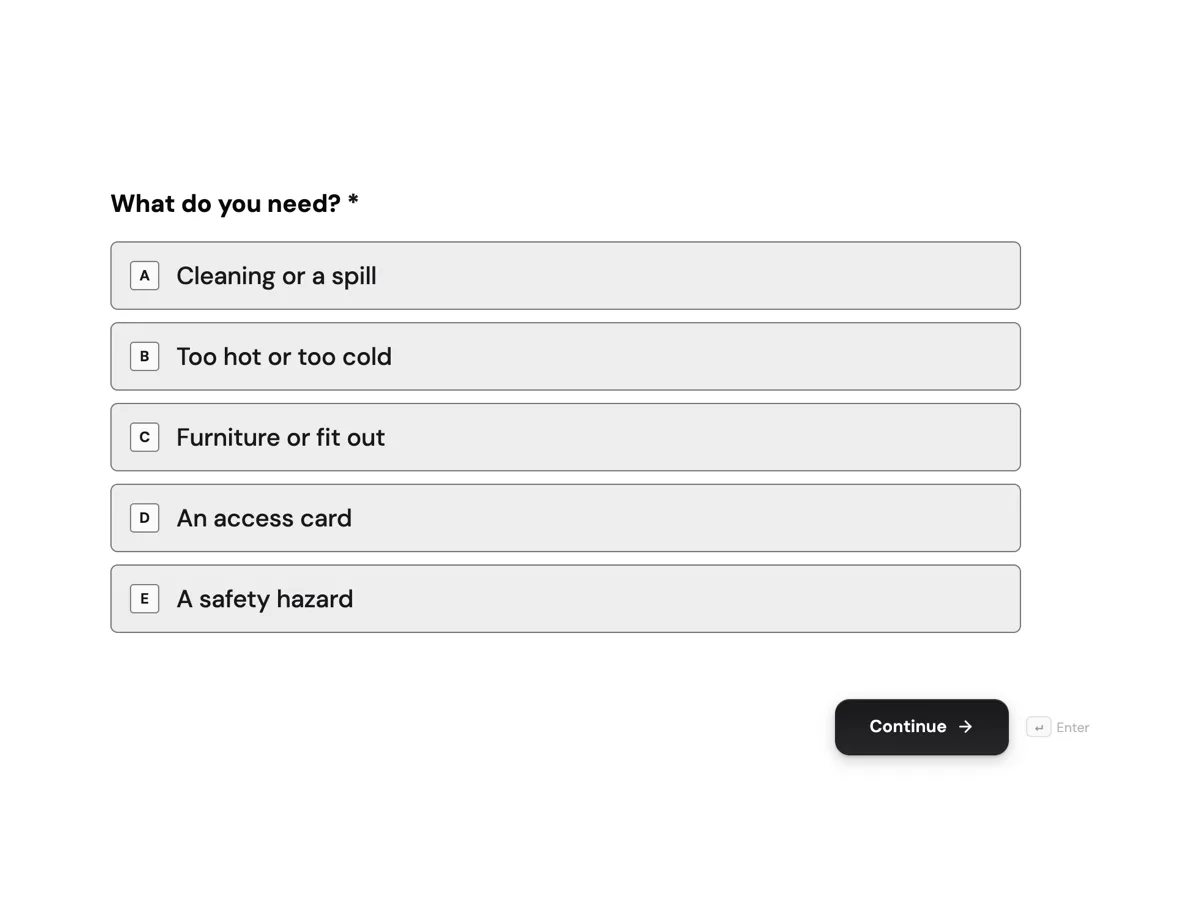
The form itself
The first screen of the form. A conversational form shows one question per screen, so the remaining screens are listed in the field table below. Nothing here can be filled in or submitted, so read it as a reference and build your own from the button above.
Every field, and what it collects
The complete field list, in the order respondents meet it.
- What do you need?Single choiceRequired
- Options: Cleaning or a spill · Too hot or too cold · Furniture or fit out · An access card · A safety hazard
- Which floor?Dropdown
- Options: Ground floor · Level 1 · Level 2 · Level 3 · Level 4 · Basement car park
- Where on the floor?Short text
- A photo, optionalFile upload
- How urgent is it?Single choice
- Options: Today, it is stopping work · This week · Whenever convenient
- Describe the requestLong text
- Your companyDropdown
- Options: Saltwater Legal · Arden Engineering · Northline Telecom · Bramble Studio · Building management
- Your name and phoneShort text
What each field on this form collects
Screen 1 asks the request type from five choices. Screen 2 is the security stop screen, with no question. Screens 3 and 4 take the floor and the location on the floor. Screen 5 takes one optional photo and screen 6 the urgency. Screen 7 asks for a description, screen 8 the tenant company from a list and screen 9 a name and phone number.
The rules, as the Logic tab shows them
On screen 1: if What do you need is A safety hazard, go to screen 2; otherwise go to screen 3. Screen 2 is set to End and submit. On screen 4: if What do you need is An access card, go to screen 7, because a card request needs no photo and has its own turnaround. A rule can use an answer from any earlier screen, which is why the access card rule sits on screen 4, after the floor and location are known.
The hazard stop screen
A water leak near a power board or a blocked fire exit needs someone there in minutes, not a request in a queue. The stop screen gives the security number in its heading and tells the person to warn people nearby and call. It still ends with End and submit, so the hazard is logged with its type and time. WorkSafe Victoria's pages on workplace inspections and on slips, trips and falls show why hazards need fast action and a record; this screen provides both. Because the form can end here, every question after screen 1 is optional.
How to adapt this form
A university campus adds the building and a rule sending laboratory requests to their own screen. A shopping centre replaces tenants with stores and adds a cleaning path for public areas. A hospital adds infection control as a request type with its own stop screen and number. A building with after hours access adds a question about whether the issue affects people working late, which changes who is called.
What makes this form work
Hazards get a phone number
A safety hazard jumps to a screen with the security number in the heading. The person calls first, and the form still logs the hazard when they press the button.
Access cards skip two screens
A rule on screen 4 sends card requests past the photo and urgency questions. Those requests have a set turnaround and nothing to photograph.
Response times are stated
The thank you screen gives the turnaround for each type. Tenants know when to expect someone before they send a second request.
Questions people ask
What counts as an urgent facilities request?
Anything that is unsafe, such as leaks near power, blocked exits, broken glass or a fallen fitting, or anything stopping people working, such as a failed air conditioner in summer. Unsafe issues go to security by phone. This form asks urgency separately for everything else.
Should tenants report hazards through a form?
They should call first, then log it. A form is fine for recording, but nobody may read it for some time. This form sends hazards to a screen with the security number and still submits, so there is a record of what was reported and when.
Who sees a facilities request?
The form owner, usually building management, sees every request in the responses table, and the email alert add-on can send each one to the facilities inbox. Building management then passes it to cleaning, mechanical or furniture contractors, and can see how many requests each floor makes.
Can requests be sent to different contractors automatically?
The email alert goes to one address for every submission. To route by type, use the webhook add-on to post each request to a system that sends it on by the answer to What do you need. Many buildings keep one person reviewing requests instead.
Why is only the request type required on this form?
Because the hazard path ends at screen 2. The server checks every required question when the form is sent, even on screens a jump skipped, so later required questions would block a hazard report. The location and contact questions are optional for that reason.
Can photos be taken on a phone?
Yes. The upload field opens the phone's photo picker, where a new photo can usually be taken. It accepts images only on this form, one per request, which is enough to show a spill, a broken chair or a damaged fitting.
Build your own in about a minute
The button below opens the generator with this use case already described. Change the wording to match your own, generate, then edit anything you like.
Make one like thisOther form examples
Help desk request form that routes by problem
A help desk request form that asks the right follow up for each problem saves the first reply, because the technician starts with the detail they would otherwise have to ask for. This conversational version also stops anyone whose work has stopped completely and tells them to phone, while still logging the outage.
RMA form for industrial parts with every serial
An RMA form is where a return becomes a traceable record, so every serial number goes in before anything ships. This conversational version for an industrial electronics maker branches on the reason: excess stock sees the restocking fee and can cancel, and only failures in service are asked how long the units ran.
HR inquiry form with a confidential concern path
An HR inquiry form routes routine questions about pay, leave, policies and personal details to the right person, and keeps sensitive concerns out of a shared inbox. This conversational version for a health service sends anyone with a confidential concern to a screen listing private options, asks only how to make contact, and ends.
Want the steps in the builder? Read Build a conversational request form, then Put response times on the thank you screen. For everything this generator can do, see the form maker.
Written and checked by the OneCraft team. Last checked .