Conversational form
Donation form that collects what the receipt needs
A donation form that is not a payment page still has a job: record who gave, how much, what name goes on the receipt and whether they want to hear from you again. This one does that in eight screens and tells the donor exactly how the money moves, by the payment link in the email.
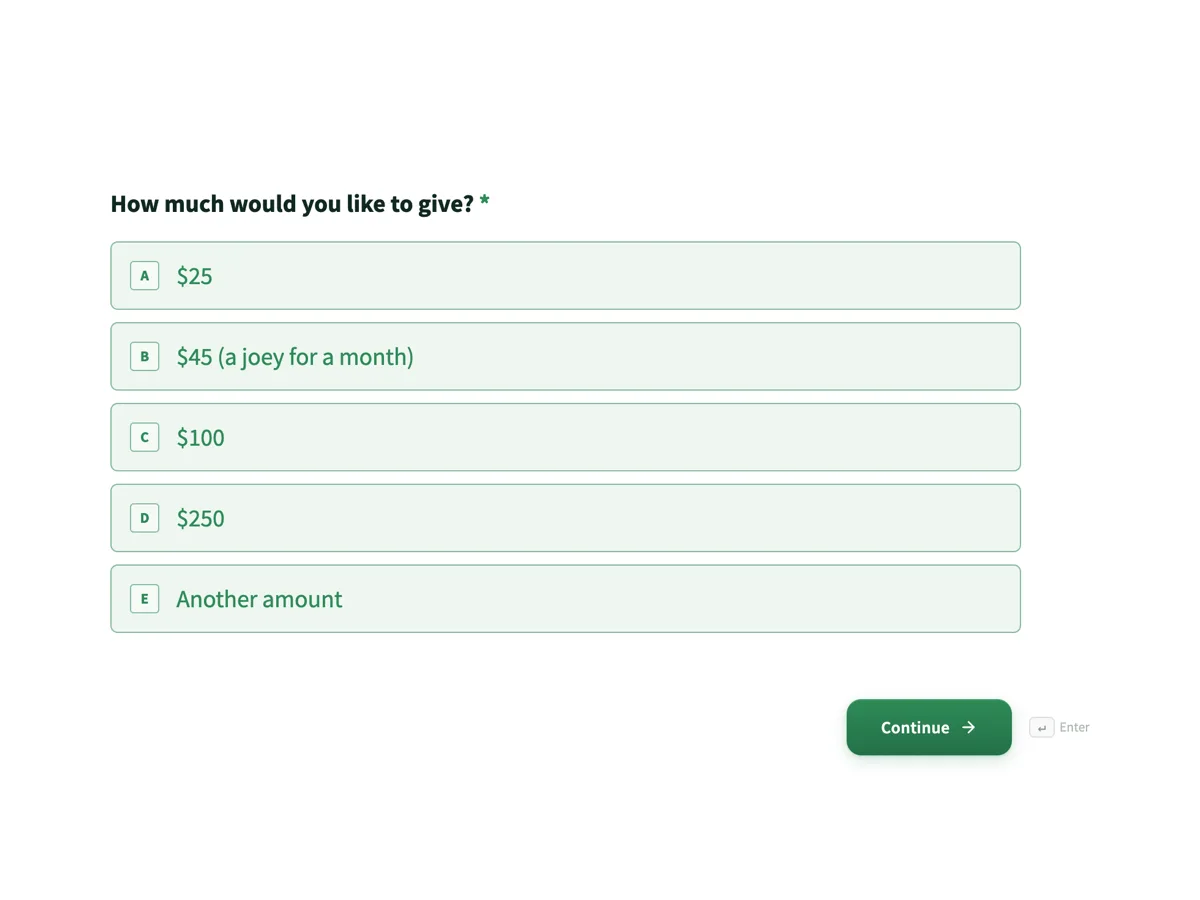
The form itself
The first screen of the form. A conversational form shows one question per screen, so the remaining screens are listed in the field table below. Nothing here can be filled in or submitted, so read it as a reference and build your own from the button above.
Every field, and what it collects
The complete field list, in the order respondents meet it.
- How much would you like to give?Single choiceRequired
- Options: $25 · $45 (a joey for a month) · $100 · $250 · Another amount
- Another amount ($)Number
- Only if you picked Another amount. Gifts of $2 or more are deductible.
- One off or monthly?Single choiceRequired
- Monthly gifts are set up through the payment link and stopped with one email, no phone menu.
- Options: One off · Monthly
- Name for the receiptNameRequired
- Exactly as it should appear. Receipts to the wrong name are the most common thing we reissue.
- Email for the payment link and receiptEmailRequired
- Address for the receiptAddress
- Optional. A receipt does not need it, but many donors like it on the record.
- Is this gift in memory or in honour of someone?Short text
- Keep me postedMultiple choice
- Tick what you actually want. The receipt arrives either way.
- Options: Rescue stories by email monthly · Volunteer call outs
What a donation form must record
For an Australian charity with deductible gift recipient status, the receipt drives the field list. The ATO expects a receipt to show the charity’s name and ABN, that it is issued by a DGR, the amount and the date, and the donor’s name, which is why this form asks for the receipt name as its own screen rather than scraping it from an email address. The $2 threshold explains the line on the welcome screen: gifts of $2 or more to a DGR are deductible, so nearly every real donation qualifies and the form can say so without hedging.
How to adapt this form
A school building fund keeps every screen and changes only the amounts, since building funds are among the most common DGR categories parents meet. A memorial fund makes the in memory line required and adds one question asking whether the family should be told of the gift, without the amount. A workplace giving version drops the payment link promise entirely, records the payroll deduction pledge instead, and swaps the receipt address for an employer field. In each case the receipt details stay untouched, because the receipt is the part the tax office cares about.
What makes this form work
The amounts say what the money does
The $45 option carries a joey for a month in its label, and the same figure is the stat on the welcome screen. Concrete amounts anchored to concrete outcomes are the oldest fundraising result there is, and here the anchor is built into the artifact rather than pasted above it.
The receipt name is its own question
Screen four asks for the name exactly as it should be printed, separate from the email screen. When one field feeds both the inbox and the receipt, receipts go out to jenandmark83, and someone spends Tuesday reissuing them. This form separates the two on purpose.
Consent is two specific things, not keep me updated
The final screen offers rescue stories monthly and volunteer call outs as separate ticks, both optional. A donor who wants the receipt and silence gets exactly that, and every address on the mailing list actually asked to be there, which is what makes the list worth having.
Questions people ask
What must a tax deductible receipt show?
The charity’s name and ABN, a statement that it is issued by a deductible gift recipient, the amount, the date and the donor’s name. This form collects the one item the charity does not already know, the exact name, on its own screen, so receipts stop being reissued over a nickname in an email address.
Can this form take the money itself?
No, and it says so twice. The pledge is recorded here, the payment link goes out by email, and the receipt follows once the payment lands. For a small rescue running on volunteers, that flow beats wiring card fields into a form, and the donor always knows which email carries the link.
Why is the address optional?
Because a valid receipt does not require it. Some donors want their postal address on the record, some organisations mail an annual thank you, and the address screen serves both without blocking anyone who would rather give thirty seconds less information.
How do monthly gifts work here?
The form records the intention, and the direct debit itself is set up through the payment link, where the payment provider handles the banking details properly. The thank-you screen makes the exit as easy as the entry: one email stops a monthly gift, which is a retention policy as much as a courtesy.
What is the $2 rule?
Under Australian tax law, gifts of $2 or more to a deductible gift recipient can be claimed as deductions. The threshold has sat at two dollars for decades, which makes it less a barrier than a definition: it is why the welcome screen can promise deductibility for effectively every gift the form will ever record.
How should a small charity thank donors?
The email alert tells the fundraiser the moment a pledge arrives, and the responses table holds the amount, the in memory line and the consent answer. A personal reply within a day, referencing the actual gift, does more for retention than any automated sequence, and this form hands over everything that reply needs.
Build your own in about a minute
The button below opens the generator with this use case already described. Change the wording to match your own, generate, then edit anything you like.
Make one like thisOther form examples
Reimbursement request form
A community club runs on people who buy things with their own money and then feel awkward asking for it back. This request makes asking straightforward and gives the treasurer the four things a set of club books needs: the budget line, the approver, the receipt and a payment method. It is a classic form, because the treasurer's rules sit in paragraphs right above the fields they govern, and the receipt is the whole point.
Trivia night registration form booked by the table captain
A school trivia night is sold by the table, not by the ticket, and the person who books is the person who will chase seven other people for twenty dollars each. This eight screen form is written for that captain, and it asks how the table is paying rather than taking a card, because a P and C runs on bank transfers and envelopes.
Grant application form with a budget the assessor can compare
Small grants rounds fail assessors, not applicants: forty applications in forty formats and no way to compare a budget. This form fixes the format, five short sections with word limits and a six line budget table with the same columns for everyone, so a panel can score in an afternoon.
Want the steps in the builder? Read Create a conversational form with AI, then Design your welcome and thank-you screens. For everything this generator can do, see the form maker.
Sources
Written and checked by the OneCraft team. Last checked .