Conversational form
Trade show visitor registration form that prints a usable badge
A visitor registration is really a print job with a survey attached, because the answers become the badge that an exhibitor reads from a metre away. This one asks ten short questions, three of which end up printed, and it settles scan consent before anyone hands a barcode across a stand.
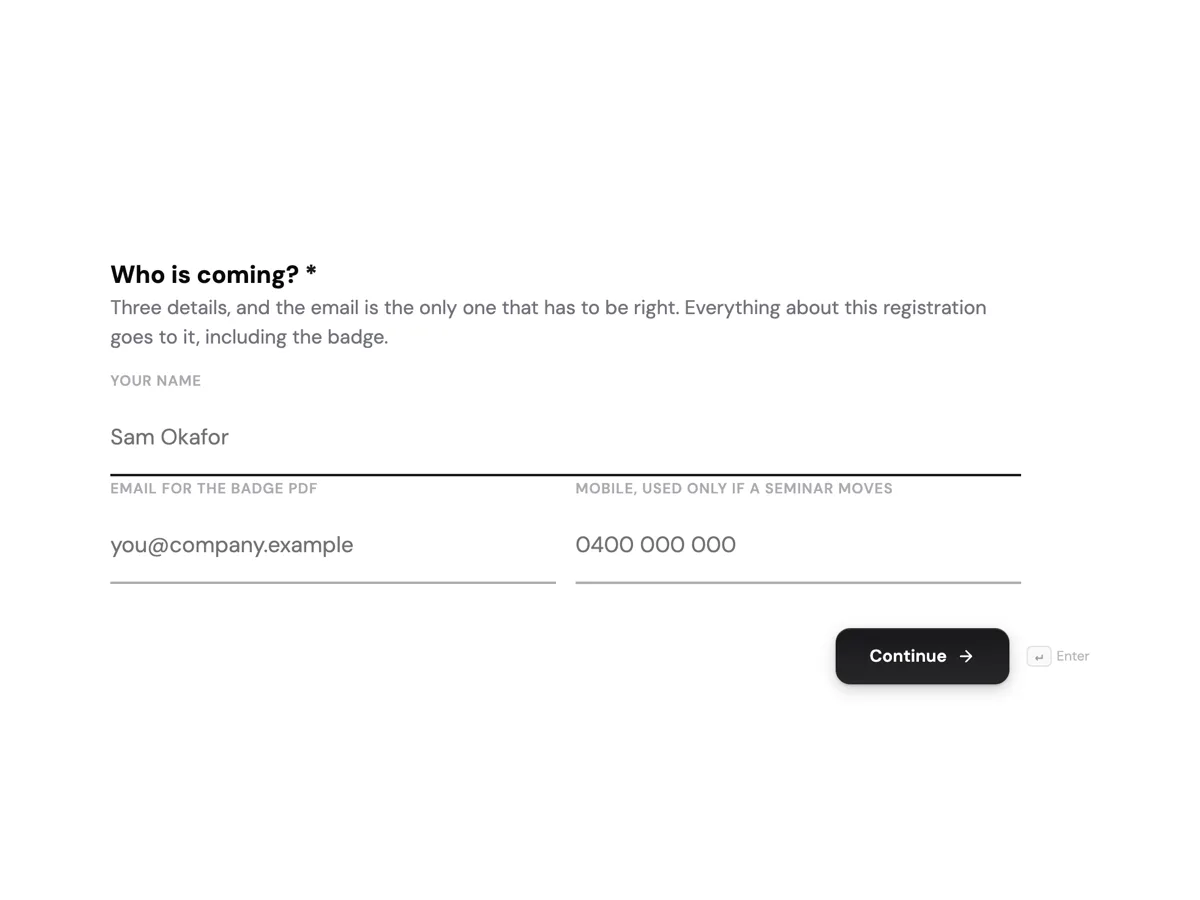
The form itself
The first screen of the form. A conversational form shows one question per screen, so the remaining screens are listed in the field table below. Nothing here can be filled in or submitted, so read it as a reference and build your own from the button above.
Every field, and what it collects
The complete field list, in the order respondents meet it.
- Who is coming?ProfileRequired
- Three details, and the email is the only one that has to be right. Everything about this registration goes to it, including the badge.
- What should the badge say?Short textRequired
- Printed at 18 point and read from about a metre away. A shortened first name is fine, a nickname is fine, and anything over 24 characters is trimmed rather than shrunk.
- Company on the badgeShort textRequired
- Printed under the name in smaller type. Use the trading name people would recognise on a quote, not the holding company.
- Your job titleShort textRequired
- Exhibitors see this on the badge and it is the single strongest signal of whether a conversation is worth having. Plain titles beat invented ones.
- How many people work in the business?Single choiceRequired
- Used to plan floor space and seminar room sizes, and never shown on the badge.
- Options: Just me · 2 to 9 · 10 to 49 · 50 to 199 · 200 to 999 · 1,000 or more
- What is your part in a buying decision?Single choiceRequired
- There is no wrong answer here and no exhibitor is given a list sorted by it. It decides which of the two seminar streams you are offered first.
- Options: I decide · I recommend and someone else signs · I specify, and a contractor buys · I research for the team · I am not buying, I am here to learn
- What are you looking for this year?Multiple choiceRequired
- Tick up to four. The organisers use these to suggest which halls to walk first, which is the main reason to answer it properly.
- Options: Structural timber and engineered wood · Roofing and cladding · Windows, doors and glazing · Insulation and building wrap · Plumbing and hydronics · Electrical and smart building · Tools, plant and access equipment · Software, estimating and site management
- Which days are you coming?Multiple choiceRequired
- One badge covers all three days, so ticking every day costs nothing. It is used for catering numbers and for the shuttle timetable.
- Options: Wednesday 9 June, 9am to 5pm · Thursday 10 June, 9am to 5pm · Friday 11 June, 9am to 3pm
- Any seminars you want a seat at?Multiple choice
- Rooms hold 120 and the first two fill by the end of May. A tick here is a request, and the confirmation comes separately two weeks before the show.
- Options: Wednesday 11am, Passive house detailing that survives a site · Wednesday 2pm, What the latest energy rating change means for builders · Thursday 10am, Estimating software, a live comparison of four tools · Thursday 1pm, Timber supply and lead times, a panel of four merchants · Friday 10am, Hiring and keeping apprentices in a tight market · None of them, I am here for the floor
- May exhibitors you visit contact you afterwards?Single choiceRequired
- Your badge carries a barcode. It is scanned only when you hand it to someone, and this answer decides what that scan is allowed to do.
- Options: Yes, any exhibitor whose stand I scan at may contact me · Yes, but by email only · No, a scan should record entry to a prize draw and nothing else
The badge is the reason this form exists
Most visitor forms collect a name and print it. That fails at a show, because the name on a driver licence and the name someone wants shouted across an aisle are often different, and the company on an invoice is rarely the company on a van. So the badge name, the badge company and the job title are asked as three separate screens with their own instructions, including the note that anything past 24 characters is trimmed. The remaining six screens never touch the badge. They shape the floor map the show sends with the badge, the seminar seats and the catering count.
Why the scan consent is a question and not a footer
A badge barcode is a data transfer. When a visitor hands it over, an exhibitor gets a record, and burying that in terms nobody opens is how a free ticket turns into a year of unwanted calls. The last screen puts it in front of the visitor in plain words with three real answers, including one that limits a scan to a prize draw entry. It costs one screen and it means the show can tell exhibitors exactly what each scan permits rather than passing on a blanket list.
How to adapt this form
A paid consumer show swaps the buying decision question for a ticket type radio and drops company entirely, since a badge with a stranger employer on it is worse than no badge. A two day medical congress replaces the eight product categories with specialties and makes the seminar screen required, because accreditation points are tied to attendance. A hosted buyer programme adds a budget band and a table of the three suppliers the visitor most wants to meet, which is the input a matchmaking team actually works from.
What makes this form work
Three separate screens feed the printer
Badge name, badge company and job title are asked on their own screens with their own notes, including the 24 character trim. That is the difference between a badge an exhibitor reads across an aisle and one they squint at.
Eight named categories, asking for up to four ticks
Structural timber through to estimating software are real aisles on this floor, not interest tags. The show uses the ticks to order the floor map it sends with the badge, which is a reason for a visitor to answer carefully.
Scan consent is asked in plain words with three answers
One answer allows any exhibitor, one limits contact to email, and one restricts a scan to a prize draw. A visitor decides once, before a barcode is handed to anybody.
Questions people ask
Why ask for the badge name separately from the registrant name?
Because they are different jobs. The profile block collects the name that matches the email and the ticket, while the badge name is typographic: it has to read at 18 point from a metre away. A shortened first name works better on a badge and a formal middle name works better on a record, so asking once forces a compromise that fails at both.
Can a conversational form handle this many choice questions?
It suits them. One question per screen means the eight buying categories get the whole screen rather than a cramped column, and each screen carries its own description under the question, which a conversational form renders and a classic form does not. Ten screens at three or four seconds each is a shorter visit than one long page of the same questions.
Does the form print the badge itself?
No. The form records the answers and the badge is produced by whatever prints the show badges. With the webhook add-on switched on, each submission is posted once as JSON to a single endpoint, carrying the response keyed by field label, so a badge queue can pick it up. There is no retry, so the endpoint has to be reachable.
How do you stop seminar picks from overselling a room?
You cannot, on the form. A checkbox does not hold a seat and nothing here claims to. The screen says plainly that a tick is a request and that confirmation follows two weeks out, which is honest and also true of most shows. Allocation happens in the show system where a waitlist and a room change are both possible.
Is the company size question worth a screen?
It is, because floor space and seminar rooms are planned from it months ahead, and a show that guesses runs out of chairs. It is also the one answer visitors are most suspicious of, so the description says it is never printed on the badge and never sorted into an exhibitor list. That sentence is what keeps the answer honest.
What happens to the contact consent answer after the show?
It travels with the scan record. An exhibitor who scans a badge set to email only gets an email address and no phone number, and one who scans a prize draw only badge gets an entry and nothing else. The value of asking on the form is that the answer exists before the first scan rather than being inferred afterwards.
Build your own in about a minute
The button below opens the generator with this use case already described. Change the wording to match your own, generate, then edit anything you like.
Make one like thisOther form examples
Cooking class sign up form with a per guest dietary grid
A cooking school books seats, but it cooks for people, and a table of four almost never eats the same way. This sign up asks the dietary question as a grid with one row per guest, then keeps allergies on a separate screen, because an allergy is a kitchen decision rather than a preference.
Hackathon registration form that handles solo and teams
Half the people who register for a hackathon do not have a team yet, and a form that assumes otherwise loses them on the second question. This one asks solo or team first, then keeps the teammate table optional, and turns the skills tick list into the data the Friday night matching actually runs on.
Supplier registration form built for a quality review
A supplier registration is reviewed twice, once by quality and once by procurement, and a form that only serves one of them stalls for weeks. This one carries a six line product table with real lead times, a certificate with its scheme and expiry, an allergen statement covering the whole site, and the commercial answers on the same page.
Want the steps in the builder? Read Build a conversational form with AI, then Automate your form with add-ons. For everything this generator can do, see the form maker.
Sources
Written and checked by the OneCraft team. Last checked .