Websites
Connect your own Supabase to an AI written website
Connecting your own Supabase account means the site's database lives in a project you own and pay for, not on the builder's servers. The AI still writes the tables, access rules and screens; the data, the backups and the dashboard are yours.
Why connect your own account
A hosted site database is included on every plan, so connecting a Supabase account of your own is optional. On any plan you may prefer it anyway: you see every table in Supabase's own dashboard, you control backups and upgrades, and the project stays yours if you stop using the builder.
Where you connect it
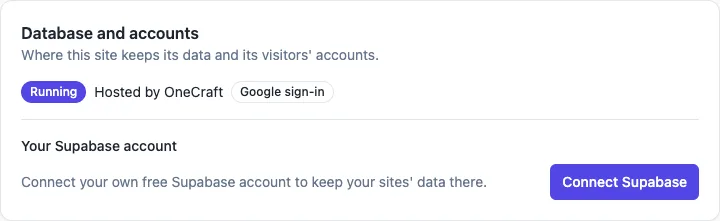
Open a site's settings and find Database and accounts. Under Your Supabase account, Connect Supabase takes you through Supabase's own sign in and permission screen. Once connected, the card says Connected, and new site databases are created on that account. Disconnect is on the same card. A site that already has a hosted database keeps it; the connection decides where new ones go.
What the AI does on your project
When a feature needs data, the AI creates a project for the site on your account and waits until it is healthy, then writes the tables, the row level security policies, the functions and the screens, and tests each new table as an anonymous visitor and as a signed in person. Migrations and a schema file go into the site's code, and the card offers Open in Supabase.
What still runs through OneCraft
Card payments, site mail and Google sign in go through OneCraft's brokers, so the site never holds a Stripe key, a mail key or a Google secret. The brokers read the site's database as the site itself to price an order or check a newsletter list. Publishing, the free address, custom domains and the visit counter work the same as on a hosted database.
What to watch
Your Supabase plan sets the project's limits and cost, which Supabase bills you for; check its pricing page before you launch. A paused free Supabase project stops the site's data parts until you resume it. Deleting the site does not delete a project on your own account, so remove it in Supabase when you no longer need it.
How it works, in three steps
Step 1
Connect Supabase
In a site's settings, open Database and accounts and press Connect Supabase, then approve the access in Supabase.
Step 2
Ask for a feature that needs data
Describe bookings, members or orders in the brief or in chat; the AI creates the project on your account and builds the tables.
Step 3
Check and publish
Open the project in Supabase to see the tables, try the feature in the preview, then publish on a paid plan.
Limits worth knowing
- Connecting is optional on every plan, since each one includes a hosted database.
- Supabase bills its own plans; a paused project stops the site's data parts.
- Deleting a site leaves a project on your account in place.
- The free plan builds and previews the site; publishing starts on Starter.
Questions people ask
Do I need to know Supabase to connect it?
No. You sign in to Supabase once and approve the access, and the AI does the rest: it creates the project, writes the tables and policies and tests them. Knowing Supabase helps only if you want to look at the data directly, which the Open in Supabase button makes easy.
Does connecting move my existing hosted database?
No. A site that already has a hosted database keeps it. The connection decides where new site databases are created, so sites you generate after connecting get a project on your account. Ask before you rely on a move; there is no automatic migration between the two homes.
Who pays for the Supabase project?
You do, on your Supabase account, at whatever plan you choose there. Supabase has a free tier with limits, and paid plans for more. OneCraft's own plan pays for the AI work in credits and for publishing, not for a project on your account.
Can I edit tables in Supabase myself?
You can, since the project is yours, but the site's code was written against the tables the AI made. A column you rename or remove can break a page. Safer is to ask the chat for the change, which updates the code and the database together and checks the access rules again.
What happens if I disconnect?
New site databases are no longer created on your account. Sites that already have a project there keep it, because the project lives on your Supabase account. If you want those sites to stop using it, ask before you disconnect, and export what you need from the admin area first.
Is Google sign in different on my own project?
Visitors sign in with Google through OneCraft's sign in broker, so you do not create a Google client yourself, and the session belongs to the site. Google sign in works on the published site and installed app, not inside the builder's preview.
Make your own website
The button opens the generator with this use case already described. Change the wording to match yours, generate, then edit anything you like.
Create a website with OneCraftRelated pages
Class timetable website with booking and waitlists
A class timetable website shows the week's classes with times, instructors and spots left, and lets members book a place. What makes it work for a studio is capacity that cannot be overbooked, a waitlist that fills a cancelled spot by itself, and a cancel cutoff everyone can see.
Website visit stats: views, visitors and referrers, no cookies
Website visit stats answer three plain questions: how many people came, which pages they read and where they came from. For a small business site that is usually all you need to know whether a post, a flyer or a profile link is working.
Website with a blog you write in the admin
A website with a blog lets the owner publish news, guides and updates without asking a developer, and lets each post be found on its own in search. The work is in a simple editor, drafts that stay hidden until ready, and posts that carry their own titles, descriptions and images.
More finished work of this kind is on the website examples hub.
Written and checked by the OneCraft team. Last checked .