Websites
Website with a database of its own, written by AI
A website with a database stores what people add, such as bookings, orders, members or form answers, and reads it back on its pages. The questions that matter are where that data lives, who can read each row and who can change it, and those are decided before the first visitor arrives.
When a site needs a database
Pages alone can show services, prices and hours. The moment visitors add something, a booking, an order, a sign up, a review or a members only post, the site needs somewhere to keep it and rules for who sees it. When a feature in your brief or a chat message needs data, the AI adds a database for the site and builds the tables, access rules and screens for it from its capability guides. Nothing is pre-made: every table is written for this site.
Where the data lives
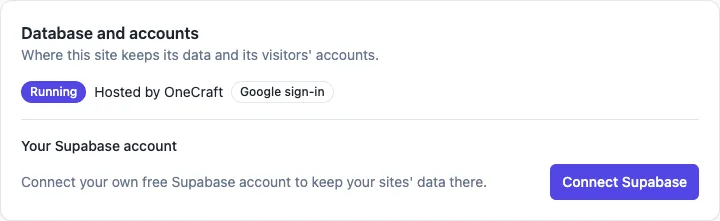
There are two homes. On every plan, the site can have a schema of its own in OneCraft's database pool. The schema has its own login role that cannot reach any other site's data. On any plan, you can instead connect your own Supabase account in the site's settings, and each new site database is then created as a project on your account, which you can open in Supabase.
Who can read each row
Every table the AI creates must have row level security switched on, or the change is refused. The rules say who can do what: anyone can read the class timetable, a signed in member can read and cancel only their own bookings, and only staff can change classes. Before a generation step can finish, the AI tests each new table as an anonymous visitor and as a signed in person, and as an admin where staff manage it, so a rule that leaks is caught before you see the site.
Admin and staff
When the owner or staff manage rows, the AI builds an admin area inside the site, at /admin on a website or an Admin tab in a phone app, shown only to people listed as site admins. The first admin account is created from the contact email in your brief. Staff lists, search, edit forms, CSV export and small dashboards over your own data are built the same way, from the admin, analytics and CSV guides.
What is in the code
Every database change is saved in the site's repository as a SQL migration, and a schema file describing every table, policy, view and function is rewritten after each change. Download the project and a developer can read exactly how the data is shaped and protected. Card payments, site mail and Google sign in go through OneCraft's brokers, so the site never holds a Stripe or mail key.
What it does not do
There is no spreadsheet style data editor in the builder; you read and change rows in the admin area the AI builds, or in Supabase for a database on your own account. The site's pages are static files, so rows load in the browser after the page, which is why anything search engines must read, such as services and FAQs, is kept in the page content instead. Pushes to visitors are not available; signed in visitors can get in-app notifications with a bell.
How it works, in three steps
Step 1
Ask for a feature that needs data
Describe bookings, members, orders or a form in the brief, or ask for it in chat; the AI adds the database when it needs one.
Step 2
Choose where it lives
It is hosted by OneCraft on every plan; to use your own Supabase account instead, connect it in the site's settings first.
Step 3
Check and publish
Sign in to the site's admin area in the preview, add a few rows, then publish on a paid plan.
Limits worth knowing
- A hosted site database comes with every plan; connecting your own Supabase account is optional.
- Every table must have row level security; tables without it are refused.
- Rows are read in the browser after the page loads, so search engines read only the page content.
- Publishing, card payments and Expo builds need a paid plan.
Questions people ask
Do I need to know SQL to have a database?
No. The AI writes the tables, rules and screens from your description and tests the access rules itself. You work with the data through the admin area it builds, with forms, search and CSV export. The SQL is still there in the repository for a developer who wants to read it.
Where can I see the data?
In the site's admin area, which lists each table you manage, with search, edit and export. For a database on your own Supabase account, the site settings also have an Open in Supabase button that takes you to the project's own dashboard, where every table can be inspected directly.
Is my site's data shared with other sites?
No. A hosted site database is a schema of its own with a login role that belongs to no other role, so its SQL cannot reach another site's tables. The AI's database tools rewrite and refuse any SQL that reaches outside that schema, whatever the request says.
Can a phone app use the same database?
Yes. Start a Mobile app based on one of your websites and the app reads the same database as the website, so a price, a class or a member changed in one shows in the other. The app gets an Admin tab for staff built on the same access rules.
What happens to the data if I delete the site?
Deleting a site drops its hosted schema and the role with it, so the data is gone. A database on your own Supabase account is a project on your account; check it in Supabase before you delete anything. Export what you need from the admin area first, as a CSV per table.
What does the database cost?
A hosted site database is included on every plan. A database on your own Supabase account follows Supabase's own plans, which you pay to Supabase. The AI work that builds the tables is billed in credits like any other generation or chat turn.
Make your own website
The button opens the generator with this use case already described. Change the wording to match yours, generate, then edit anything you like.
Create a website with OneCraftRelated pages
Edit your website with AI chat: describe the change, review it, keep or undo
Editing a website with AI chat means typing what you want, such as add a pricing page after services, and having the AI change the site's code and rebuild it. The useful part is not the typing, it is that every change is listed, built, previewed and reversible before you publish.
Website in another language: the copy, the tags and the direction
A website in another language needs more than translated paragraphs: the page has to declare its language to browsers and search engines, the small interface words have to match, and right to left scripts have to flip the layout. A generator can do most of that from one setting.
AI website generator from a prompt: what to write so the draft is right
A website generator reads a prompt the way a designer reads a brief: who the business serves, what it sells, why people trust it and what a visitor should do next. A prompt that answers those four things gets a draft that needs polishing, and one that only names the business gets a generic page.
More finished work of this kind is on the website examples hub.
Written and checked by the OneCraft team. Last checked .