Websites
Directory website builder with filters and submissions
A directory website is a list people browse and filter, such as local tradies, rentals, cars for sale or job ads, and often one they can add to. It stays useful only if the filters match what people look for and new listings are checked before they appear.
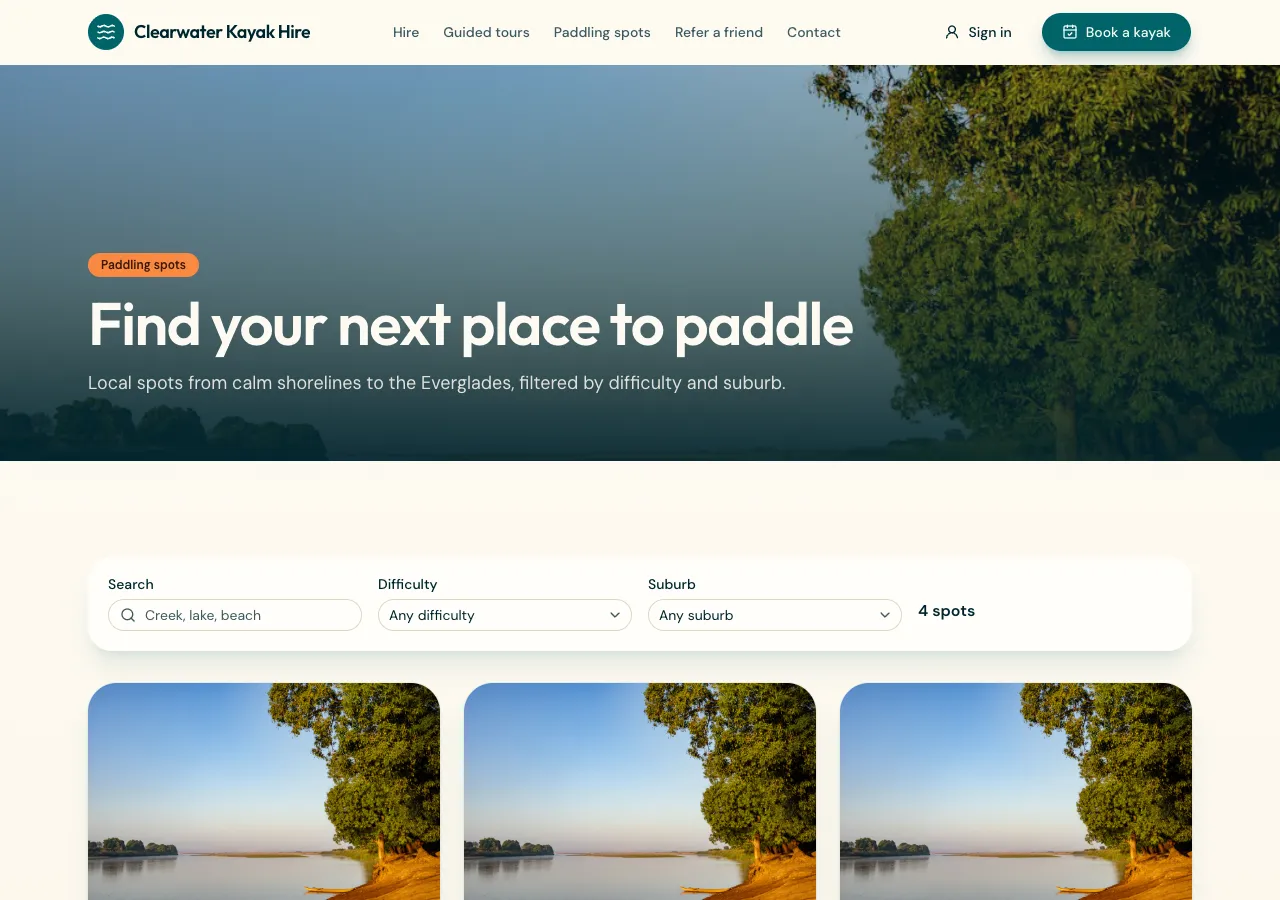
Listings shaped for your directory
Ask for a directory and the AI follows its listings guide: listings with a title, description, location, photos, a status and a flexible set of attributes that suit the kind, such as price and bedrooms for rentals, salary for jobs or year for cars. Categories group them, and an index keeps filtering on those attributes quick as the directory grows.
Filters people actually use
The listings page has a filter bar built from the attributes, with selects and ranges, sorting by newest or price, and 24 results at a time with Load more. Each listing page shows the photos, a facts table from the attributes, a Google Maps directions link and an enquiry form that stores the message in the site's database.
Submissions and moderation
Signed in people can submit a listing through a multi step form with photo uploads, and it starts as pending. A database rule lets visitors see only published listings, and lets an owner see and edit their own pending one. Staff approve or reject from a moderation queue in the admin area, pending first.
Saving and searching
Ask for saved listings and signed in visitors can heart a listing and find it again on a Saved page. Search over titles and descriptions finds listings by words as well as by filters. A phone app based on the site gets Browse, a detail screen and a Post screen.
What it does not do
There is no paid listing fee or featured placement unless you ask the AI to build one with payments, and no marketplace checkout between visitors and listers; enquiries go to the site, and contact happens from there. Listing expiry dates are stored, but nothing runs on a schedule, so expired listings are tidied from the admin.
How it works, in three steps
Step 1
Describe the directory
Say what is listed, the filters people need, who can submit and whether enquiries go to you or the lister.
Step 2
Seed and moderate
Add the first listings in the admin, then approve submissions from the moderation queue.
Step 3
Publish
On a paid plan, publish and invite listers to sign up and submit.
Limits worth knowing
- The data lives in the site's own database: a hosted one on every plan, or your own Supabase account.
- New listings wait for approval in the admin.
- Photos up to 10 MB each, stored in the site's own storage.
- The free plan builds and previews the site; publishing starts on Starter.
Questions people ask
Can people add their own listings?
Yes. Signed in people submit a listing with photos, and it waits as pending until staff approve it. Owners can edit their own listing while it is pending and see its status in their account. Visitors only ever see published listings, which the database rule enforces.
What filters can a directory have?
Any that fit the listings: price ranges, bedrooms, suburbs, categories, years, salary bands, or yes and no options. They come from each listing's attributes, which the AI shapes for your kind of directory from the brief. Name the filters you want and it builds them.
Can visitors contact a lister?
Each listing has an enquiry form that stores the message against the listing in the site's database, where staff can read it. Passing enquiries straight to a lister's email is not built in, since site mail only reaches the signed in sender or the owner.
Can I charge for listings?
Not by default. Ask for paid listings and the AI can add a fee paid through Stripe Checkout on your connected account before a listing goes to moderation, on a paid plan. Featured spots can be added the same way. There is no checkout between visitors and listers.
Will listings show in Google?
Listing data loads in the browser after the page, so search engines see the listing pages only partly. Content that must be indexed, such as category descriptions and town pages, should be in the page text. Ask the AI for that, and keep listing titles clear.
Can it show listings on a map?
Each listing has a Google Maps directions link from its location. A map with every listing pinned is not built in, since the site uses Google Maps embeds rather than map libraries. A list sorted by distance from the visitor can be added with their permission.
Make your own website
The button opens the generator with this use case already described. Change the wording to match yours, generate, then edit anything you like.
Create a website with OneCraftRelated pages
Pricing page builder with plans, testimonials and your team
A pricing page shows what each plan or package costs and what it includes, so buyers can choose without a sales call. It earns trust when prices are real, the comparison is easy to scan on a phone, and the quotes and faces around it belong to real clients and staff.
Ecommerce website with Stripe: Checkout on your own account
An ecommerce website with Stripe sends buyers to Stripe Checkout to pay and records the order when Stripe confirms it. On OneCraft the agent writes the shop as code, and payments run as a direct charge on the Stripe account you connect, with prices read from your site's database, never from the browser.
B2B video maker
Two findings from a professional network's own creative research shape everything about B2B video. A logo in the opening two seconds lifts click through by about a sixth. Human talent in that same window lifts it by around two fifths. And only about seven percent of the B2B ads analysed featured any human emotion at all.
More finished work of this kind is on the website examples hub.
Written and checked by the OneCraft team. Last checked .