Websites
Online course website with lessons, progress and paid access
An online course website sells or gives access to a set of lessons and remembers how far each learner got. The work is less in the pages than in the rules: who may open which lesson, which ones are free to preview, and how a learner pays and comes back to where they left off.
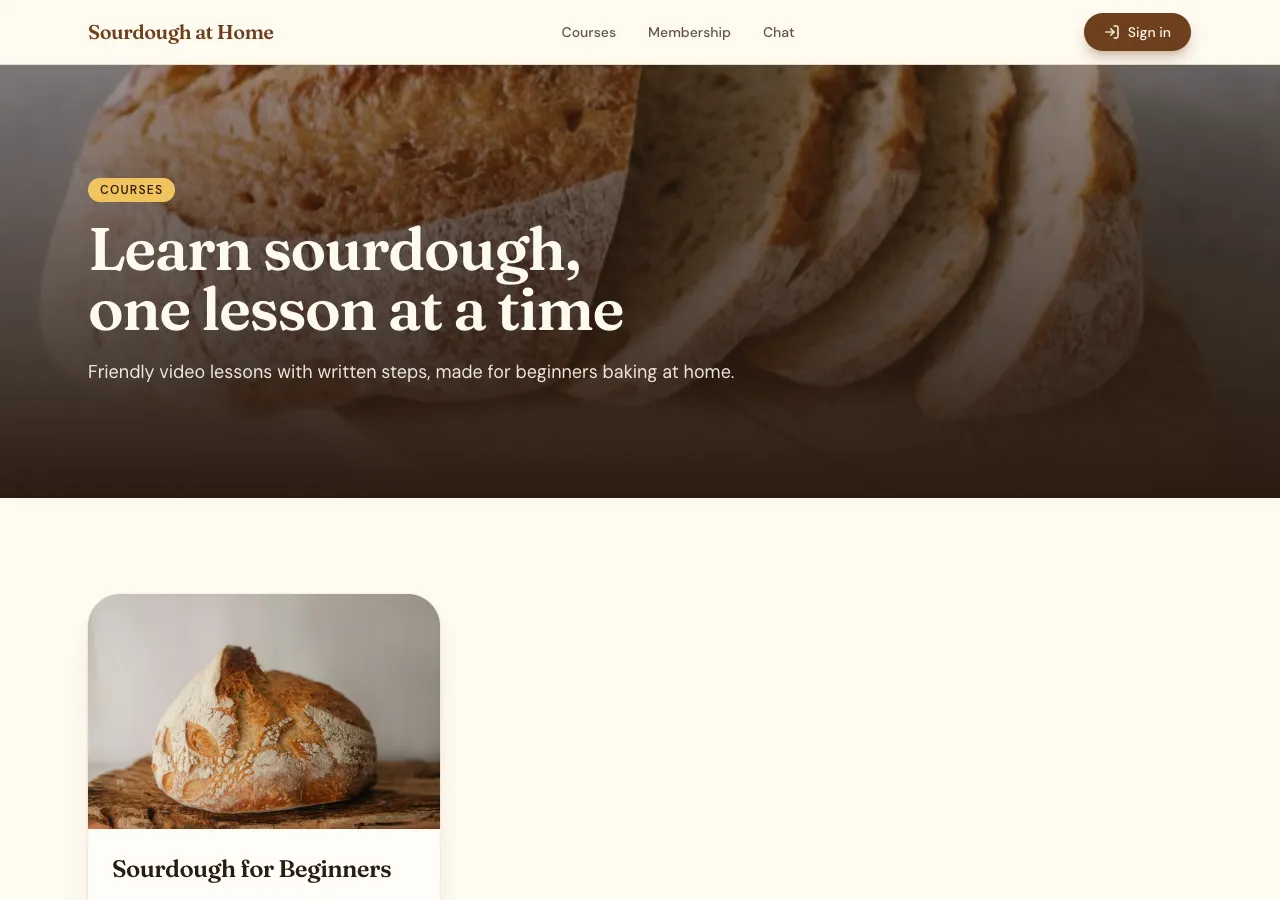
Courses and lessons
Ask for a course and the AI follows its memberships guide: a courses table, lessons in order with a body written in Markdown and an optional video, and a progress table that records each learner's completed lessons. A course page lists its lessons with locks on gated ones and ticks on finished ones; a lesson page shows the text, the video and Mark complete.
Free previews and paid access
Each course can be open to every member or tied to a paid plan, and any lesson can be marked as a free preview. A database rule decides who may read a lesson, and the AI tests it as an anonymous visitor and as a signed in learner before it finishes. Paid plans are billed through Stripe Checkout on your connected account.
Where the videos live
Lessons embed videos from YouTube or Vimeo only; video files are not uploaded or hosted. Upload lesson videos as unlisted on YouTube, or private with embedding allowed on Vimeo, and paste the links in the admin. An unlisted video can still be watched by anyone who has its link, so keep that in mind for paid content.
Running the course
The admin area holds courses and lessons with ordering, the plans, and members with their subscription status. Ask for comments under lessons and learners can ask questions, with moderation in the admin. A phone app based on the site gets a Learn tab with the same courses and progress.
What it does not do
There are no quizzes with grading, no certificates and no drip schedule unless you ask for them and the AI builds them from the forms or memberships guides; there is no video hosting and no live classes. For a large catalogue with marketing email built in, a dedicated course platform fits better.
How it works, in three steps
Step 1
Describe the course
List the lessons, which are free to preview, the price or plan, and where the videos are.
Step 2
Fill the lessons
Sign in to the site's admin area and add lesson text and video links, in order.
Step 3
Check and publish
Open a gated lesson signed out and signed in, then publish on a paid plan with Stripe connected.
Limits worth knowing
- Videos play from YouTube or Vimeo; video files are not hosted.
- Card payments need a paid plan and Stripe connected in account settings; the platform fee is 2% on Starter, 1% on Pro and 0.5% on Pro+, with Stripe fees on top.
- The data lives in the site's own database: a hosted one on every plan, or your own Supabase account.
- No certificates, graded quizzes or live classes are built in.
Questions people ask
Can I sell a course once instead of monthly?
Yes. A one off course is a product paid through Stripe Checkout, and the purchase unlocks it for that learner; a membership is a monthly or yearly plan that unlocks every course tied to it. Say which you want in the brief, or offer both, and the AI builds the matching access rule.
Can learners see their progress?
Yes. Each completed lesson is a row in the progress table for that learner, so the course page shows ticks and how many lessons remain, and the learner picks up where they stopped on any device after signing in. Progress is private to each learner and to your admins.
Are my paid videos protected?
The lesson page is protected by a database rule, but the video itself plays from YouTube or Vimeo. An unlisted YouTube video can be watched by anyone with its link. Vimeo's privacy settings can limit embedding to your domain, which is the stronger choice for paid lessons.
Can I add downloads to a lesson?
Yes. Ask for lesson files and the AI stores them in the site's private storage, up to 25 MB each, readable only by learners with access to that course. Printable recipes, worksheets and slides work well this way. Larger files are links you host elsewhere.
Do learners need an account?
Yes, to track progress and check paid access. They sign up with email and password or with Google on the published site. A free preview lesson can be open to visitors without an account, which is a good way to let people try before they pay.
Can I build a phone app for the course?
Yes. Start a Mobile app based on the course website and it reads the same courses, lessons and members, with a Learn tab. Videos open in the in app browser, since the app starter has no video player. You build it with Expo and submit it yourself.
Make your own website
The button opens the generator with this use case already described. Change the wording to match yours, generate, then edit anything you like.
Create a website with OneCraftRelated pages
Auction website builder: bids, reserves and online payment
An auction website lets signed in bidders raise the price on items until a closing time, then asks the highest bidder to pay. It is only fair if every bid is checked in one place, the reserve stays hidden, late bids cannot snipe the item, and the winner pays online.
Subscription website with plans, a billing portal and access rules
A subscription website charges people every month or year for a plan, a box, a service or access to something. The site has to know at every moment who has an active plan, let subscribers change their card or cancel by themselves, and never trust a price that came from the browser.
Client portal website with projects, files and invoices
A client portal is a signed in area where each client sees their own project: progress, updates, files, approvals and invoices, instead of an email thread. It is only useful if one client can never see another's work, and if clients can act there, approving a design or paying an invoice, without emailing you.
More finished work of this kind is on the website examples hub.
Written and checked by the OneCraft team. Last checked .