Forms · Compared
Google Forms vs Typeform, plus a third option
Google Forms is the free, fast choice for internal surveys, quizzes and sign up sheets, with answers flowing into Sheets. Typeform is the paid choice for branded, one question at a time forms where completion rate matters. A third option fits the forms neither handles well: those that must end as a fillable PDF or a signed document.
Updated , competitor details checked . Google Forms is a trademark of Google LLC and Typeform is a trademark of its owner. OneCraft is not affiliated with or endorsed by either company.
Indunil Asanka · Co-founder
3 min read · Published
The short verdict
Use Google Forms for free internal surveys, quizzes and class sign ups where a spreadsheet is the destination. Use Typeform for customer facing, branded forms where the pacing lifts completion and logic and integrations matter. Use the third option when the form is paperwork: an intake, consent or application that needs a printed or signed copy.
| Feature | Google Forms | Typeform | OneCraft |
|---|---|---|---|
| Cost to start | Business use is sold inside Google Workspace; Business Starter is shown at A$9.90 per user a month with an annual commitment checked 2026-10-21 | Basic at $39 a month, or $28 a month billed yearly, with 100 responses a month and 1 user checked 2026-10-21 | Free at $0 with 100 credits a month; Starter $8 |
| Response limits | No response limit stated on the Forms product page checked 2026-10-21 | Plus 1,000 responses a month with 3 users at $79; Business 10,000 with 5 users at $129 checked 2026-10-21 | No response cap printed on the pricing page |
| Question types | Short answer, paragraph, multiple choice, checkboxes, dropdown, file upload, linear scale, rating, grids, date and time checked 2026-10-21 | Video questions and answers on the Talent plan; question types not counted on the pricing page checked 2026-10-21 | 41 component types including matrix, table, address, signature and recording |
| Logic | Send a responder to a certain section of the form based on a multiple choice, checkbox or dropdown answer checked 2026-10-21 | Conditional logic listed on Basic checked 2026-10-21 | Jump rules on conversational forms only |
| One question at a time | Not offered; questions are organised in sections checked 2026-10-21 | Interactive AI forms; one question at a time is Typeform's format checked 2026-10-21 | Classic and conversational forms in one builder |
| Quizzes | Create quizzes to test knowledge checked 2026-10-21 | Not itemised as graded quizzes on the pricing page checked 2026-10-21 | No scoring or correct answers |
| Design | Choose colours, images and fonts to match branding checked 2026-10-21 | Plus removes Typeform branding and adds a custom subdomain checked 2026-10-21 | 37 themes, 22 palettes, 10 welcome layouts |
| File upload | Responders must sign in to a Google Account; files are stored in the owner's Drive checked 2026-10-21 | Lets the audience attach files to responses checked 2026-10-21 | 1 to 10 files per field, images and PDF, up to 100 MB each; no sign in needed |
| AI form creation | Help me create a form with Gemini on eligible Workspace or Google AI plans checked 2026-10-21 | AI powered form creation on Basic checked 2026-10-21 | A prompt of up to 10,000 characters generates the whole form |
| Export | Export raw data into Google Sheets checked 2026-10-21 | Download responses in XLSX or CSV checked 2026-10-21 | CSV with one column per field |
| PDF and signing | Not described on the Forms product page checked 2026-10-21 | Not listed on the pricing page checked checked 2026-10-21 | Response PDF, fillable PDF from Starter, e-signing add-on |
Where Google Forms is better
Free at the point of use, with Sheets
For a team already in Workspace, a form costs nothing extra and the responses land in a Sheet that the whole team can analyse. Neither of the other two columns matches that frictionless path to a spreadsheet.
Quizzes for classrooms and training
Google Forms creates quizzes to test knowledge, which is why schools rely on it. Typeform's pricing page does not itemise graded quizzes, and OneCraft does not score answers at all.
Where Typeform is better
A respondent experience people finish
Typeform's format, one question at a time with branding, is the reason customer surveys and lead forms move there. Google Forms shows sections of questions on a page, which is efficient but plain.
Integrations, analytics and growth plans
Typeform lists webhooks and integrations on Basic, drop off rates and conversion tracking on Business, and a Growth Flow plan with Salesforce and SMS follow ups. OneCraft offers a webhook and an email alert.
Where OneCraft is different
Both shapes from one prompt
OneCraft writes a classic sectioned form or a conversational one question at a time form from the same kind of description, and either can be themed, so the choice between the Google and Typeform styles becomes a setting rather than a product.
Uploads without a Google sign in
A respondent uploads up to 10 files per field, images and PDF, up to 100 MB each, without signing in to anything. Google Forms requires a Google Account for file upload questions.
The form leaves as a document
A response prints through a PDF layout editor, a fillable PDF exports from Starter, and the e-signing add-on routes a response for certified signing. Neither of the other columns lists either output.
A finished example
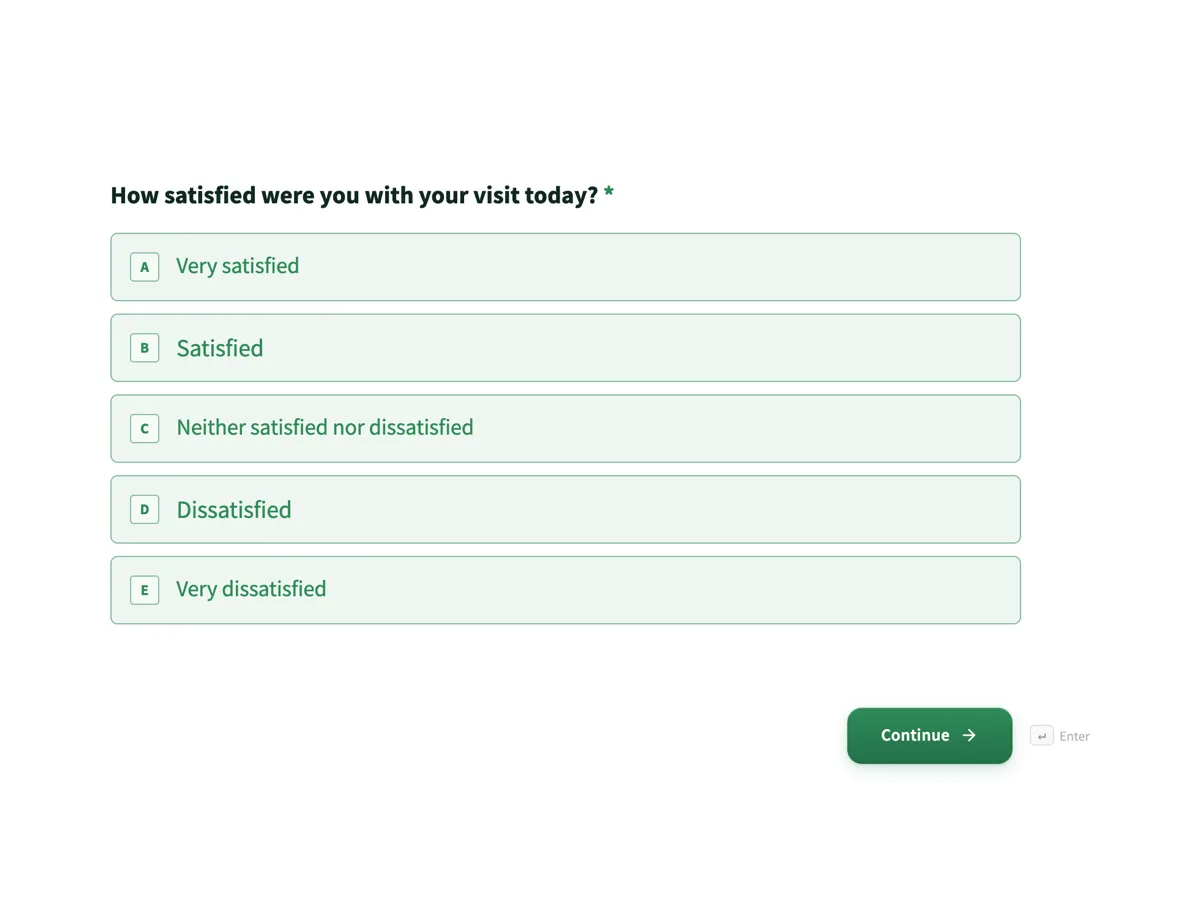 Customer feedback surveyMade with OneCraft, exactly as the generator and editor left it. Open the page for the full breakdown.
Prices read on the same day
On 21 October 2026 Google's Workspace pricing page, shown in Australian dollars to a visitor from Australia, listed Business Starter at A$9.90, Business Standard at A$19.80 and Business Plus at A$30.90 per user a month with an annual commitment, each with an introductory discount; Forms is part of those plans. Typeform's pricing page listed Basic at $39 a month or $28 billed yearly with 100 responses and 1 user, Plus at $79 or $56 with 1,000 responses and 3 users, Business at $129 or $91 with 10,000 responses and 5 users, and Talent from $119 a month. OneCraft listed $0, $8, $25 and $125 a month for 100, 500, 1,500 and 7,500 AI credits.
Quiz grading and design in one table
The two features people ask about most split cleanly. Google Forms builds quizzes and grades them, and gives you colours, images and fonts. Typeform focuses on design and pacing and does not itemise graded quizzes on its pricing page. OneCraft has themes, palettes and welcome screens but never grades an answer, so a classroom quiz stays on Google Forms.
A one line verdict for each
Google Forms: the free default for anything internal that ends in a spreadsheet. Typeform: the paid choice when the person answering is a customer and completion rate is the metric. OneCraft: the choice when the answer has to become a PDF or a signed document.
Where the facts come from
Google facts are from the Forms product page, the Workspace pricing page and two Google Docs Editors Help articles; Typeform facts are from its pricing and product pages; all were read on 21 October 2026. OneCraft facts cite an internal ledger checked against the product source.
Who should stay with Google Forms or Typeform
Stay with Google Forms if your forms are free internal surveys, quizzes or sign ups that end in a Sheet. Stay with Typeform if your forms are customer facing, depend on logic and integrations, and justify paying for responses. Move to the third column only when the form's output must be a printed or signed document.
Questions people ask
Is Typeform better than Google Forms?
For customer facing forms where design and pacing matter, usually yes, at a price starting at $39 a month for 100 responses. For internal surveys, quizzes and sign ups, Google Forms does the job for free inside Workspace. Better depends on who answers and what happens to the data.
Is Google Forms free for business?
Business use is part of Google Workspace, whose pricing page on 21 October 2026 listed Business Starter at A$9.90 per user a month on an annual commitment for Australian visitors. The Forms product page itself does not print a separate price.
Which one looks more professional?
Typeform, out of the box, because its one question at a time format and branding options are its focus. Google Forms can change colours, images and fonts but keeps its familiar layout. OneCraft offers 37 themes and welcome screens in either a classic or conversational form.
Do respondents need a Google account for uploads?
Yes, on Google Forms: its help article says responders must sign in to a Google Account to answer a file upload question, and files go to the owner's Drive. Typeform and OneCraft take uploads without a Google sign in. That sign in step can put off members of the public.
Can either tool print a response as a PDF?
Neither Google's Forms page nor Typeform's pricing page lists a response PDF. OneCraft prints each response as a PDF laid out in its own editor on every plan, and exports a fillable PDF of the form from the Starter plan.
Try the form side of OneCraft
The button opens the generator with a starting prompt already filled in. Change the wording to match your own work before you run it.
Create a form with OneCraftMore comparisons
- A Google Forms alternative: what you gain, what you give upOneCraft as a Google Forms alternative: themes, welcome screens, fillable PDFs, e-signature and AI generation, against the Sheets link you give up.
- A Typeform alternative, compared honestlyOneCraft as a Typeform alternative for conversational forms: what matches, what does not, where Typeform stays ahead, and both public pricing pages quoted.
- Tally vs Typeform vs OneCraftTally, Typeform and OneCraft compared for conversational forms: price and caps, fields, logic, design, PDFs and signing, with where each one wins.
What the module actually does, feature by feature: the AI form builder page, and the forms maker page.
Step by step in the builder: Classic and conversational forms compared, then Create a conversational form with AI.
Sources
Written and checked by the OneCraft team. Last checked .