Forms · Alternative
A Gravity Forms alternative without plugins or add-ons
Gravity Forms is the developer's WordPress form plugin: calculations in fields, conditional logic on pages and sections, more than 500 hooks and a framework for building your own add-ons. The gap to state first is that OneCraft calculates nothing and has no developer hooks, so this comparison is really for forms that collect, print and sign rather than compute.
Updated , competitor details checked . Gravity Forms is a trademark of Rocketgenius Inc. OneCraft has no connection with Rocketgenius and is not endorsed by it.
Indunil Asanka · Co-founder
3 min read · Published
The short verdict
Gravity Forms wins for any form that has to calculate, route data by rules, process payments or be extended in PHP on a WordPress site. OneCraft fits teams that want a hosted form drafted from a description, a webhook without a licence tier, and a response that can be printed as a fillable PDF or sent for certified signing.
| Feature | Gravity Forms | OneCraft |
|---|---|---|
| Licence price | Basic License $59 per year for 1 site, Pro License $159 for 3 sites, Elite License $259 for unlimited sites checked 2026-10-21 | Free $0 with 100 credits a month; Starter $8, Pro $25 and Pro+ $125 a month |
| Calculations | Use calculations within fields, so a field's value is calculated from a mathematical formula checked 2026-10-21 | No calculated fields at all; a number field validates a minimum and a maximum |
| Conditional logic | Conditional logic displays or hides fields, sections, pages and more based on user selections checked 2026-10-21 | Jump rules between screens on conversational forms only, with no show or hide |
| Add-ons | Basic add-ons include HubSpot and Mailchimp; Pro adds Stripe, Square, Dropbox and Zapier; Elite adds Signature, Survey, Quiz, Webhooks and more checked 2026-10-21 | 4 add-ons on every form: e-signing, webhooks, email alerts and redirect |
| Webhooks | The Webhooks add-on is listed as an Elite add-on checked 2026-10-21 | One POST with JSON per submission, 10 second timeout, no retry |
| Developer hooks | Tap into 500+ hooks to customise form behaviour, plus an API class and add-on frameworks checked 2026-10-21 | No hooks or plugin framework; the webhook is the integration point |
| Field count | 30+ form fields checked 2026-10-21 | 41 component types, 36 in the classic toolkit and 25 in the conversational one |
| Payments | Payment processor integrations with Stripe, Square, Mollie and more, plus discount codes checked 2026-10-21 | No payment component |
| Repeating rows | Not described on the features page checked checked 2026-10-21 | A table field draws a fixed number of rows with no add row button |
| Access control | Not itemised as access types on the pages checked checked 2026-10-21 | 4 access types: public, secret key, login required and domain restricted |
| Response PDF | Not listed on the features or pricing pages checked checked 2026-10-21 | A response PDF with no plan gate, and a fillable PDF export from the Starter plan |
Where Gravity Forms is better
Fields that calculate
Gravity Forms computes a field's value from a formula, which is the backbone of order totals, quotes, loan estimates and scored assessments. OneCraft stores what was typed and leaves every sum to whoever opens the CSV later, so any form that must show a number before submit belongs in Gravity Forms.
Logic on fields, sections and pages
Its conditional logic hides or shows individual fields, whole sections and pages, and email routing follows the same rules. The OneCraft Logic tab can only send a conversational respondent to another screen or end the form, and classic forms have no logic at all.
A platform for developers
More than 500 hooks, a REST API, an API class and add-on frameworks let an agency make Gravity Forms do almost anything on a WordPress site. Nothing comparable exists on the OneCraft side; the one outbound integration is a webhook that fires once per submission.
Payments and discounts
Stripe, Square, Mollie and PayPal checkout are among its add-ons, with discount codes and recurring payments. OneCraft forms cannot take money in any form.
Where OneCraft is different
Nothing to install or license per site
There is no WordPress requirement, no PHP version to meet and no licence count. The form is hosted, published to a link and embeddable, and the add-ons are the same four on every form.
A webhook without a tier
Every form can post its response as JSON to a URL, keyed by field label and by field id. On Gravity Forms the Webhooks add-on sits in the Elite licence. The trade is reliability: this webhook does not retry, so the receiving end must be up.
Paper and signing after submit
Each response can print through a PDF layout editor, the blank form downloads as a template PDF on any plan, and the e-signing add-on sends a response to up to 25 recipients for signing with a hash chained audit trail.
A finished example
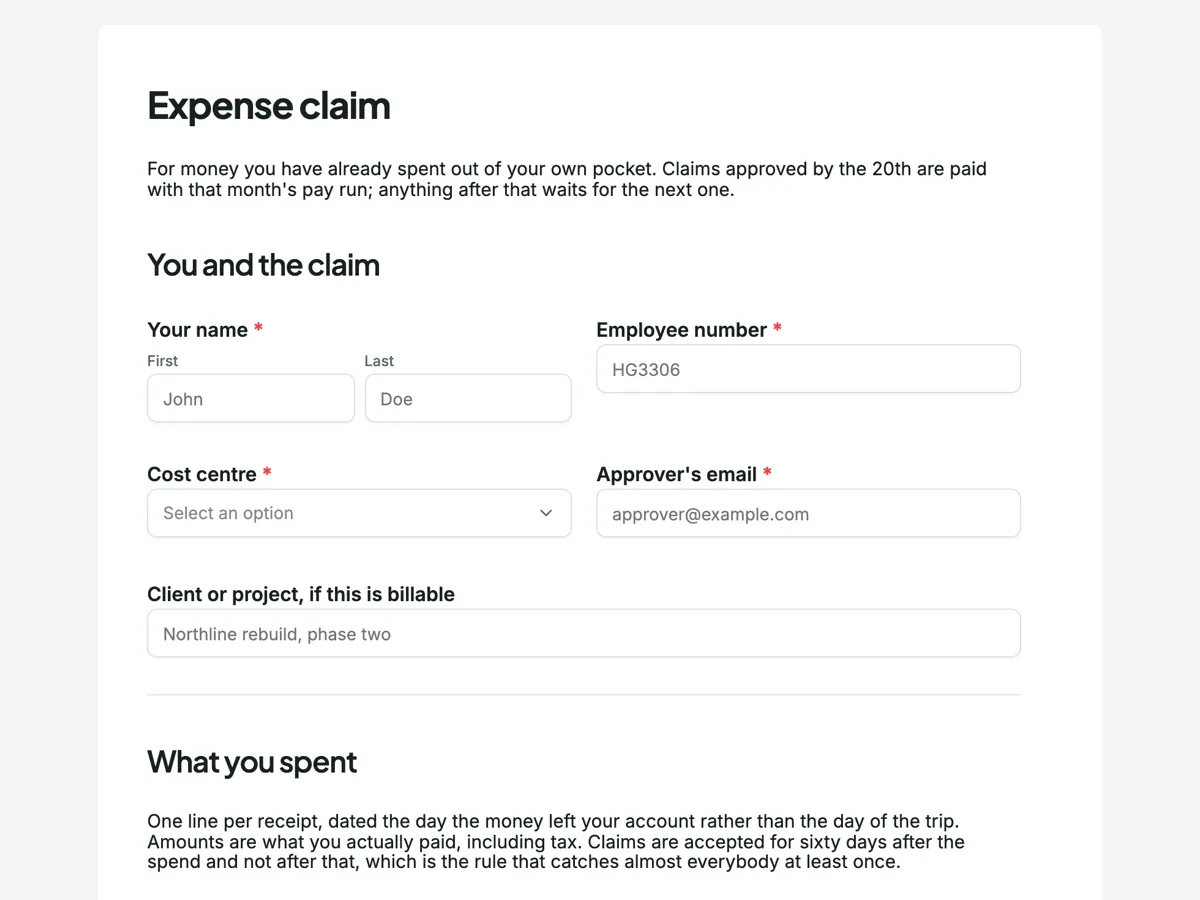 Expense claim formMade with OneCraft, exactly as the generator and editor left it. Open the page for the full breakdown.
Pricing in plain terms
Gravity Forms has no free tier and no trial; its pricing page, checked 21 October 2026, offers three yearly licences: Basic at $59 for 1 site with standard support, Pro at $159 for 3 sites with standard support, and Elite at $259 for unlimited sites with priority support and WordPress Multisite. The add-on a feature needs often decides the tier, since Stripe and Zapier need Pro and Webhooks, Signature and Survey need Elite. OneCraft charges monthly by AI credits: $0 for 100 credits, $8 for 500, $25 for 1,500 and $125 for 7,500, and every form gets the same four add-ons.
The webhook payload, side by side
A OneCraft webhook sends one POST per submission with a JSON body: an event name of form_submission, a timestamp, the form's id, title and slug, and the response with its id, the data keyed by field label and the raw data keyed by field id. It times out after 10 seconds, does not follow redirects and refuses private network addresses. Gravity Forms documents its Webhooks add-on as a way to reach services it does not officially support, on the Elite licence. If your receiving system cannot tolerate a missed delivery, add a queue in front of it or choose a tool that retries.
Rebuilding a form
There is no Gravity Forms importer. The practical route is to export entries to CSV from WordPress, then describe the form to the generator or attach a screenshot of it on a paid plan. Calculated fields, conditional sections and payment fields will not come across, so mark them before you start and decide whether the form still works without them.
How the claims were checked
Licence prices and add-on tiers come from the Gravity Forms pricing page and its features page, both read on 21 October 2026. Each OneCraft cell names a row in an internal fact ledger written from the product source, and the ledger records what is missing as carefully as what exists.
Who should stay with Gravity Forms
Stay with Gravity Forms if a form calculates anything, takes a payment, depends on logic that hides fields or sections, or is extended with custom PHP by a developer. Those are absences on the other side, not weaker versions, and a webhook is no substitute for a hook inside the form.
Questions people ask
Does Gravity Forms have a free version?
No. Its pricing page lists three paid yearly licences, Basic at $59, Pro at $159 and Elite at $259, and its FAQ says there is no trial version, pointing instead to an online demo and the documentation. OneCraft has a free plan with 100 credits a month, about three AI generated projects.
Which Gravity Forms licence includes webhooks?
The Webhooks add-on is listed with the Elite licence on the pricing page checked on 21 October 2026. On OneCraft every form can send a webhook on any plan, but only once per submission with no retry, so the trade is cost against delivery guarantees.
Can a OneCraft form total an order?
No. There are no calculated fields, so quantities and prices are collected as typed values and summed after export. A table field with a fixed number of rows can hold order lines, but it cannot add them up or grow. Forms that must show a running total should stay on Gravity Forms.
Will my Gravity Forms entries transfer?
Not automatically. Export them to CSV from the WordPress dashboard before you cancel and keep the file. New responses on OneCraft export to CSV too, one column per field, with composite fields such as an address or a matrix joined into a single column rather than split.
Is a WordPress site needed for either tool?
Gravity Forms is a WordPress plugin and its FAQ notes that sites on WordPress.com need the Business plan with a custom domain. OneCraft needs no website: the form has its own link and can also be embedded in any page, including a WordPress one.
Try the form side of OneCraft
The button opens the generator with a starting prompt already filled in. Change the wording to match your own work before you run it.
Create a form with OneCraftMore comparisons
- A WPForms alternative for forms that live outside WordPressA WPForms alternative for forms hosted outside WordPress: payments, logic and entry storage compared, with WPForms pricing read on 21 October 2026.
- A Cognito Forms alternative for forms and PDFsA Cognito Forms alternative for AI written forms, response PDFs and certified signing, with the repeating sections, calculations and payments gap stated.
- A Formstack alternative for forms, PDFs and signingA Formstack alternative for AI built forms, fillable PDFs and certified signing, with Formstack's workflow and Salesforce strengths stated plainly.
What the module actually does, feature by feature: the AI form builder page, and the forms maker page.
Step by step in the builder: Automate your form with add-ons, then The form builder components.
Written and checked by the OneCraft team. Last checked .