Forms · Alternative
A WPForms alternative for forms that live outside WordPress
WPForms is a WordPress plugin, so its forms, entries and payments live inside your own WordPress site. The question that decides a switch is simple: is the site on WordPress, and does the form need to take money. If both answers are yes, WPForms is hard to beat; if neither is, a hosted builder that writes the form for you and turns the answer into a PDF may suit better.
Updated , competitor details checked . WPForms is a trademark of its owner. OneCraft is an independent product with no affiliation to WPForms and no endorsement from it.
Nuwan Madhusanka · Co-founder
3 min read · Published
The short verdict
WPForms is the better choice for a WordPress site whose forms take payments, show or hide fields, calculate totals or must store entries in the site's own database. OneCraft suits people without a WordPress site, or with one they would rather not extend, who want the form written from a description and a response that can become a fillable PDF or a signed document.
| Feature | WPForms | OneCraft |
|---|---|---|
| Where it runs | Pricing tiers are sold by number of sites: Basic on 1 site, Plus on 3 sites, Pro on 5 sites, Elite on unlimited sites checked 2026-10-21 | A hosted form on its own link, published from the builder, with a version row written each time it is published |
| Entry price | Basic is normally $99.00 a year, shown at $49.50 for the first year as special introductory pricing; renewals are at full price checked 2026-10-21 | Free at $0 with 100 credits a month, about 3 AI projects; Starter $8 a month |
| Higher tiers | Plus normally $199.00, Pro normally $399.00 and Elite normally $599.00 a year, each shown at half price for the first year checked 2026-10-21 | Pro $25 a month with 1,500 credits and Pro+ $125 with 7,500; monthly prices only |
| Conditional logic | Smart Conditional Logic shows or hides fields based on the user's input, listed on the Basic plan checked 2026-10-21 | Jump rules on conversational forms only, set in a Logic tab; no show or hide of fields and no logic on classic forms |
| Payments | Pro adds Stripe Pro, Square Pro, PayPal, Mercado Pago and Paystack, plus recurring subscriptions and coupons checked 2026-10-21 | No payment component in any form |
| Calculations | Calculations for real time calculator forms are listed under Pro checked 2026-10-21 | No calculated fields; a number field checks a minimum and a maximum |
| Where entries are kept | Entry Management shows every submission inside the WordPress dashboard, exportable as Excel, PDF or CSV checked 2026-10-21 | A responses table in the account, exported to CSV with one column per input field |
| PDF of entries | A PDF addon generates PDFs from form entries, listed among the Pro advanced addons checked 2026-10-21 | A response PDF arranged in a PDF layout editor, and a fillable PDF export from the Starter plan |
| Signatures | Digital Signatures let users sign on the form with a mouse or touch screen, listed under Pro checked 2026-10-21 | An inline drawn or typed signature, plus an e-signing add-on that sends the response for certified signing |
| Building with AI | WPForms AI creates entire forms through an AI chat and edits existing ones with Smart Edit checked 2026-10-21 | A description of up to 10,000 characters generates the fields, welcome screen and theme in one pass |
| Conversational layout | Conversational Forms ask one question at a time, listed under Pro conversion tools checked 2026-10-21 | Classic and conversational forms are two form kinds in one builder |
| Look and feel | Form layouts adapt to the WordPress theme, with multi column layouts and custom CSS checked 2026-10-21 | 37 themes and 22 colour palettes, set through themes and a theme builder; no custom CSS field |
Where WPForms is better
Entries stay on your own site
Every WPForms submission lands in the WordPress dashboard of the site that hosts the form, and the Basic plan already exports entries to Excel, PDF or CSV. A team that wants its data on infrastructure it controls, next to the rest of the website, gets that by default. OneCraft keeps responses in its own hosted account.
Payments, subscriptions and coupons
The Pro licence connects Stripe, Square, PayPal, Mercado Pago and Paystack, adds recurring subscription payments and coupon codes, and WPForms says it charges no extra transaction fee on an active licence. No OneCraft form can take a payment at all, so a booking deposit or a product order points to WPForms.
Show and hide logic plus calculations
Smart Conditional Logic is on every paid tier and calculations arrive with Pro, which covers quote forms, shipping estimates and eligibility checks. OneCraft only jumps between screens on a conversational form and never computes a value.
A deep add-on bench
Save and resume, form abandonment capture, user registration, post submissions, geolocation, offline forms and more than 9,000 Zapier connections are all on the pricing page. That breadth reflects years as the WordPress default, and nothing on the OneCraft side competes with it.
Where OneCraft is different
No website required
A OneCraft form is published to its own link and can be embedded with an iframe, so a plumber with a social page and no website can still take enquiries. WPForms needs a self hosted WordPress site before the first field exists.
The first draft is written for you
A prompt of up to 10,000 characters produces fields, sections, a welcome screen and a theme as one job. On a paid plan the prompt can be a PDF or a photo of an existing paper form instead, which suits replacing a clipboard sheet.
Responses become documents
A submitted response renders to a PDF laid out in the form's own PDF editor, a blank template PDF downloads with no plan gate, and the e-signing add-on sends a response out as a signing envelope with an audit trail and a certificate of completion.
A finished example
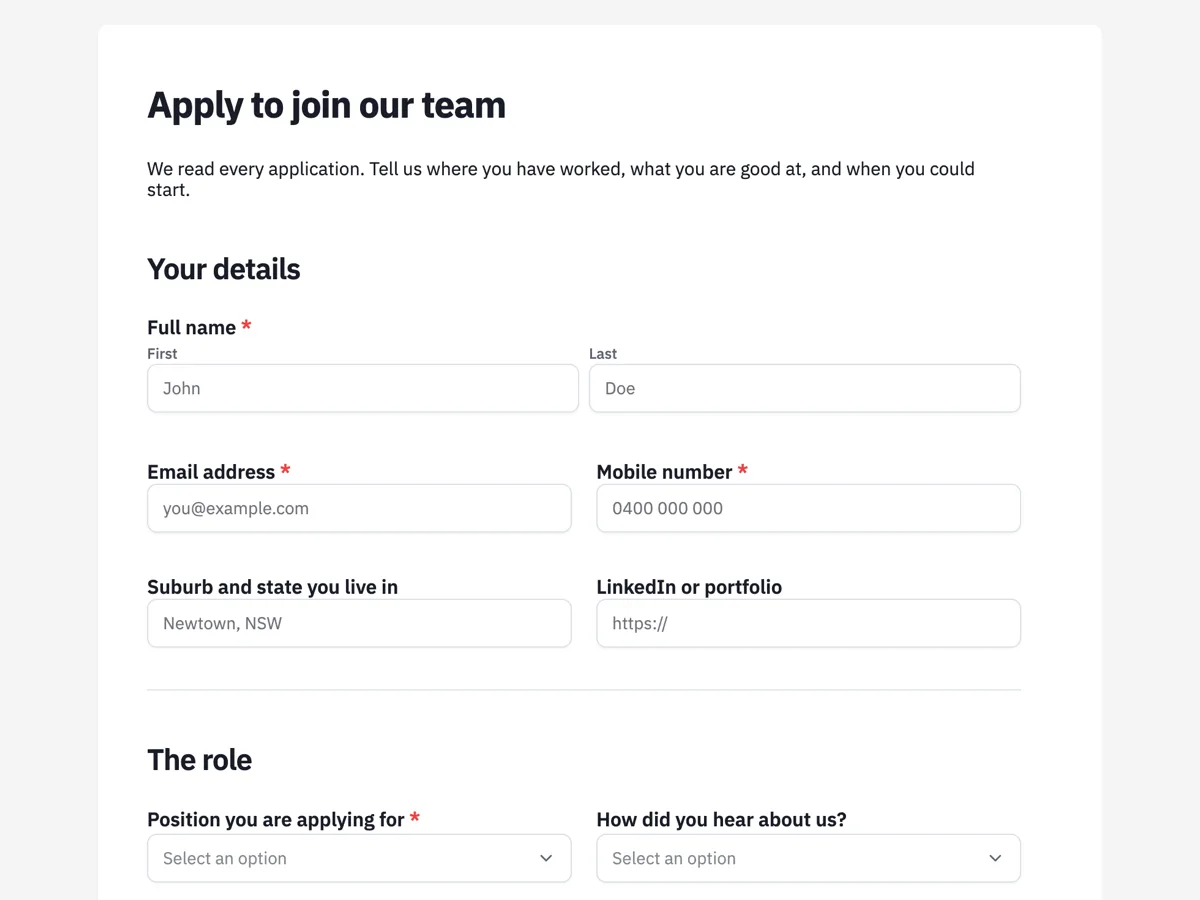 Job application formMade with OneCraft, exactly as the generator and editor left it. Open the page for the full breakdown.
Pricing in plain terms
WPForms sells yearly licences by site count. On its pricing page, checked 21 October 2026, Basic is normally $99.00 a year for 1 site, Plus $199.00 for 3 sites, Pro $399.00 for 5 sites and Elite $599.00 for unlimited sites, and each is shown at half that figure for the first year with a note that renewals are at full price. Every tier lists unlimited forms, submissions and users, and the page offers a 14 day money back guarantee. OneCraft lists monthly prices only: Free at $0 with 100 credits a month, Starter at $8, Pro at $25 and Pro+ at $125. The difference in model matters more than the numbers. WPForms charges per website and assumes you host it; OneCraft charges for AI generation and hosts the form.
Moving entries out of WordPress
There is no importer from WPForms into OneCraft. Before switching, export your entries from the WordPress dashboard to CSV, which WPForms supports on every paid tier, and keep that file as your historical record. Then rebuild the form by pasting its question list into the generator, or by attaching a PDF or screenshot of the live form on a paid plan. Old entries stay in WordPress; new ones start in the OneCraft responses table, which exports to CSV with one column per field, so the two files can be combined in a spreadsheet if you need a single history.
When the switch makes sense
The cleanest case is a business without a WordPress site, or one moving off WordPress, whose forms are enquiries, intake sheets, applications or consent forms. Another is a clinic or trade business that prints most forms and wants the same build as a fillable PDF. The weakest case is an online shop or event site that charges at the end of the form, because that feature simply does not exist on the other side.
What was checked and how
The WPForms column quotes its own pricing page and features page as read on 21 October 2026, including which addons sit on which tier. The OneCraft column names a line in an internal ledger read out of the product source for every claim, including the absences: no payments, no calculations and no show or hide logic are checked statements rather than gaps in research.
Who should stay with WPForms
Stay with WPForms if your site already runs on WordPress and your forms take payments, use show or hide logic, calculate a total or need entries saved in the site's own database. Those are the jobs WPForms was built for, and OneCraft does none of the first three.
Questions people ask
Is there a WPForms alternative that does not need a plugin?
Yes. A hosted builder such as OneCraft publishes the form at its own link, with no plugin, no WordPress install and nothing to update. The trade is that responses live in the builder's account rather than your site's database, and features such as payments and calculated totals that WPForms Pro offers are not available.
Can I keep using my WordPress site with a hosted form?
Yes. A hosted form can sit inside a WordPress page through an iframe embed, so visitors never leave your site. The entries are stored in the form builder rather than in WordPress, which means exports come from the builder's responses table and not from the WordPress dashboard.
What happens to my WPForms licence price after the first year?
WPForms shows each tier at half price for the first year and states on its pricing page that renewals are at full price, so Basic moves from $49.50 to $99.00 and Pro from $199.50 to $399.00. Budget for the renewal figure when comparing tools, not the introductory one.
Does the alternative support save and resume?
No. Nothing is stored before the respondent submits, so there are no partial entries or drafts to return to. WPForms lists Save and Resume and form abandonment capture among its Pro features, which is a real reason to stay if your forms are long applications people finish over several sittings.
Can a respondent receive a confirmation email?
Not from a OneCraft form. The only form email is the owner's alert, sent to one address on each submission. WPForms lists customised follow up emails after submission on its Basic tier, so if a receipt to the person filling the form is required, that favours WPForms.
Try the form side of OneCraft
The button opens the generator with a starting prompt already filled in. Change the wording to match your own work before you run it.
Create a form with OneCraftMore comparisons
- A Gravity Forms alternative without plugins or add-onsA Gravity Forms alternative without plugins: calculations, logic, webhooks and add-ons compared, with Gravity Forms licence prices read on 21 October 2026.
- A Jotform alternative for forms, PDFs and signingOneCraft as a Jotform alternative: classic and conversational forms, fillable PDFs, e-signature and AI generation, with Jotform's breadth stated honestly.
- A Google Forms alternative: what you gain, what you give upOneCraft as a Google Forms alternative: themes, welcome screens, fillable PDFs, e-signature and AI generation, against the Sheets link you give up.
What the module actually does, feature by feature: the AI form builder page, and the forms maker page.
Step by step in the builder: Create a form with AI, then Automate your form with add-ons.
Written and checked by the OneCraft team. Last checked .