Forms · Compared
Jotform vs Formstack for business forms, and a third option
Jotform starts free and prices by forms and submissions, with HIPAA features on its Gold plan; Formstack starts at $99 a month and bundles forms, document generation and signing in its Suite plan for teams with workflows. OneCraft is a third column for small teams that want forms generated by AI, PDFs and signing without per submission limits printed on the plan.
Updated , competitor details checked . Jotform and Formstack are trademarks of their owners. OneCraft is not affiliated with or endorsed by either.
Indunil Asanka · Co-founder
3 min read · Published
The short verdict
Jotform suits teams that want a free start, thousands of templates, payment gateways and HIPAA features at a mid tier price. Formstack suits organisations that run forms, documents and signatures as one workflow, often with Salesforce and approvals. OneCraft suits small teams that generate a form from a description, export a fillable PDF and send responses for a certified signature.
| Feature | Jotform | Formstack | OneCraft |
|---|---|---|---|
| Pricing | Starter free; Bronze $39 a month or $408 a year; Silver $49 or $468; Gold $129 or $1,188; Enterprise custom checked 2026-10-05 | Forms $99 a month or $83 a month paid annually; Suite $299 or $250 paid annually; enterprise options custom checked 2026-10-05 | Free $0 with 100 credits a month, then Starter $8, Pro $25 and Pro+ $125 a month, per account |
| Caps | 5 forms and 100 submissions a month free; 25 and 1,000 on Bronze; 50 and 2,500 on Silver; 100 and 10,000 on Gold checked 2026-10-05 | 25 forms and 1,000 submissions per form on Forms; 100 forms and 5,000 per form on Suite checked 2026-10-05 | Plans meter AI credits; the pricing page prints no form or submission cap |
| Logic | Show or hide fields, send emails to certain users and vary thank-you messages based on answers checked 2026-10-05 | Show or hide fields based on the user's input checked 2026-10-05 | Jump rules on conversational forms only, which skip ahead or end the form; no show or hide, no calculations |
| Workflow and approvals | A drag and drop approval flow with approvers, emails and conditional branches checked 2026-10-05 | Approval workflows to collect sign-off, included in the Suite plan checked 2026-10-05 | No approvals. The add-ons are e-signing, a webhook posted once, an email alert and a redirect |
| HIPAA | HIPAA features and a signed BAA on Gold and Enterprise checked 2026-10-05 | HIPAA-friendly data collection; HIPAA compliance named in the Salesforce solutions tier checked 2026-10-05 | No healthcare compliance claim and no BAA; access is set by 4 types: public, secret key, login required, domain restricted |
| PDFs | A PDF Editor that turns responses into PDF documents, with 2,000+ templates and fillable PDF forms checked 2026-10-05 | Documents generated from DOCX, PPTX, PDF or CSV templates, filled from Salesforce, HubSpot or SharePoint checked 2026-10-05 | A fillable PDF export from Starter, shaped in a PDF layout editor; a PDF of each response with no plan gate |
| Signing | 10 signed documents a month free, 100 on Bronze, 250 on Silver, 1,000 on Gold checked 2026-10-05 | Unlimited eSignatures in the Suite plan, not in Forms checked 2026-10-05 | An add-on turns each response into an envelope, one recipient per e-signature component, returned as a certified PDF |
| AI | AI Agents counted per plan, from 5 active on Starter to 100 on Gold checked 2026-10-05 | An AI-powered form builder for digital data capture checked 2026-10-05 | A whole form from a prompt of up to 10,000 characters, or from up to 5 attached files of 10 MB each on a paid plan |
| Integrations | 150+ integrations and 40+ payment gateways checked 2026-10-05 | Salesforce native forms and documents in a custom priced Salesforce solutions tier checked 2026-10-05 | A webhook fired once per submission with a 10 second timeout and no retry, plus an email alert to one address |
Where Jotform is better
Templates and payments
Jotform lists more than 20,000 form templates and more than 40 payment gateways. OneCraft has no template library and takes no payments, so an order form that charges a card belongs in Jotform.
HIPAA at a mid tier
Gold includes HIPAA features with a signed Business Associate Agreement. OneCraft makes no healthcare compliance claim, so a clinic collecting health information should not move intake forms to it.
Show and hide logic on any form
Jotform shows or hides fields, emails different people and changes the thank-you message by answer. OneCraft logic only jumps between screens on conversational forms.
Where Formstack is better
Forms, documents and signing as one workflow
Formstack Suite combines forms, document generation from DOCX, PPTX or PDF templates, approvals and unlimited eSignatures. OneCraft has signing and PDFs but no approvals and no document merge from a CRM.
Salesforce
Formstack offers Salesforce native forms and documents built from Salesforce data. OneCraft has no CRM connector of any kind.
Styling with CSS
Formstack's Theme Editor is backed by CSS tools for advanced styling. OneCraft offers themes, palettes and a theme builder, but no custom CSS.
Where OneCraft is different
A form from a description or a photo
Describe the form, or on a paid plan attach a PDF or a photo of the paper version, and the generator writes the fields, sections, welcome screen and theme in one pass.
Classic and conversational in one builder
A classic form runs as a page or paginated steps; a conversational form asks one question at a time and can take recorded audio or video answers.
A signature with evidence
A submitted response can become an envelope with identity checks, an 18 event hash chained audit trail and a PDF certified so later edits break the seal.
A finished example
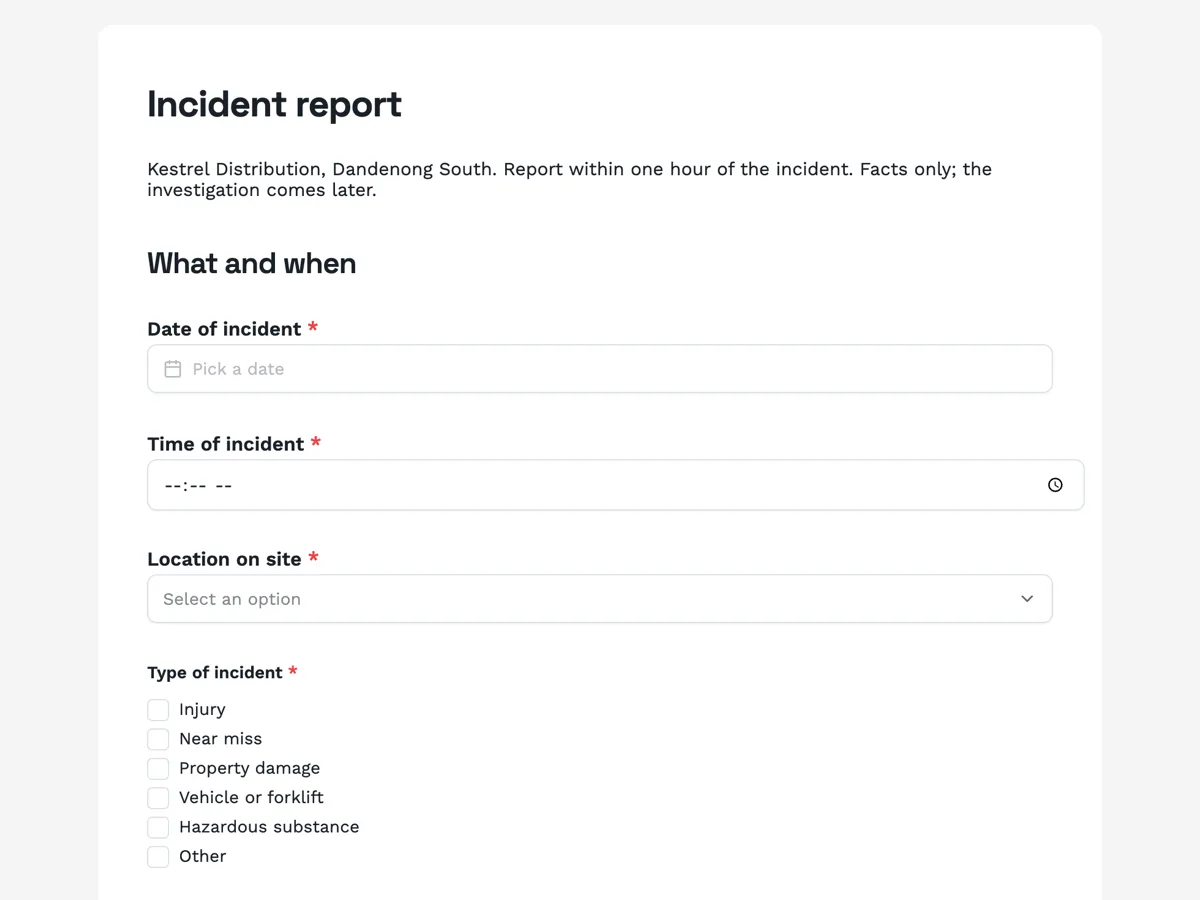 Workplace incident report form built for the first hourMade with OneCraft, exactly as the generator and editor left it. Open the page for the full breakdown.
Pricing in plain terms
Checked 5 October 2026. Jotform lists Starter free with 5 forms and 100 submissions a month, Bronze at $39 a month or $408 a year, Silver at $49 or $468, Gold at $129 or $1,188, and Enterprise by quote. Formstack lists Forms at $99 a month or $83 paid annually with one builder user, Suite at $299 or $250 paid annually with three builder users, and a 14 day trial. OneCraft lists Free at $0 with 100 credits a month, then $8, $25 and $125 a month; the fillable PDF export starts at Starter.
Choosing between Jotform and Formstack
Price the whole job, not the form. If you need forms only, Jotform's paid tiers start well below Formstack's. If each submission must become a generated document, go through an approval and be signed, Formstack Suite does all three, while on Jotform you assemble its PDF Editor, Approvals and Sign products, which are counted per plan. Health data narrows it further: Jotform names HIPAA with a BAA on Gold; Formstack names HIPAA in its features and Salesforce tier.
Where a third option fits
OneCraft fits a small team whose forms end in a PDF or a signature and who would rather describe a form than drag fields: an incident report signed by a supervisor, a contractor onboarding form, an application that prints cleanly. It gives up templates, payments, approvals, show and hide logic, integrations and compliance programmes to keep that path short.
What could not be checked
Jotform's features page does not detail approvals or AI form generation, so those cells cite its approvals and pricing pages. Formstack's pricing page does not price HIPAA or AI separately, and neither vendor states which logic features each plan carries, so the logic row quotes the features pages. Every OneCraft cell names a row in an internal fact ledger checked against the product's source code.
Who should stay with Jotform or Formstack
Stay with Jotform if you need templates, payments, show and hide logic or HIPAA on a mid tier plan. Stay with Formstack if forms feed documents, approvals and Salesforce as one workflow. OneCraft fits small teams that want AI built forms, PDFs and certified signatures without seats to count.
Questions people ask
Is Jotform or Formstack cheaper for one person?
Jotform, on the pages checked. Its Starter plan is free and Bronze is $39 a month or $408 a year. Formstack's entry Forms plan is $99 a month, or $83 a month paid annually, with one builder user. Formstack's price includes 1,000 submissions per form, so compare against your expected volume, not the headline.
Which one is better for HIPAA forms?
Both name HIPAA. Jotform offers HIPAA features and a signed Business Associate Agreement on its Gold and Enterprise plans. Formstack describes HIPAA-friendly data collection and names HIPAA in its Salesforce solutions tier. OneCraft makes no healthcare compliance claim and offers no BAA, so it is not an option for protected health information.
Can a OneCraft form route a submission for approval?
No. There is no approval step. A submission lands in the responses table, and the automation is a webhook posted once, an email alert to one address, a redirect, or the e-signing add-on. A form that needs a manager's yes before anything happens belongs in Jotform Approvals or Formstack Suite.
Do signed forms count against a monthly limit?
On Jotform, yes: signed documents are counted per plan, from 10 a month free to 1,000 on Gold. Formstack includes unlimited eSignatures in Suite but not in Forms. OneCraft's pricing page prints no signing allowance; plans are metered in AI credits for generation and exports.
Can OneCraft fill a Word template with form answers?
No. OneCraft does not merge responses into DOCX or PPTX templates. It produces a fillable PDF of the form, shaped in a layout editor, and a PDF of each response with uploaded images added as pages. Formstack Documents is built for template merges from form and CRM data.
Try the form side of OneCraft
The button opens the generator with a starting prompt already filled in. Change the wording to match your own work before you run it.
Create a form with OneCraftMore comparisons
- A Jotform alternative for forms, PDFs and signingOneCraft as a Jotform alternative: classic and conversational forms, fillable PDFs, e-signature and AI generation, with Jotform's breadth stated honestly.
- A Formstack alternative for forms, PDFs and signingA Formstack alternative for AI built forms, fillable PDFs and certified signing, with Formstack's workflow and Salesforce strengths stated plainly.
- Typeform vs Jotform, and where a third option fitsTypeform vs Jotform on price, logic, templates, payments and PDFs, with both sets of published figures dated, and where a third AI form builder fits in.
What the module actually does, feature by feature: the AI form builder page, and the forms maker page.
Step by step in the builder: Automate your form with add-ons, then Shape the PDF version of your form.
Written and checked by the OneCraft team. Last checked .