Classic form
Bug report form that produces reports a developer can reproduce
A bug report is useful when someone else can make the bug happen, and most forms ask for a description and nothing else. This one asks for the steps as a numbered table, the expected and actual result as two fields, the environment as choices, and posts the whole thing to the issue tracker as JSON.
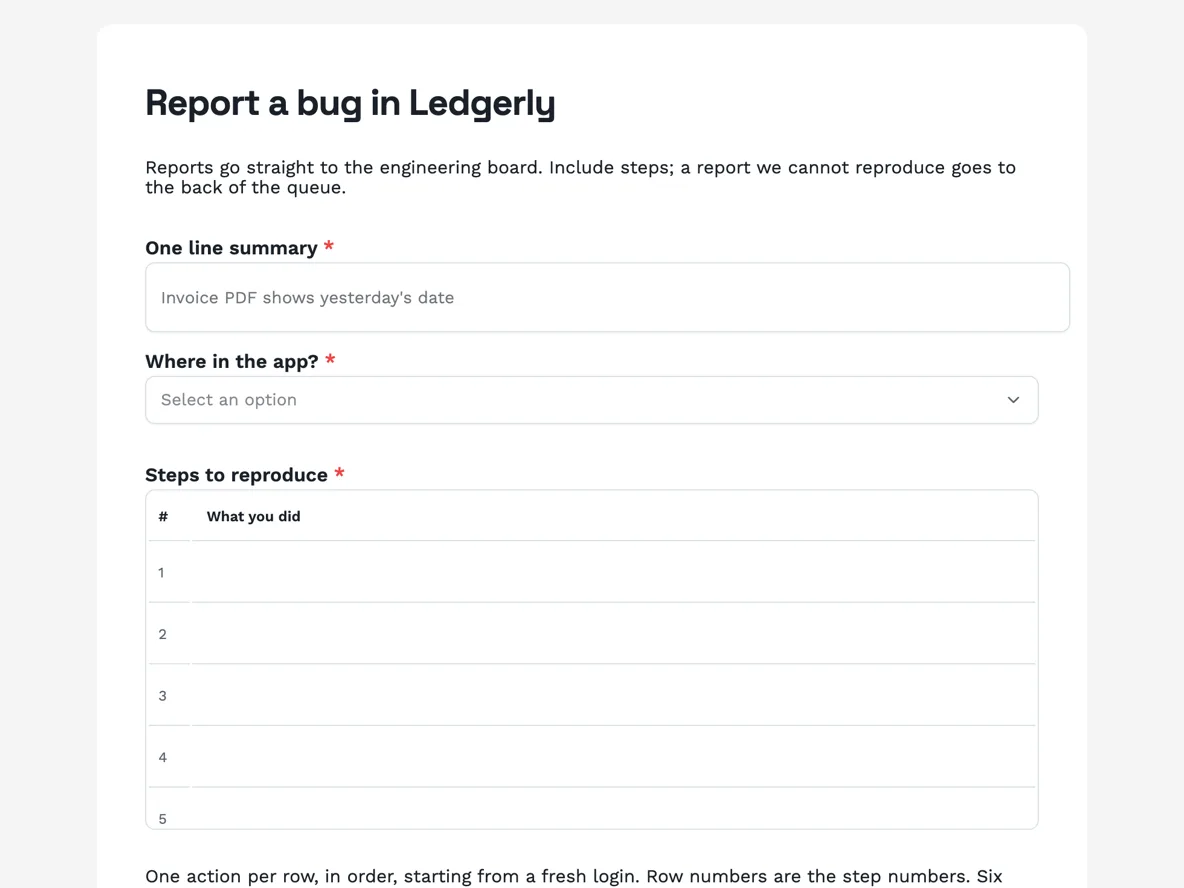
The form itself
A static copy of the finished form, exactly as it renders. Nothing here can be filled in or submitted, so read it as a reference and build your own from the button above.
Every field, and what it collects
The complete field list, in the order respondents meet it.
- One line summaryShort textRequired
- Where in the app?DropdownRequired
- Options: Dashboard · Invoices · Bank feeds · Reports · Settings · Mobile app · Other
- Steps to reproduceTableRequired
- Columns: What you did
- What you expectedLong textRequired
- What actually happenedLong textRequired
- How bad is it?Single choiceRequired
- Options: I cannot use the app · A feature is broken · Something is wrong but I have a workaround · Cosmetic
- Does it happen every time?Single choiceRequired
- Options: Every time · Most times · Sometimes · Once
- Browser or appDropdownRequired
- Options: Chrome · Safari · Firefox · Edge · iOS app · Android app
- Device and operating systemShort text
- Account emailShort textRequired
- Approximate time it happened, with timezoneShort text
- ScreenshotPhoto upload
- The whole screen, including the URL bar. Blur anything private first.
- Exports or capturesFile upload
- Up to 3 files, images or PDF. Plain text logs are not accepted as files; paste them below.
- Anything else, including pasted error textLong text
Question banks built on this form
The webhook payload, and what the tracker side needs
With the webhook add-on on, each submission fires one POST of JSON: an event name, a timestamp, the form's id and title, and the response with its answers keyed two ways, by field label and by field id. The receiving endpoint has ten seconds to answer and there is no retry, so the tracker side should accept immediately and process afterwards, a tiny function that acknowledges, then creates the issue with the summary as the title and the steps table, which arrives as an array, rendered into a numbered list. Redirects are not followed and only http and https are accepted, so point it straight at the final endpoint.
How to adapt this form
An internal QA version adds a build number field beside the browser dropdown and drops the account email, since QA knows its own accounts. A game studio replaces the where-in-the-app dropdown with level or mode and asks for a save file link, uploads being image and PDF only. A hardware version swaps environment for a serial number and firmware version pair. The four load-bearing fields survive every variant untouched: summary under 120 characters, steps one per row, expected, actual. Remove any of those and the form goes back to collecting descriptions.
What makes this form work
Steps arrive in order because the table forces order
Six numbered rows, one action each, starting from a fresh login. The difference between click, then, then in sequence and the same facts scattered through a paragraph is the difference between reproducing a bug in two minutes and emailing the reporter twice.
The 120 character summary is the issue title
The first field is capped at 120 characters, which is a workable issue title in every tracker. Whatever the webhook creates on the board is titled by the reporter, in the reporter's words, without an engineer rewriting it, and the cap is what makes that safe.
Severity is asked in sentences a user can stand behind
I cannot use the app is a fact the reporter knows; P1 is a judgement they cannot make. Four plain statements collect the honest signal, the team maps them to priority at triage, and nobody argues about whether their cosmetic bug was really a P2.
Questions people ask
What should a bug report contain?
The classics, and this form is shaped exactly on them: a clear one line summary, precise steps to reproduce, what you expected, what actually happened, and the environment it happened in. Mozilla's bug writing guidelines have said the same thing for two decades, because reports with those five parts get fixed and the rest get triaged into silence.
Why are the steps a table?
Because order is the evidence. A paragraph mixes setup, action and reaction into prose a developer has to untangle; a numbered table with one action per row forces the sequence out of the reporter's head. The six rows are fixed, and the paragraph under the table says three good rows are usually enough.
Can users attach a log file?
Not as plain text: uploads accept images and PDF only, so the form says so on the upload field and provides a paste field for error text instead. Pasted logs also arrive searchable in the tracker, which a screenshot of a terminal never is.
How does a submission reach the issue tracker?
Through the webhook add-on: one JSON POST per submission, answers keyed by field label, ten second timeout, no retry. The endpoint should acknowledge first and process after. The payload section above walks the shape and the sharp edges, including the absent retry, which is the one to design around.
Should you ask users for severity?
Yes, in words they can actually judge: cannot use the app, a feature is broken, workaround exists, cosmetic. Those map roughly onto P1 through P4, but the mapping is the team's call; the reporter is only ever asked about their own experience, which is the only thing they can honestly rate.
How do you stop duplicate reports?
You do not, at least not at the form. Duplicates are cheap to merge at triage and expensive to prevent at submission, and a duplicate is still evidence of frequency. A public status page quietly reduces them, because half of all duplicate reports are people checking whether you already know.
Build your own in about a minute
The button below opens the generator with this use case already described. Change the wording to match your own, generate, then edit anything you like.
Make one like thisOther form examples
Customer complaint form that asks what outcome you want
A customer complaint form identifies the customer, sorts the complaint by type, records what happened and when, whether this is a repeat contact, any evidence, and the outcome the customer wants. This water utility version also states the response time and the right to go to the ombudsman before the customer starts typing.
Survey with skip logic, rule by rule
Skip logic removes whole sections a respondent cannot answer, so a customer who has never used the app never sees four app questions. This cafe survey uses two rules to skip the app and catering sections, and everyone meets the same closing questions on satisfaction, one change and how often they visit.
Hotel guest satisfaction survey from check in to check out
A hotel guest satisfaction survey has to show which part of the stay let a guest down, tied to a room so someone can fix it. This one follows the stay in order, from check in through a four item room grid, staff and breakfast, then asks whether a problem was reported and fixed.
Want the steps in the builder? Read Automate your form with add-ons, then Form builder components. For everything this generator can do, see the form maker.
Written and checked by the OneCraft team. Last checked .