Classic form
Content request form for an editorial desk
A content request form gives an editorial team what it needs to decide on a piece and brief a writer: the format, the topic, the search phrase it should answer, who it is for, the sources, who asked and when it is needed. This newsletter publisher version schedules requests with clear sources first.
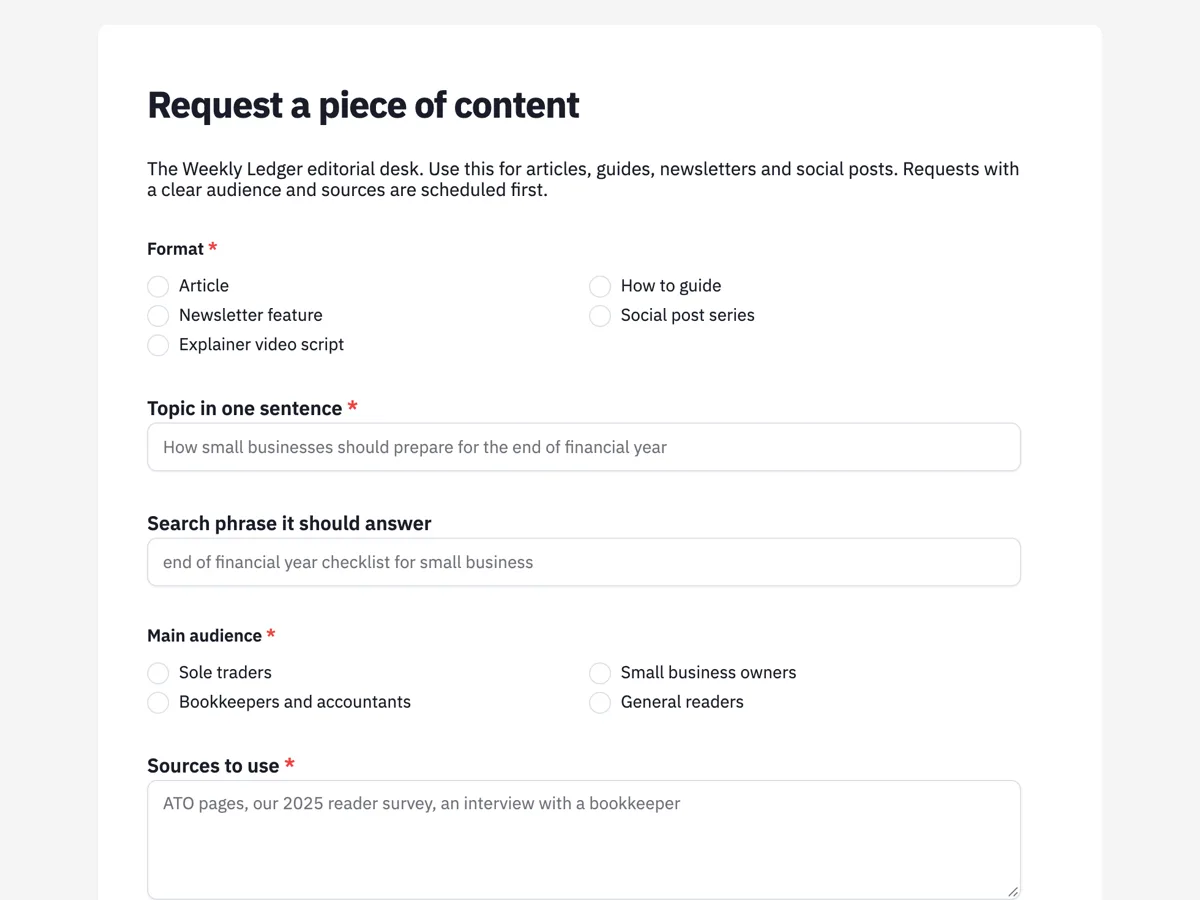
The form itself
A static copy of the finished form, exactly as it renders. Nothing here can be filled in or submitted, so read it as a reference and build your own from the button above.
Every field, and what it collects
The complete field list, in the order respondents meet it.
- FormatSingle choiceRequired
- Options: Article · How to guide · Newsletter feature · Social post series · Explainer video script
- Topic in one sentenceShort textRequired
- Search phrase it should answerShort text
- Main audienceSingle choiceRequired
- Options: Sole traders · Small business owners · Bookkeepers and accountants · General readers
- Sources to useLong textRequired
- Requested byDropdownRequired
- Options: Editorial · Partnerships · Product · Events
- Needed byDateRequired
- Where it will be promotedMultiple choice
- Options: Newsletter · LinkedIn · Instagram · Partner sites · Not promoted
What each field on this form collects
A single choice records the format, from an article to an explainer video script. The topic is one sentence. An optional short text asks for the search phrase the piece should answer. The main audience is a single choice of four. A required long text lists the sources. The requesting team and the date needed share a row, and a checklist records where the piece will be promoted.
Sources and audience first
An editorial desk gets more requests than it can write, and the ones that are easiest to schedule name their audience and bring their sources. A piece for bookkeepers needs a different depth from one for general readers, and a piece built on the ATO's own pages and a reader survey can be written this week, while one that needs original research cannot. Google's guidance on creating helpful content asks whether content shows first hand expertise and is written for people rather than search engines, and the sources field is where that starts.
The search phrase, not a keyword list
Asking for one search phrase the piece should answer focuses the writer on a question a reader actually types. A list of keywords invites stuffing; a single phrase invites an answer. The field is optional, because not every newsletter feature needs to rank in search, and Google's starter guide is clear that writing for people comes first. When the phrase is filled in, the editor can check it is not already answered by an existing piece.
How to adapt this form
A university communications team adds the faculty and an approval contact. A software company adds the product area and the release date the content supports. An agency adds the client and the brand guidelines as an upload. A desk that commissions freelance writers adds a word count and a fee band, so the editor can match the request to the right writer and budget before saying yes.
What makes this form work
Sources are required
The sources box is one of the required fields, with an example mixing official pages, a survey and an interview. Requests arrive ready to write, not ready to research.
One phrase to answer
A single search phrase rather than a keyword list. The writer knows the question the piece must answer in its first paragraph.
Promotion is planned up front
A checklist of channels, including not promoted. The editor can see which pieces need social copy or newsletter space before they are written.
Questions people ask
What should a content request form include?
The format, topic, audience, sources, who is requesting it and why, the deadline and how it will be promoted. A search phrase helps for web content. Keep it short enough that people use it instead of messaging the editor directly.
How do editors prioritise content requests?
Usually by audience value, timeliness, how ready the request is and the effort needed. Requests with clear sources and a defined audience are faster to produce. This desk reviews requests weekly and fast tracks news pieces through the duty editor.
Should every piece target a search phrase?
Not every piece. Newsletter features and social series may not need search traffic. For web articles, one clear question per piece helps readers and search engines alike. Avoid writing for keywords at the expense of usefulness, and check the phrase is not already answered by a piece the desk has published.
Can people attach drafts or notes?
This version does not, to keep requests short. A file upload field can be added for notes or a draft, and it accepts images and PDFs only, so a Word draft would need to be saved as a PDF first.
How does the requester hear back?
The form does not email the requester. The thank you screen says the editor reviews requests on Mondays and replies. An email alert can send each request to the editor's inbox as it arrives, with the answers set out in the message so the editor can reply straight away.
Can the form track the status of each piece?
No. It collects requests. Once a piece is scheduled, track it in the team's planning tool. A webhook can post each request once to that tool to save copying it across, though it does not retry, so the responses table stays the full record.
Build your own in about a minute
The button below opens the generator with this use case already described. Change the wording to match your own, generate, then edit anything you like.
Make one like thisOther form examples
Design request form for an in house studio
A design request form gives a designer the deliverable, the size, the final copy, the brand to use, reference files, how many rounds of changes are expected, the deadline and the priority. This in house studio version requires final copy before work starts, because designing around placeholder text wastes a round.
Marketing request form that starts with the objective
A marketing request form tells the marketing team what kind of work is needed, what it should achieve, who it is for, the one message that matters, when, with what budget and who approves it. This agency version asks what should change because of the work before anything about format.
Budget request form with a cost breakdown and outcomes
A budget request form makes the case for money: how much, what it buys, what it achieves and why it beats the alternatives. This one does that for a council program bid, with a five line cost breakdown, start and end dates for the funding, measurable outcomes and a required answer on what doing nothing would mean.
Want the steps in the builder? Read Build an intake form for your team, then Send requests to the editor. For everything this generator can do, see the form maker.
Written and checked by the OneCraft team. Last checked .