Conversational form
Photography booking form that gets a quote back
A photographer’s inbox is full of enquiries that have to be answered with a question. This form asks the ten things a quote depends on, one screen at a time, and finishes with the contact block so nobody hands over an email before they know what they are asking for.
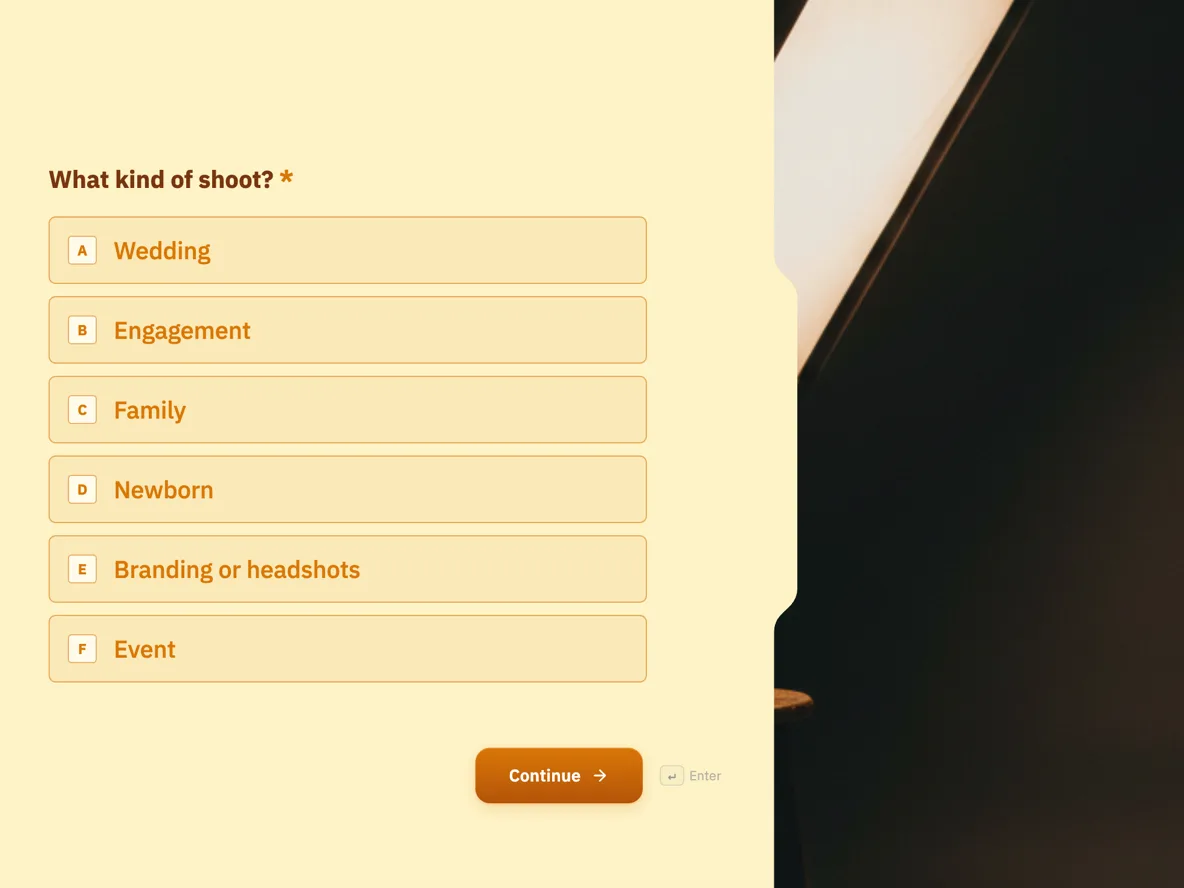
The form itself
The first screen of the form. A conversational form shows one question per screen, so the remaining screens are listed in the field table below. Nothing here can be filled in or submitted, so read it as a reference and build your own from the button above.
Every field, and what it collects
The complete field list, in the order respondents meet it.
- What kind of shoot?Single choiceRequired
- Options: Wedding · Engagement · Family · Newborn · Branding or headshots · Event
- When?DateRequired
- Your best guess is fine if the date is not locked in. The next question covers that.
- Is the date fixed or flexible?Single choiceRequired
- A week of flexibility rescues more bookings than any other answer on this form.
- Options: Fixed · Flexible by a week or two · Not decided
- Where will it be?Short textRequired
- Travel gets priced from this, so a suburb is enough.
- Roughly how long?Single choiceRequired
- Hours drive the quote more than anything else you will answer.
- Options: Up to 1 hour · 2 hours · Half day · Full day (8 hours) · Not sure
- Budget you have in mindSingle choiceRequired
- An honest band saves us both a phone call. The last option is a real answer, not a trap.
- Options: Under $500 · $500 to $1,000 · $1,000 to $2,500 · $2,500 plus · Would rather see packages
- Anything you want captured?Long text
- A photo of the location or a style you likeFile upload
- One image, up to 10 MB. A screenshot of a photo you love tells me more than a paragraph.
- How did you find me?Dropdown
- Options: Instagram · Google · A friend · A venue · Other
- Your contact detailsProfileRequired
- Last screen. Name, email and a number in case the quote bounces.
Why the contact block comes last
Most enquiry forms open with name and email, which is the moment casual browsers close the tab. This one runs the order of a good first conversation instead: what, when, where, how long, and only then who. By the final screen the person has already described their shoot, so typing three contact fields into one profile block feels like finishing a sentence rather than starting a commitment. The photographer gets the same win in reverse, because every enquiry that arrives is complete enough to price, and the reply can be a quote with two date options instead of a list of questions.
How to adapt this form
A studio with set packages can swap the budget band for a package picker and let the price do the qualifying. A videographer should add a deliverables question, since a three minute film and a full ceremony edit are different jobs at the same shoot. A photographer hiring a second shooter can reuse the same ten screens with the budget question replaced by an hourly rate band. Whatever the variant, keep date and flexibility as two separate screens, and keep the reference upload to a single image so the enquiry stays a brief rather than becoming a mood board.
What makes this form work
Five budget bands and an escape hatch
The budget screen offers four dollar ranges and a Would rather see packages option, so it qualifies the job without forcing a number from someone who does not know what photography costs. Either answer moves the quote forward, which is the whole point of asking.
Date and flexibility are separate questions
Screen two takes the date, screen three asks whether it is fixed, flexible by a week or two, or not decided. That second screen is where a fully booked Saturday turns into a Friday booking instead of a lost enquiry, and it costs the respondent one tap.
Ten screens, three of them contact fields in one
The profile block closes the form with name, email and phone on a single screen, avatar and address switched off. Nobody is asked to identify themselves until they have said what they want, and the enquiry that arrives is still complete enough to price in one reply.
Questions people ask
Should a photography enquiry form ask for budget?
Yes, as bands rather than a blank number, and after the shoot details rather than before. Placed sixth, the question reads as sizing the job, not gatekeeping it. The Would rather see packages option is the pressure valve; a person who picks it is telling you to lead the reply with your price sheet.
Why a file upload rather than a photo field for the reference picture?
Either works in a conversational form, since the photo field and the file upload both render there. This one uses a file upload set to one image, because a reference is usually a screenshot or a saved picture already on the phone rather than a photo taken on the spot. The respondent sees a normal upload control and the photographer gets one reference picture.
Can clients book a date through the form?
No, and it does not pretend to. The form is an enquiry; the calendar stays with the photographer, and the thank-you screen says the two closest dates come back if the requested one is gone. A deposit, taken outside the form, is what actually holds a date.
What is the profile block on the last screen?
A conversational-only field that collects name, email and phone together on one screen, with the avatar and address parts switched off. In a classic form the same job takes three separate fields. Here it means the contact ask is one screen out of ten instead of three out of twelve.
How does the photographer follow up?
An email alert can fire on each submission, and the responses table holds every enquiry with its answers in columns. The reply is written from the budget band, the hours and the location, which is why those three are required and the mood questions are not.
Does one question per screen actually help nervous clients?
A wedding enquiry is often written at midnight by someone who has never hired a photographer. One question at a time with a progress counter reads like a conversation rather than paperwork, and the two minute estimate on the welcome screen is honest: five of the ten screens are a single tap.
Build your own in about a minute
The button below opens the generator with this use case already described. Change the wording to match your own, generate, then edit anything you like.
Make one like thisOther form examples
Band booking enquiry form with the line up and the stage
A band booking enquiry form has to match three things: the line up the client wants, the space and power the venue has, and the budget. This one gives each line up its stage size in metres, asks what the venue offers, from separate power circuits to a sound limiter, and takes a budget band so the quote is pitched right.
Wedding planner questionnaire that asks about the budget out loud
A wedding planner questionnaire has one job before the first meeting: work out whether the date, the guest count and the budget can exist in the same room. This one asks all three in the first four screens, then spends the rest of its questions on the things a couple actually argues about, which are the must haves, the vendors already locked in and who is doing the planning.
Cooking class sign up form with a per guest dietary grid
A cooking school books seats, but it cooks for people, and a table of four almost never eats the same way. This sign up asks the dietary question as a grid with one row per guest, then keeps allergies on a separate screen, because an allergy is a kitchen decision rather than a preference.
Want the steps in the builder? Read Create a conversational form with AI, then Classic vs conversational forms. For everything this generator can do, see the form maker.
Sources
Written and checked by the OneCraft team. Last checked .