Presentations
Process slide templates
A process slide shows work that happens in order, and seventeen layouts carry the purpose. Fifteen of them lay the stages out as rows, chevrons, lanes or cards; two draw a real flowchart with nodes and connectors, which is where a decision with two outcomes belongs. A roadmap of quarters belongs on a timeline instead.
Seventeen layouts, two of them flowcharts
Seventeen templates carry the process purpose and one more lists it as a secondary role. Most of them are sequence layouts: numbered roadmap rows, stepped arrow rows, chevron headers over body cards, a zigzag journey, kanban swimlanes, a SIPOC map, a value chain and a sprint pinwheel. Only two carry a flowchart block, the decision flowchart and the eight step two row flow, and those are the layouts that can show a step splitting into two outcomes. The vocabulary for the purpose lists a flowchart, but what a slide actually draws is decided by its layout.
Branching needs one of the two flow layouts
The purpose is described as branching flowcharts, decision gates and approval flows, but a chevron row or a kanban lane cannot branch. If your process has a decision in it, pick the decision flowchart, which takes up to twelve nodes with diamonds for the questions, or the two row flow for eight boxes. If it really is a straight line, a sequence layout gives each stage more room for its description than a flowchart node does.
What each step can carry
The slide title runs to forty characters and the optional description to a hundred and sixty. Steps in the flow steps list carry a label and a sublabel each. Some layouts add a centre badge, an icon with a title of twenty two characters and a caption of forty, for the thing the whole process revolves around, and a footer with a headline of forty eight characters and a caption of sixty four for the outcome. Grouped layouts hold up to four detail items under each stage.
Process against timeline
The test is whether the thing that orders your steps is a decision or a date. A process is ordered by what has to finish before the next thing starts. A timeline is ordered by the calendar, and eighteen separate layouts exist for it, with a period carrying a number, an icon, a label, a date and a body. Putting quarters into a process slide loses the dates; putting an approval flow into a timeline invents dates you do not have.
Pillars are not a process
Three or four things that are all true at once, in no particular order, belong on a pillars slide, and thirty three layouts carry that purpose. The giveaway is whether swapping two of your boxes changes the meaning. If it does not, they are pillars, and drawing arrows between them tells the reader something untrue about how the work happens.
How it works, in three steps
Step 1
Add the slide from the library
From Library, filtered to the process purpose. Seventeen layouts come back, grouped by how much detail each stage carries.
Step 2
Lay out the flow
On a flowchart layout, add the nodes and connect them. On a sequence layout, fill one row or card per stage in order.
Step 3
Label each step in a few words
A label and a sublabel per step. If a stage needs a paragraph, it is a section of its own rather than a node.
Step 4
Say what it produces
Use the footer headline and caption for the outcome, so the slide ends on the result rather than the last box.
The full walkthrough with screenshots is in the guide Add, reorder and restructure slides.
Limits worth knowing
- Seventeen templates carry process as their primary purpose; one more lists it as secondary.
- Only two of the seventeen draw a flowchart; the rest show stages as rows, cards, chevrons or lanes.
- Titles are capped at 40 characters and the description at 160.
- Grouped layouts hold four detail items per stage, no more.
- Layout swap is filtered to one purpose, so a process layout cannot be swapped straight to a timeline.
Slide examples
Finished single slides on this layout, each one built from a real template and written out in full.
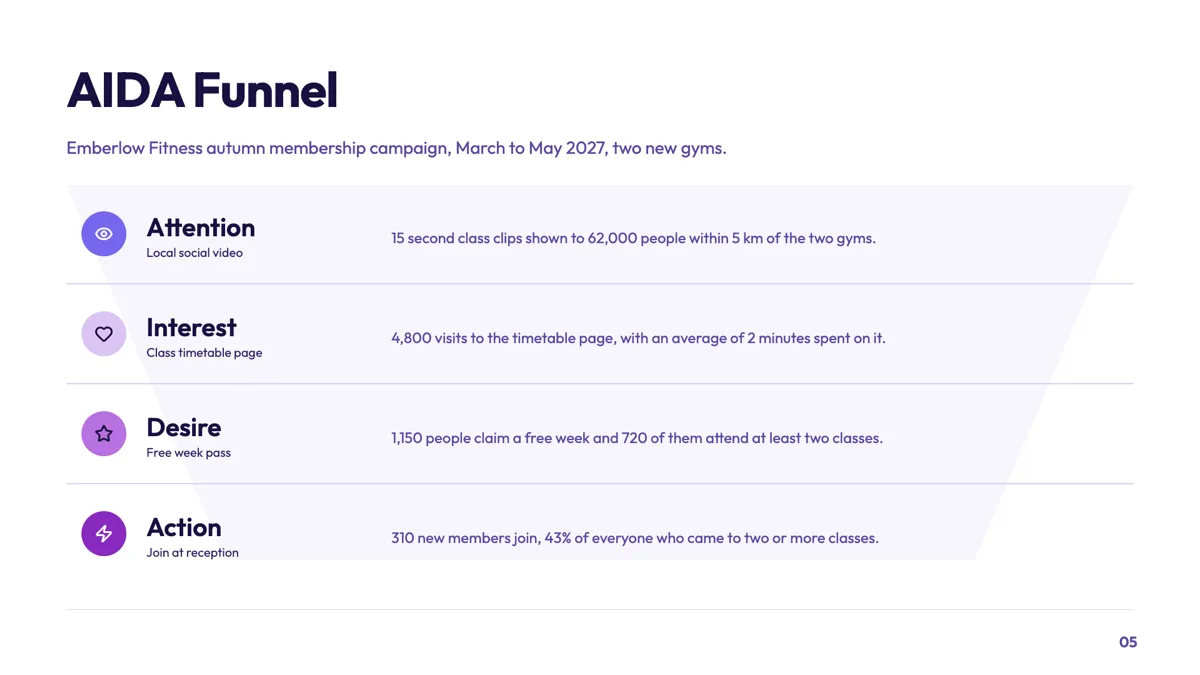
AIDA slide mapping each campaign channel to a stage
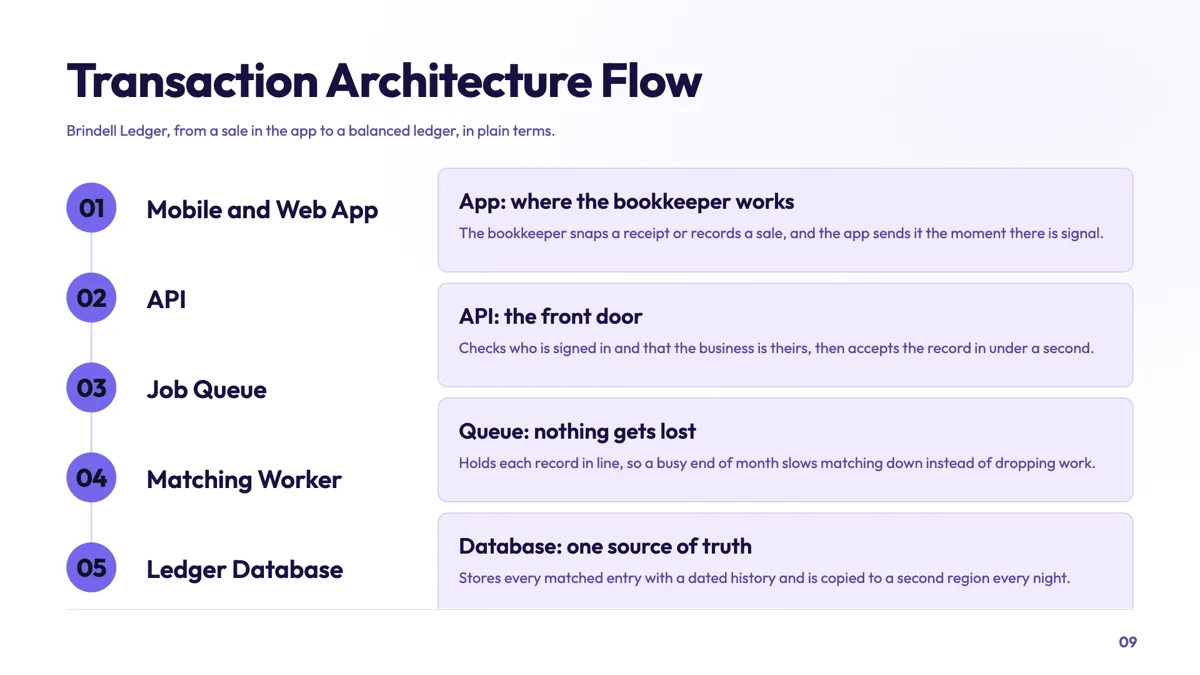
Architecture flow slide a non technical board can follow
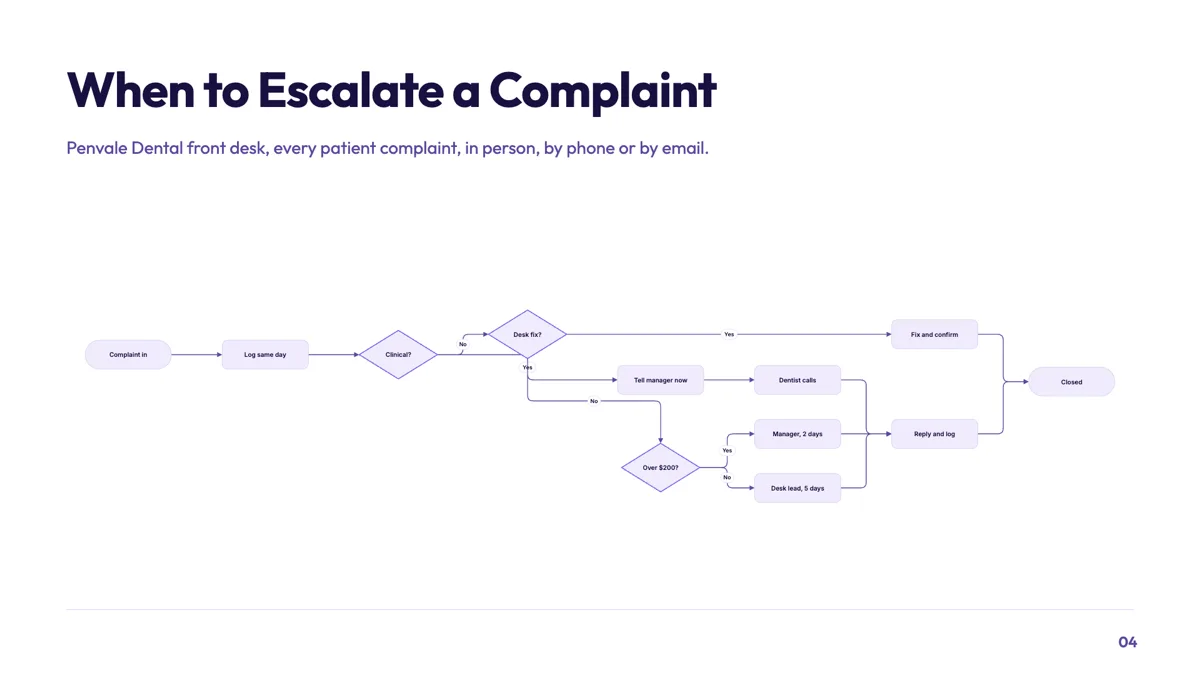
Decision flowchart slide for escalating a patient complaint
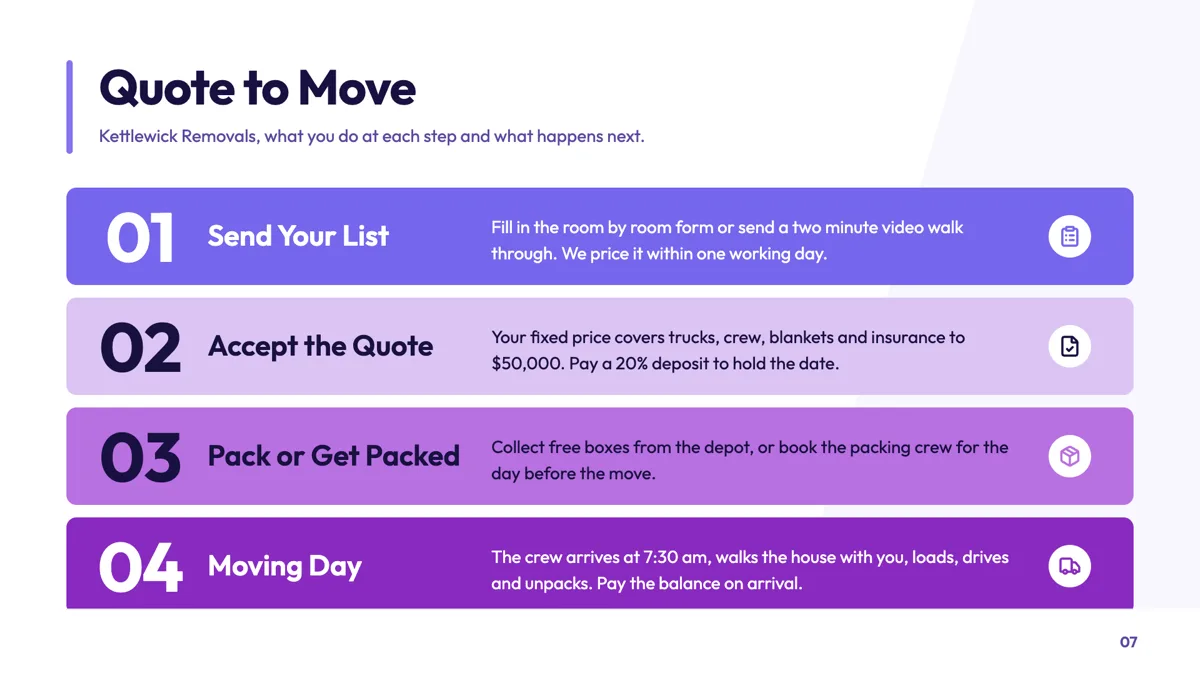
Four step process slide written for the customer
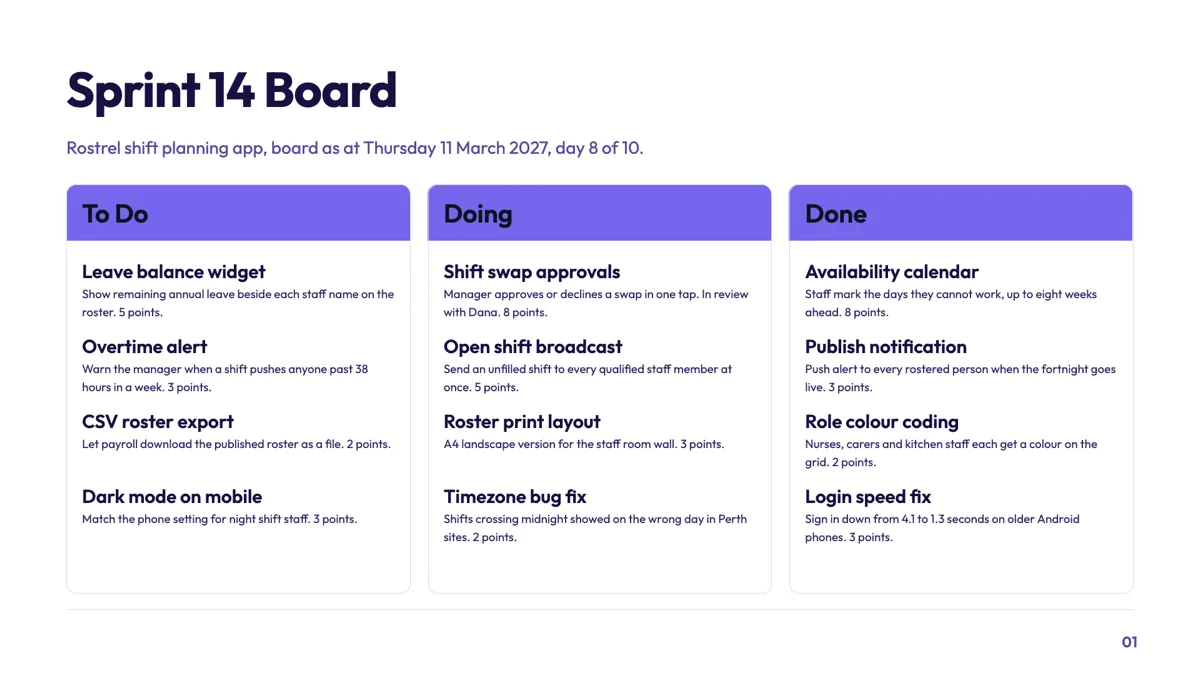
Kanban slide showing a sprint board on a single date
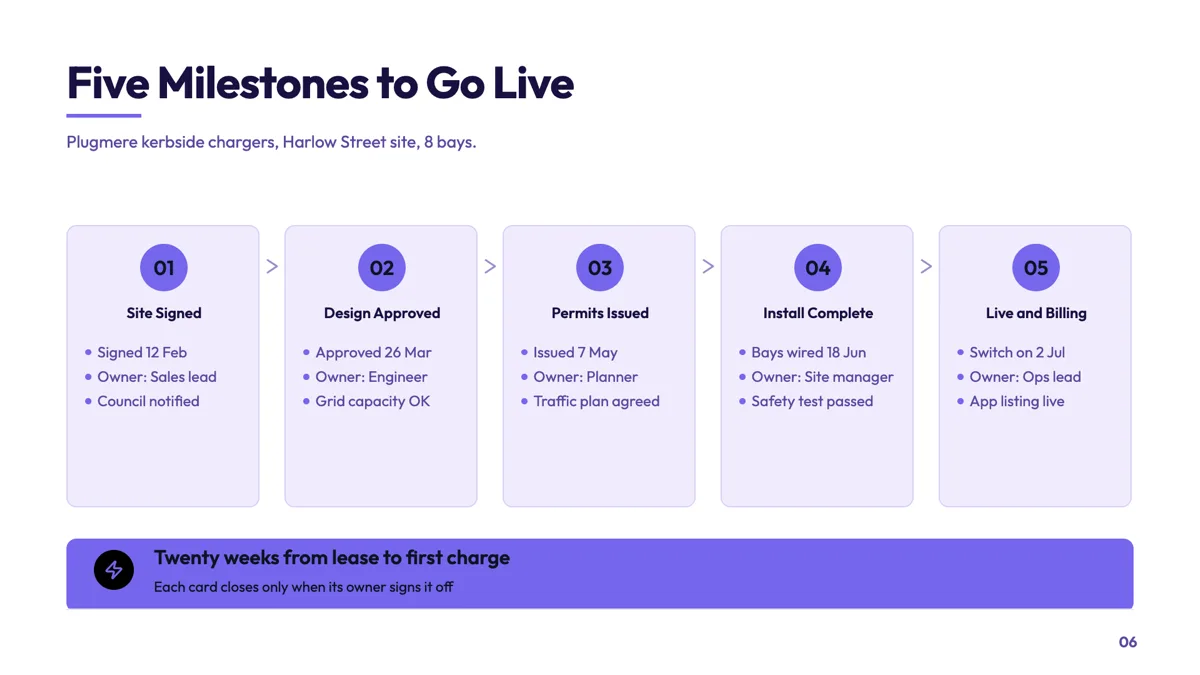
Milestone pipeline slide with a date and owner on each card
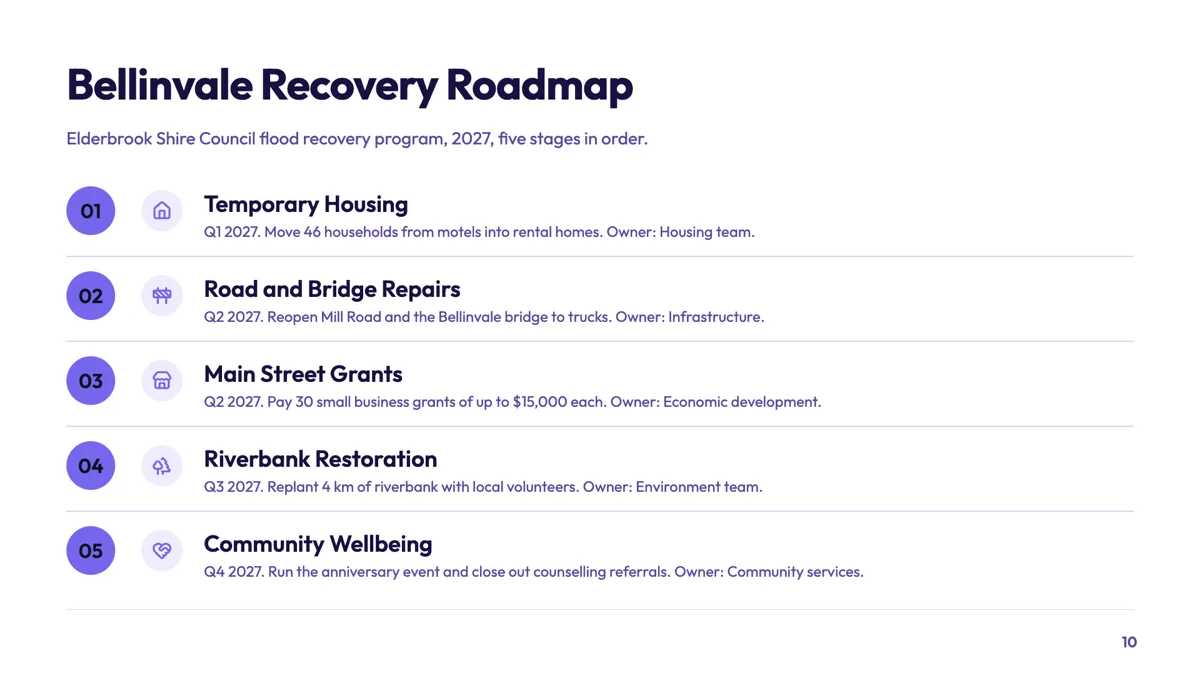
Numbered roadmap slide with a quarter and owner per row
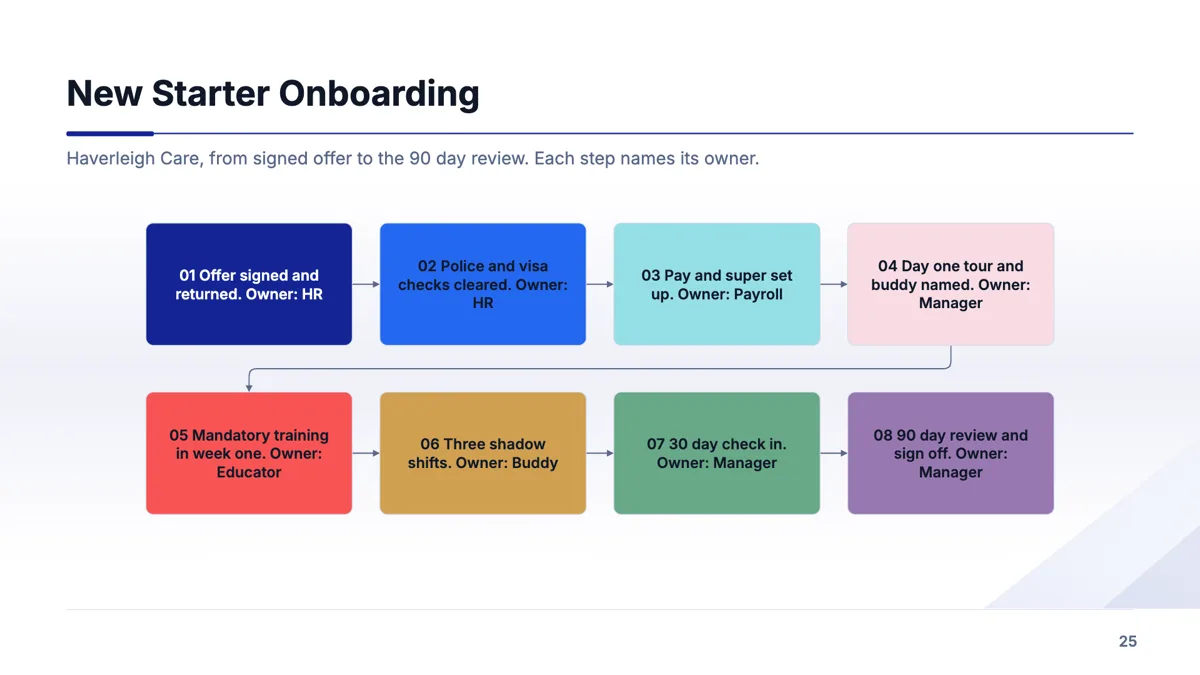
Onboarding process slide with an owner on every step
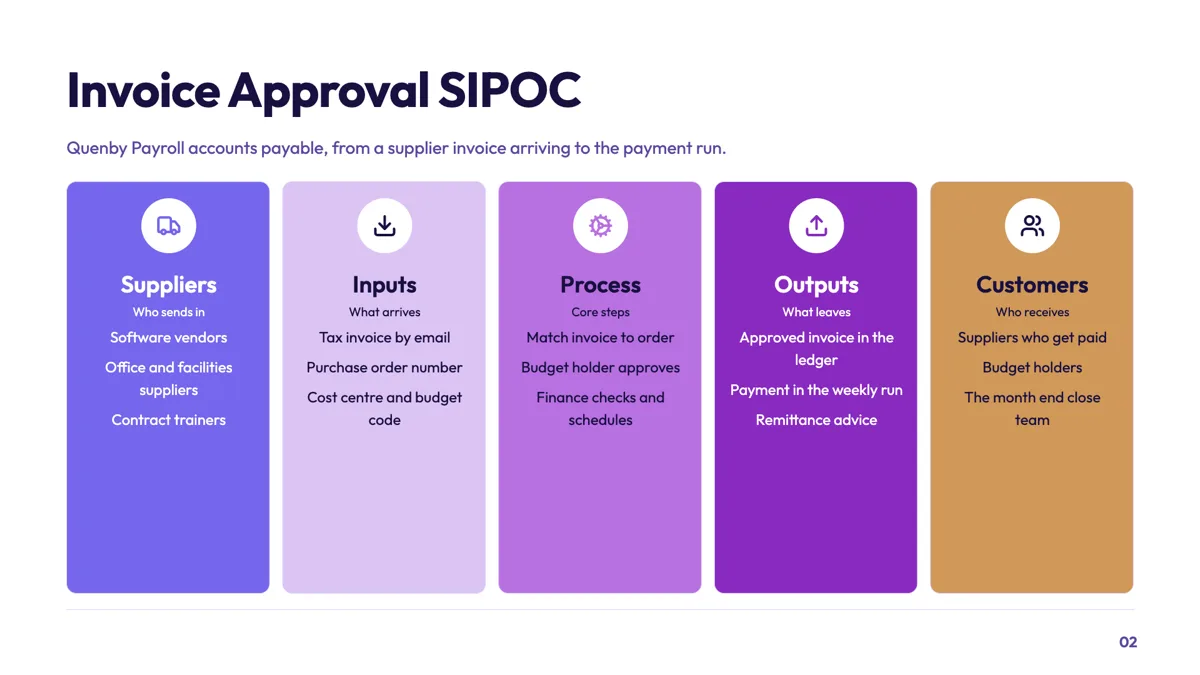
SIPOC slide that scopes an invoice approval process
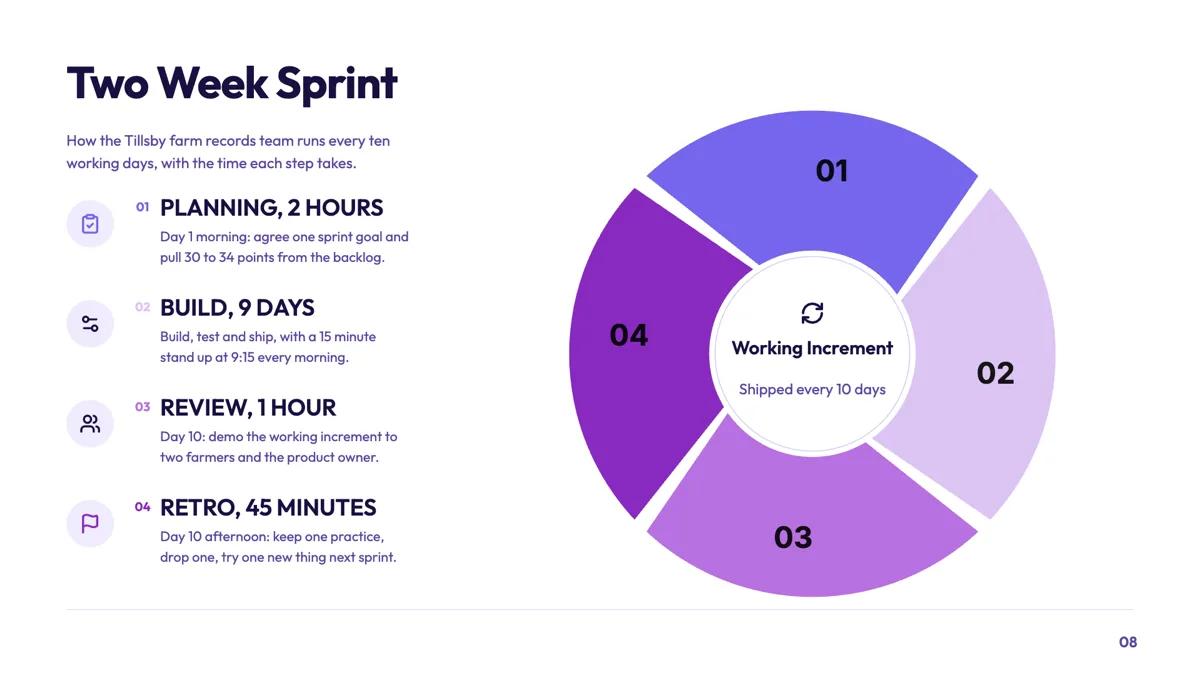
Sprint cycle slide with the length of every ceremony
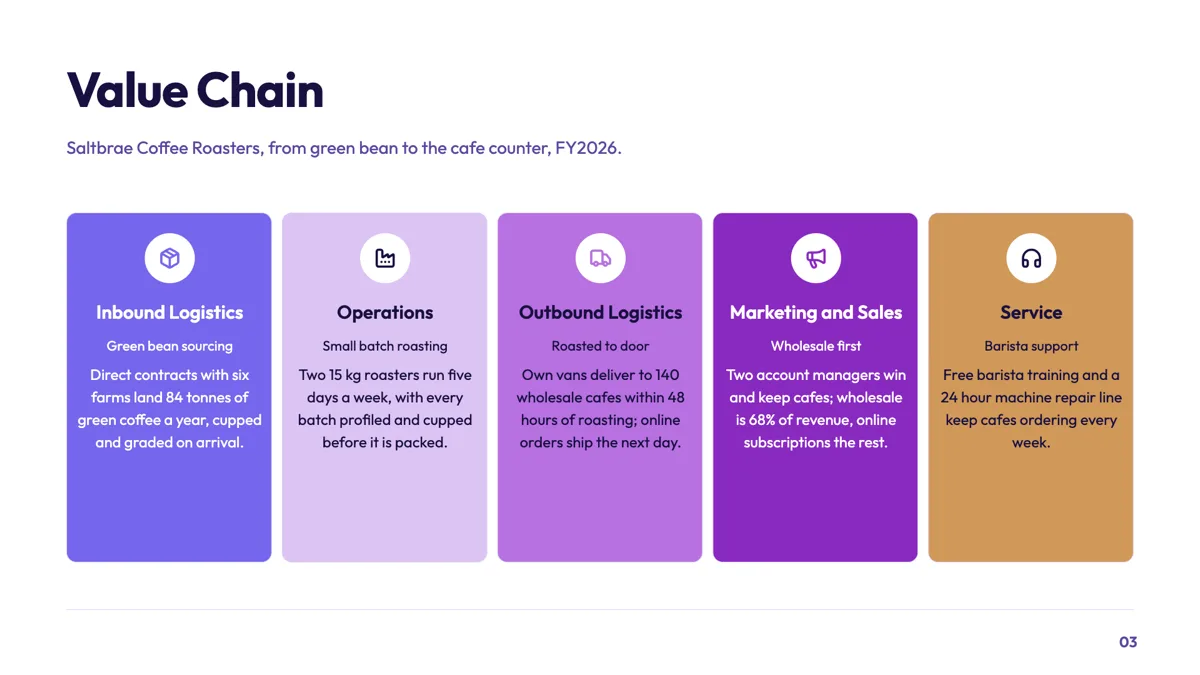
Value chain slide for a small batch coffee roaster
Questions people ask
Is there a separate flowchart slide type?
Not as its own purpose. Flowcharts live inside the process purpose, on two layouts: the decision flowchart and the eight step two row flow. The other fifteen process layouts show stages without connectors. You can also drop a flowchart onto any slide from the element library, which takes up to twenty nodes, so a flowchart is never limited to those two designs.
What if my process is a straight line?
Use one of the sequence layouts. Numbered roadmap rows, stepped arrow rows and the milestone card pipeline each give a stage a label and a line of description, with the order carried by position, so a five step linear process reads without any arrows. Keep the flowchart layouts for the steps where the path actually splits.
When should I use a timeline instead?
When dates are what order the steps. A timeline period carries a date field alongside its label and body, and eighteen layouts are built around that. If somebody would ask when for each of your steps, and you can answer, it is a timeline. If the honest answer is after the previous one finishes, it is a process.
How many steps fit on one slide?
Enough that the labels stay readable from the back of a room, which in practice is about five or six nodes with a decision or two. A fifteen node flow is a document rather than a slide. Split it at a natural handover, or show the shape here and put the detail in an appendix.
Can I swap a process layout for a timeline layout?
Not directly. The layout picker filters by purpose, so a swap moves you between the seventeen process layouts, keeping your content. Moving to a timeline means a new slide, because the fields are different: a period has a date, a flow step does not.
Can the AI draw the flow for me?
The first generation fills the slide from your brief, flow included, so describing the approval path in the prompt gets you nodes and connectors on a flowchart layout rather than a blank block. After that the AI chat can reword text, swap the layout, regenerate the whole slide or add a new one, but it cannot add a single node or move a connector; that is builder work.
Make your own presentation
The button opens the generator with this use case already described. Change the wording to match yours, generate, then edit anything you like.
Create a presentation with OneCraftRelated pages
Flowchart slides
A flowchart is the one diagram where the connections carry as much meaning as the boxes. This component treats them that way: nodes and connections are separate lists, positions are computed for you, and then you move things until it reads.
Testimonial slide templates
Twelve layouts are filed under the testimonial purpose, and they split by how many voices you have. The one thing none of them will do is make a customer up: the quote has to be in your brief, or the slide comes back empty.
Agenda slide templates
An agenda slide is a promise about the next twenty minutes. The twelve layouts differ in how many items they hold and whether each item carries a time, and the section dividers later in the deck should use the same names so the promise is visibly kept.
More finished work of this kind is on the presentation examples hub.
Written and checked by the OneCraft team. Last checked .