Websites
Waitlist page builder with queue positions and referrals
A waitlist page collects interest before a launch and tells each person where they stand. A queue position and a referral link turn a sign up into something people share, as long as the rule for moving up is stated and the list cannot be read by anyone but you.
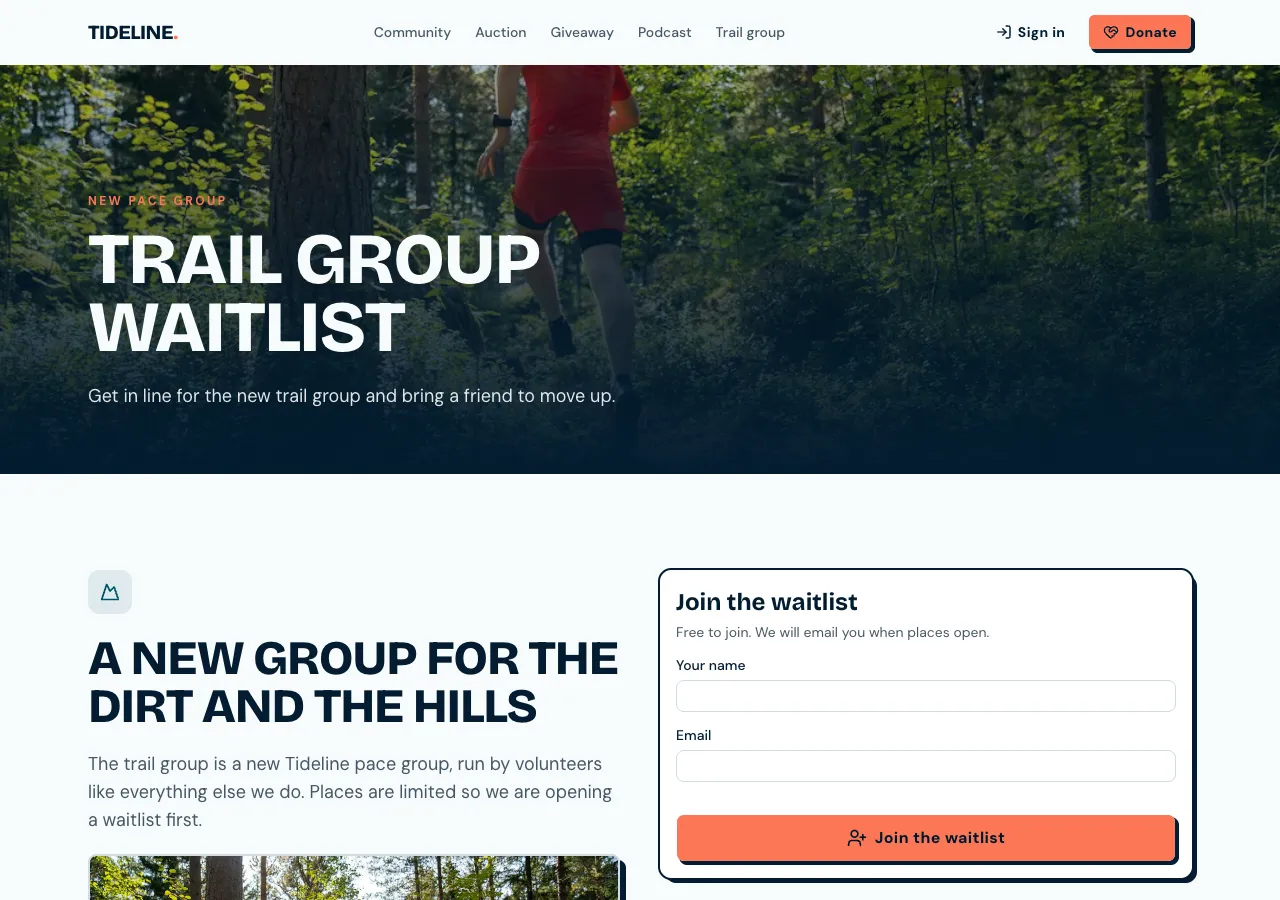
Joining the list
Ask for a waitlist and the AI follows its waitlist guide: a join form in the hero with email, name and an Email me at launch tick, reading a referral code from the link. A database function adds the person, or returns their existing code if they already joined, so a second sign up neither duplicates nor reveals who is on the list.
Queue positions
After joining, a status page says You're number 128 of 2,040, from the order people joined. The page refreshes the position when it is opened, and the code is kept on the device so people can come back to it. Nobody can read the list from the site, only their own position.
Moving up by referring
Each person gets a referral link with Copy and Share buttons. Each friend who joins through it moves the referrer up five places, and the page says so in one line, such as 3 friends joined, you moved up 15 places. Referrals can be gamed with throwaway emails, so check the top of the list before you invite.
Inviting people
In the admin area, entries are listed by position with name, referrals and join date, with search and a CSV export. Mark invited works one at a time or for the top of the list, and a dashboard tile counts joins per day. The launch email goes as a newsletter to the people who ticked for updates, at most 500 a send.
What it does not do
The site does not email each person their invite on its own; invites and the launch mail go out as a newsletter from the admin, or from your own email tool with the exported list. There is no automatic opening of access, since invite handling is a step you take.
How it works, in three steps
Step 1
Describe the launch
Say what is launching, what people get for joining and how referrals move them up.
Step 2
Check the page
Join in the preview, join again with the same email, and join through a referral link.
Step 3
Publish
On a paid plan, publish and share the page.
Limits worth knowing
- The site does not email invites one by one; the launch mail goes as a newsletter, at most 500 a send.
- Referrals can be gamed with throwaway emails; check the top before inviting.
- The data lives in the site's own database: a hosted one on every plan, or your own Supabase account.
- The free plan builds and previews the site; publishing starts on Starter.
Questions people ask
Can someone see who else is on the waitlist?
No. Visitors cannot read the list at all; the join and status functions return only a person's own position and their own referral count. Names and emails are visible only to staff in the admin area, which the AI tests as an anonymous visitor before it finishes.
How much does a referral move someone up?
Five places per friend who joins through their link, by default, and the page states the rule. Ask for a different number and the AI changes the position rule in the database. The rule is applied when positions are read, so it is the same for everyone.
What happens if someone joins twice?
They get their existing referral code back, with no duplicate and no error message that would reveal the email was already on the list. Their position stays where it was, so nobody gains places by signing up again with the same address.
How do I send the launch announcement?
People who ticked Email me at launch are added to the site's subscribers. From the admin you send a newsletter to confirmed subscribers, at most 500 a send, each with an unsubscribe link. For larger lists, export the CSV and use your own email tool.
Can I use the waitlist for a product pre-order instead?
A waitlist takes no money. If people should pay or reserve now, ask for pre-orders, which take payment through Stripe with a ship date and an optional limit. Many launches run a waitlist first and open pre-orders to the list later.
Can the waitlist live in an app too?
Yes. A phone app based on the site uses the same list, with the join form and status screen, and the share sheet sends the referral link. Most waitlists live on a web page, since that is what people share before an app exists.
Make your own website
The button opens the generator with this use case already described. Change the wording to match yours, generate, then edit anything you like.
Create a website with OneCraftRelated pages
Pricing page builder with plans, testimonials and your team
A pricing page shows what each plan or package costs and what it includes, so buyers can choose without a sales call. It earns trust when prices are real, the comparison is easy to scan on a phone, and the quotes and faces around it belong to real clients and staff.
Website with customer reviews and moderation
A website with customer reviews lets real customers rate a product, a service or the business and say why. Reviews are only worth showing if they come from real people, appear after a check, and are never mixed with quotes the owner picked or numbers the owner made up.
Giveaway website with entries, rules and a fair draw
A giveaway website runs a prize draw people enter online, with clear rules and a draw nobody can rig. It needs one entry per person, rules written by the owner for their state or country, and a draw that runs once, at random, after entries close.
More finished work of this kind is on the website examples hub.
Written and checked by the OneCraft team. Last checked .